


🎥 Capture Every Moment in Stunning 4K—Stream Like a Pro, No Compromises!
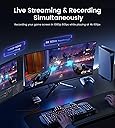
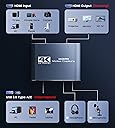
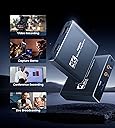
The MOYOON 4K Capture Card delivers ultra-HD 4K@60Hz pass-through and smooth 1080P@60FPS recording with ultra-low latency via USB 3.0/Type-C. Featuring a durable aluminum shell and 3.5mm mic input for live commentary, it supports plug-and-play use across Windows, MacOS, Linux, and Android, compatible with all major consoles and cameras. Ideal for gamers, content creators, and broadcasters seeking professional-grade streaming and recording with minimal setup.







| ASIN | B09CDMDNKY |
| AV Output | YUV |
| Antenna Location | Video Recording |
| Best Sellers Rank | #111 in Internal TV Tuner & Video Capture Cards |
| Brand | MOYOON |
| Built-In Media | USB3.0 to USB/Type c cable |
| Compatible Devices | Gaming Console, Nintendo Switch, PS4, PS5, Xbox one, Camera, Personal Computer, Tablet |
| Customer Reviews | 4.1 out of 5 stars 1,202 Reviews |
| Hardware Interface | USB 3.0 |
| Item Weight | 0.1 Kilograms |
| Manufacturer | MOYOON |
| Mfr Part Number | AUB09CDMDNKY |
| Minimum System Requirements | Windows 7 (64-bit), Mac OS X 10.10 or later, Linux kernel 4.4 or later, Android 5.0 or later, USB 3.0 port, 1 GB RAM |
| Model Name | AUB09CDMDNKY |
| Model Number | AUB09CDMDNKY |
| Operating System | Android, Linux, Mac, Windows 7 above |
| Other Special Features of the Product | Recording Scheduler |
| Platform | Nintendo Switch, PlayStation 4, PlayStation 5, Xbox, Xbox One |
| Recommended Uses For Product | Video Recording |
| Special Feature | Recording Scheduler |
| UPC | 754909813543 |
| Unit Count | 1 Count |
| Video Capture Resolution | 1080p |
| Warranty Description | 1 month |
S**A
Works great but one slight problem. UPDATE
11.2.21 UPDATE I decided to ask for a replacement on this capture card to see if I still had a static sound issue. Upon unboxing and hooking the capture card, I realized the cable that goes from the card to pc didn’t work. I talked to customer service who reached out quickly after my review and they apologized profusely, and offered to send another replacement. Luckily the cable from the last card works, so I didn’t need another replacement, but customer service gets a 10 out of 10 from me. Very kind and understanding, I’m glad they are a seller who cares about their customers opinions and making things right. Thank you again so much for reaching out and helping me, I sincerely appreciate it. I bought this to stream my switch gaming to twitch, one of the very first things I noticed is there is a static-y squealing noise within the switch audio. I don’t have problems with my audio on my pc or switch so I’m assuming it’s probably the capture card. Regardless of that it works amazing. I may buy another capture card to make sure it’s not my pc, like I said I never had issues with noise like that until I plugged my switch & pc into the capture card.
K**T
Great for streaming my switch
I was a bit hesitant to buy a cheaper capture card after warning from a friend that it may not work well, but I went ahead and didn’t it anyways. I’ve been using it for a while now to stream my switch to discord and it’s great! Even with my cheap laptop it works perfectly. I have tested it with recording software as well, and the video had a great picture and audio capture. Definitely recommend for anyone who’s hesitant to buy this product!
D**Y
works, just not on obs, obs has issues on MacBook
I got this capture card to work, only issue is if you have a MacBook. OBS and MacBook don't work well together, so I used Streamlabs. Works great on Streamlabs, only issue is that the power usb cable is way too small.
J**S
Definently Worth It.
Very good and very cheap. I was going to drop $200 on an elgato that only got 1080p. Very glad I found this instead. Zero latency, 4k and easy to set up. What more could you ask for. If using OBS it is found under video capture, not game capture. Literally the only issue I had.
N**.
Malfunctioned on 2nd use.
1. I finally managed to get the device working with OBS Studio (free). The USB A was the connection to my computer, no USB-C port. I was able to record a bit of some movie and playback faithfully with sound. 2. I then set the device aside for about a year. Other than installation and initial testing this was the first time I was actually being used. 3. There is a webinar that I am attending that I thought would be of interest to the other members of my American Legion post. I got out the device and hooked it up again. The device will not allow any information to pass to the monitor. I verified both the input and output cables by: 1). running from my computer to the monitor (sound and video); 2). running from my Playstation 3 to my monitor (sound and video); 3) using a female-female HDMI cable and running from my computer to the monitor (sound and video); and finally running tests 1-3 to another monitor (sound and video for all 3 configurations). I tried connecting running with the USB cable connected to my computer and with the USB not connected. The unit gives a red dot when plugged into my computer via device's USB port connected to the computer via the USB-A terminal. I have added a USB-C card for using with a Meta Quest III. I tried using the USB-C port. The monitor reported "No Signal". One very strange thing I did notice. If I had the computer directly connected to the monitor (so I had a display), OBS Studio was reporting detecting sound and it was matching in amplitude what was playing on the computer. The strange this is the input for the device was had no cable attached. When I paused the bar dropped to zero. When I started back up the bar bounced up and down. When I turned to a movie on Amazon that had loud noise the bar kept pegging out. I had no microphone or speakers/headset connected. Further the little red dot of the device would be on if the USB cable was connected but not an HDMI cable and/or when a HDMI cable was connected to either the input or the output. I had made no changes to the computer except Microsoft Updates. I ever removed the OBS Studio, downloaded the current version and installed that version 30.0.2. Windows 10 Pro 64bit ASRock Z87 Extreme IV i7-4770K 32GB RAM Lots of hard drives (both HDD and SSD - total 277TB not all connected at the same time due to running out of SATA III connections (32 counting on motherboard))
R**S
A good budget capture card but a little misleading
So I'm actually giving this 3 1/2 stars because this has nothing to do with 4k. It will only capture 1080p. I also feel the plug and play advertising is misleading as well. Full disclosure I am not a smart man when it comes to electronics so it could all just be user error for a wannabe Tuber like myself. TL;DR at the end Cons: What I don't like about this capture card is it says 4k right up top but will not even read a 4k input. I had a black screen until I switched my Xbox to 1080p display. It also seems claims a plug and play fashion on OBS as if it will just pop up ready to go and it doesn't. That part may just be user error but I want to point out that you have to select what item OBS will be recording however, it does not require a software update or download from what I have seen . I had to look up a video of how to record from this card. Pros: What I like is that it seems to do pretty well with capturing footage and audio. I have a Snowball that I use for audio and I am still playing around with the settings. I have captured footage from games like R6 Siege, Battlefield Hardline (a great game no matter what anyone says) and Zombie Army Trilogy. I have play ZAT with someone else and it seems to keep up with the audio and video. I also like that the case is metal instead of plastic. It comes with the cables you need to connect to a computer but I would like it if the included a HDMI that was maybe 3 or 4 feet long. TL;DR a good budget capture card for consoles. Does not capture 4k and take a bit of setting up on OBS but now software needed.
S**O
Capturadora
Me sirvio mucho, y que tenga entrada Tipo USB y Tipo C me ha servido de mucho para mi laptop, y cumple con toda la función de transmitir lo de mi play a la laptop y poder hacer stream, solo me falta configurar lo del audio. Por que al hacerlo de la capturadora el audio sale muy suave
J**E
Customer service well appreciated
After unsuccessfully being able to get the first capture card to work the company reached out and was more than willing to fix the issue no matter how hard they had to work, the company was nice enough to address my issue and fully see to the fact that they were able to meet high customer satisfaction. I am highly satisfied with the replacement device they were able to send me and after a while of troubleshooting finally found that the capture card works perfectly with streamlabs unfortunately could not get it to work well with obs but I believe could be a software issue I have been recently using the device to live stream to twitch as well as record my game plays and save them to my MacBook. Would definitely recommend the updated version of this capture card thank you to the company for reaching out quickly and helping resolve the issue.
T**S
Works great for the price!
So far I've had zero issues with this product! It works great for streaming my Switch games and there is barely any noticeable delay. In my opinion, if you have ANY OBS experience or knowledge, this takes no time at all to set up. Good quality visuals and the audio works as well, no desync noticed between the two. The only notable thing is, the product does get a little warm, so I do unplug it from my PC when not in use. I highly recommend this item if you have a budget and don't want to spend over $100 on a higher end capture card.
J**I
4 stars because it needs more instructions
This was a gift for my son to stream his games, wasn't very easy to use at first as the sound wasn't passing. it took some time to work out how to set it up. It does work and he is very happy with it now but i think the instructions are on the poor side.
A**I
Excellent
Im recording my PS3 gameplay with this product using “streamlabs” in PC, Everything is good
評**ん
店舗で2台のモニターに使用
壊れることなく数年動いております。安価で同じ画面を出したいときは良いです。出力元はPCからの動画です。
B**K
HD画質の録画でいいならこれでもいけそう
PS4ー(HDMI)ー本機ー(HDMI)ーモニタ ー(USB)ーPC と接続し、OBSでPS4のHD映像録画できました。 他の方がおっしゃるように、付属のUSBケーブルは使わず、手持ちのUSB-Cケーブル使用です。 OBSでPS4の映像を取り込むには、映像キャプチャデバイスを選択し、デバイスをUSB Videoを 選択するとプレビュー及び録画ができました。 OBS上で音声は流れませんでしたが、録画映像に音声は取り込めていました。 遅延はPSリモートに比べて感じませんでしたが、私の場合OBSで録画開始したあと、モニタで PCからPS4に切り替えてプレイするので、遅延は無縁です。 (モニタにはPCをDP接続、PS4ーキャプチャーモニタをHDMI接続しています。) 今のところしたいことができているので、満足です。
Trustpilot
2 weeks ago
2 weeks ago