


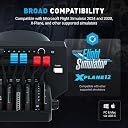
Honeycomb Aeronautical Bravo Throttle Quadrant
Product ID: 379553359
💡7 programmable switches + 14 warning lights
🛫LED landing gear indicators (red/green)
🎛️Configurable throttle setup (1-4 engines)
🎮 Elevate your flight sim game—because your cockpit deserves the Bravo touch!
The Honeycomb Aeronautical Bravo Throttle Quadrant is a premium, all-in-one flight sim controller designed for professional-grade versatility. It supports configurations from single-engine general aviation to complex four-engine commercial aircraft, featuring programmable switches, LED gear indicators, and an integrated autopilot panel. Built for precision and immersive realism, it perfectly complements the Honeycomb Alpha Yoke, making it the go-to throttle quadrant for serious flight simulation enthusiasts.


| ASIN | B07SK43CJ6 |
| Customer Reviews | 4.6 4.6 out of 5 stars (1,596) |
| Item Dimensions LxWxH | 46.2 x 33.3 x 25.9 Centimeters |
| Item Weight | 5 kg |
| Item model number | AER-HONEYQUAD |
| Language | English |
| Manufacturer | Honeycomb Aeronautical |
| Product Dimensions | 46.23 x 33.27 x 25.91 cm; 5 kg |
| Rated | Ages 3 & Over |
K**S
Best in class
The build quality, look and feel is simply superb and identical to the Honeycomb Alpha Yoke. Mounting options are identical. Mount them both side by side with a 4-5 inch gap and you will be able to place your keyboard on top and the mouse on the right hand side comfortably with enough room to spare on a 120cm desk. In the box is the throttle quadrant, mounting base, clamps, cable, rubber axis covers and two boxes full of beautifully made GA and jet airliner levers. See photos for details of what's included. The axes are reasonably smooth, accurate and firm even on the lowest tension setting, allowing precise control of prop RPM, throttle MAP and fuel flow. A tensioning knob is provided on the right side of the unit which can be tightened to increase the resistance. The default configuration in MSFS is for a complex twin engine. I have copied the profile multiple times to create a complex single engine, simple single engine, 4 engine jet and 2 engine jet. Remember to assign the buttons in the first profile before copying them over to the other profiles. By default the button assignments are the same as those found on the Alpha Yoke. Re-assigning them to parking brakes, yaw damper, pitot heat, cabin lights, icing controls etc. works for me. The led lights on the gear position annunciator, and the backlights for the autopilots were not working out of the box. This was fixed by installing AFC bridge software from the Honeycomb website. The annunciator panel is a bit hard to read as it is hidden by the levers most of the time. This brings me to the A/P panel which is literally the icing on the cake. While adding to the overall immersion experience, there's no more fiddling with the mouse and zoom wheel to operate autopilot on screen. Button are firm, rubbery and backlit, much like the Garmin systems. The select knob position is a bit hard to judge as there are no clear markings on the position. The increase/decrease knob doesn't "accelerate" for quick adjustments as much as I would like it to. Minor gripes but worth mentioning nonetheless. If you already have the Alpha Yoke, then just go for it. The Bravo throttle complements it perfectly in all aspects.
C**E
J’aime
Très bien .tres bonne qualité avec fs2024
K**.
It doesn't work on Apple Silicon
Not comptabile with Xplane 12 on Apple Silicon, or even previous Intel. The mapping of the Speedbreak and thruster 1 can't be changed and they are detected the wrong way around. Engine 4 is also engine 2 and vice versa. Only thruster 3 and the flaps map correctly when you calibrate. None of the autopilot or LEDs work. You can get a few to work if yiu run this on Apple Silicon using Rosetta. Honeycomb were never interested in Apple users, soI've returned mine for a refund. This might be ok with Windows using the proper MS flight sim. It looks impressive, but lack of function makes it pretty useless.
B**N
Ny yoke till flightsim
Fantastiskt fin yoke till min flight sim. Leverans och hantering perfekt. Inget att anmärka på.
D**T
Bardzo dobra jakość wykonania
Ogromne możliwości konfiguracji. W komplecie wymienne dźwignie do różnych typów samolotów. Kółko TRIM i dźwignie działają bardzo płynnie. Możliwość zmiany parametrów autopilota, np. HDG,ALT, VS itd. To wszystko daje dużo większą przyjemność z obsługi samolotu. W połączeniu z VR jest bajecznie ;)
R**G
Well built, highly versatile and very enjoyable to use
Damn good throttle at a very fair price. I love how versatile this throttle block is. It's not just an "Airbus" or "Boeing" throttle, it's what you want it to be. Change the handles as needed to make it just perfect for each flight. The throttle block doesn't feel plasicy or badly made. The sensors are top notch and well synchronized. Throttle values are the same when the handles are in the same place. Not a given with some other offerings on the market. I love how they added multiple buttons and dials on the throttle to add even more utility to it, for example to dial in autopilot values and control each of it's functions. Installation is easy and for many default cases it works perfectly out of the box (based on my X-Plane 11 & 12 experience). Additional settings are possible with the native software by honey comb as well as settings in the simulator. Overall it's not too difficult to make custom profiles and you'll find it to be incredibly powerful as it can directly manipulate things like X-Plane datarefs. I highly recommend this throttle for anyone who wants to enjoy a more realistic throttle setup but not commit to any specific layout or be limited by the number of axies. Almost every plane imaginable can be covered quite easily making this the go to throttle block in my book. Highly recommended.
Trustpilot
1 month ago
1 month ago