Desertcart purchases this item on your behalf and handles shipping, customs, and support to New Zealand.
⏳ Never miss a beat—schedule smarter, live brighter!
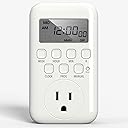
The BN-LINK Digital Outlet Timer is a versatile, 7-day programmable timer featuring 8 on/off settings, a large clear display, and a grounded 3-prong outlet. Designed for energy savings and home security, it includes a unique random vacation mode to simulate occupancy. Compact yet durable, it supports precise scheduling with easy setup and is ETL listed for safety, making it ideal for managing lamps, appliances, and more.


| ASIN | B09MHLVLWK |
| Best Sellers Rank | #10,231 in Tools & Home Improvement ( See Top 100 in Tools & Home Improvement ) #24 in Wall Timer Switches |
| Brand | BN-LINK |
| Brand Name | BN-LINK |
| Color | 7 Day, Single Outlet, 1-pack |
| Customer Reviews | 4.1 out of 5 stars 1,330 Reviews |
| Item Dimensions D x W x H | 1.47"D x 2.68"W x 4.72"H |
| Manufacturer | BN-LINK |
| Manufacturer Part Number | BNE-60/U167 |
| Material | Phosphor Bronze |
| Material Type | Phosphor Bronze |
| Model Number | BNE-60/U167 |
| Number of Items | 1 |
| Number of Packs | 1 |
| Number of settings | 8 |
| Product Dimensions | 1.47"D x 2.68"W x 4.72"H |
| UPC | 810079580637 |
| Unit Count | 1 Count |
A**S
Easy to use digital timer with clear display
I picked this up to control my grow lights for plant propagation, and it’s been working perfectly for that purpose. Setup was quick and straightforward, and the instructions were easy to read and follow. Everything is clearly labeled, so there’s not much guesswork getting it programmed. It’s very easy to use day to day. The controls are simple, and setting up on and off schedules is intuitive. Once programmed, it runs reliably without needing constant adjustments. In terms of use, it does exactly what it’s supposed to do. I have it running my grow lights on a consistent schedule, and it has been dependable so far without any missed cycles. The timer function works as expected and makes it easy to maintain a consistent lighting schedule, which is important for plant growth. The display is easy to read and large enough that I can clearly see it from about 10 feet away, which is a nice bonus when it’s plugged in across the room. Size wise, it’s compact and doesn’t take up much space on the outlet. Build quality feels solid, and it seems durable enough for long term use. The buttons have a good feel to them and don’t feel flimsy. I also appreciated that the safety instructions were clearly outlined, especially regarding proper electrical use. As long as you follow the guidance, it feels safe and well designed. Overall, this is a reliable and easy to use digital timer that does exactly what it’s supposed to do.
C**X
Reliable, versatile timer.
I bought one of these to keep the batteries of my GNSS land surveying receivers topped off so I don't leave them on the charger continually. My receivers cost several thousand dollars total, so I prefer to maximize their battery life. This timer has a lot more versatility than what I need it for, which is nice. As for its size... yes, it is perhaps a bit on the large side but for me that's a non-issue. It is an excellent value in my opinion.
S**T
Difficult to Program; does not always work
A nice little timer for one device. Please be careful when using the reset button. Instructions say to use a non-metallic point like a pencil or toothpick. DO NOT USE ANYTHING WOTH A SHARP POINT! The reset button has a soft rubber type covering that easily punctures. Also, even though the instructions say don’t use anything metallic, the video on their website shows them using a metallic screw driver. I purchased the to use indoors in Christmas lights. Buttons are very unclear. Multiple buttons labeled On, Off, and Auto although not all are used for these purposes. Followed their directions to a T and still impossible to get the Auto function to work properly. I finally figured it out (for now) that even though you set both an on and an off time when programming, you have to turn the auto on and the auto off function on, otherwise it only recognizes the auto on but won’t turn them off. If I am using the Auto function for what I have programmed, why wouldn’t I’d just recognize both the in and off programmed times? Why would you program it to turn on but not off? You could just use the on function if you don’t want it to turn off. I would not buy these again and do t recommend them.
L**T
Useful and flexible - except...
I'm controlling six lights with this one timer by plugging an extension cord into the timer. Since I want them all to go on and off at the same time, it's perfect. It was pretty easy to set but remember that it has a manual as well as an auto mode and it seems to default to manual. And I love that it has a daylight savings time setting although you still have to push a button to make that happen. It beats having to change the time twice a year. Ugh. But - it's big and it covers up at least partially SIX plugs on the power strip. Wouldn't it be nice if they someday will make things to work together properly? One thing was very NOT clear in the instructions, which caused me to spend a lot of time redoing it, pondering what was wrong, and being close to throwing it against the wall, and finally calling BN-Link for help -- The instructions don't TELL you everything you need to know. There are teeny tiny illustrations that give you needed info, but it isn't written in the how-tos. UGH! And, When I asked that question here, I got an AI description of the problem and the fix that was WRONG. So unnecessary and frustrating. But here's the gist of that -- when programming, just be sure that the mode doesn't say AUTO ON. That seems to tell it to be ON all the time and it doesn't follow the programming. It (I think) can be in any other mode than auto on and it will program okay.
B**9
Super easy to set up! no more digging for the manual
The build quality is solid and it handles my high-wattage space heater without any issues. It’s silent too! no ticking noises like the old mechanical timers. I love that it has a battery backup so I don’t lose my settings during a power outage. What I loved most was how intuitive the setup is. The programming is so simple and straightforward that I’m confident I won't even need to look at the manual again the next time I want to change the schedule. It’s also compact enough that it doesn’t block the second outlet on my wall if I plug it into the top one.
M**S
Helps keep track
The BN-LINK Digital Timer Outlet is like having a personal assistant who never forgets. Need your lights to turn on at 7 PM? Done. Want your coffee machine to start brewing before you roll out of bed? Easy. It's so precise and reliable, I’m starting to think it has a better memory than I do. Programming it is simple enough, though the first time I tried, I felt like I was setting up a spaceship launch. Once you get the hang of it, it’s smooth sailing. It’s also surprisingly sturdy—this timer can handle heavy-duty appliances without breaking a sweat. And the best part? It has helped me trick burglars into thinking I’m home when I’m not. My lights turn on and off like I’m hosting a disco party every night. Highly recommend it for anyone who likes convenience, energy savings, and a touch of harmless mischief!
W**3
Perfect for Reptile Fogger
Ah, humidity. Those of us with scaly friends chase after it as if it was some sort of holy grail--which, really, it is. Too much of it, and you've got yourself a bad case of mold--and maybe a sick critter with respiratory or bacterial infections. Too little of it, and your poor pet slowly dehydrates. Foggers help--but they usually don't need to be running 24/7. They also need to kick on during the day when no one's around. Simple timers usually only allow for one on/off cycle per day. Sounds like a problem, doesn't it? That's where this unit comes in. Once you've left it plugged in long enough to charge its internal battery, you set today's date and time. Then you can march through up to eight programable cycles and start tweaking away. Once it's set the way you want it, plug it back in, plug your device into the unit itself, and you're good to go. Why the internal battery, you ask? That's so power blips won't knock out everything you've set. You can also unplug the unit for a brief amount of time, and once you've plugged back in, you're right back to where you were before--no need to reset everything. It remembers. Want a device to turn on multiple times during every day of the week? You can do that. Want a device to turn on multiple times on one day, a few less times on another, and all day long on another day--like you might do with lights if you want your home to look occupied during a vacation? Yep. You can do that, too. Want to easily change what you've got programmed without having to dig around for the instruction manual? Sure. You can likely do that. This unit's pretty logical and easy to set up. Do you have a fogger and a few days to dial in the humidity level on a terrarium? From experience, I can tell you that you can do that, too. You can even make it more "rainy" on Sunday than it is the rest of the week. You can give your critter drier days as well. It's not only up to you... it's easy to do! (Hey, poetry!) Good device! I'm glad to have found it! If you're reading this review, I'm willing to bet you will be, too.
G**G
Cool
I love this product now my lamps are in auto mode this is a great product.
P**H
Muy bueno
muy buen equipo, se ve bien y funciona sin problemas.
C**R
dependable
Convenient and reliable, sometimes difficult to set up
G**.
Excelete
Excelente temporizador, estoy muy satisfecho con el, el manual no te explica bien como programarlo pero busque en internet y resulto muy fácil, puedes programar todos los días un día en especifico cada semana o solo ciertos días solamente, muy muy recomendable.
S**Z
Buen producto
Buen funcionamiento
E**E
Works well
It works well. I give it 4 stars because the instructions are difficult to understand and makes programming and setup very difficult. It takes a lot of patience to figure it out, I was ready to toss it out, but instead walked away and came back with a cool mind, got it figured out by trial and error, pushing buttons, aha moments, great challenge, lol. After all that, to get the program working, you need to set it to auto mode. It's on the next page in the instruction booklet, turn the page, ha ha! 😁
Trustpilot
2 weeks ago
1 day ago