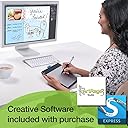
🎨 Elevate your digital canvas—create like a pro, anywhere, anytime!
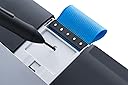
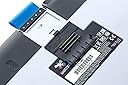
The Wacom Intuos Pen and Touch Medium Tablet (CTH680) is a versatile digital drawing tool featuring a battery-free pen with 1024 pressure sensitivity levels, an 8.5 x 5.3 inch active area, and multi-touch gesture support. Designed for both Mac and PC users, it includes customizable ExpressKeys and comes bundled with creative software like Autodesk Sketchbook Express and ArtRage Studio. Its medium size offers a perfect balance of workspace and portability, making it ideal for professionals and creatives on the go.
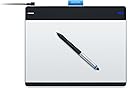
| ASIN | B00EN27UC2 |
| Active Surface Area | 8.5 x 5.3 |
| Additional Features | Pen |
| Best Sellers Rank | #239 in Computer Graphics Tablets |
| Brand | Wacom |
| Built-In Media | Autodesk Sketchbook Express & ArtRage Studio |
| Color | Silver and Black |
| Compatible Devices | Personal Computer |
| Connectivity Technology | Wireless |
| Customer Reviews | 4.5 out of 5 stars 731 Reviews |
| Global Trade Identification Number | 00753218991096 |
| Item Dimensions L x W | 8.75"L x 10.75"W |
| Item Weight | 1.1 pounds |
| Manufacturer | Wacom, Inc |
| Mfr Part Number | CTH680 |
| Model Name | CTH680 |
| Model Number | CTH680 |
| Native Resolution | 4096 levels |
| Number of Items | 1 |
| Operating System | Mac OS, Windows |
| Pressure Sensitivity | 1024 levels |
| Screen Size | 216 inches |
| Software Update Supported to Date | unknown |
| Special Feature | Pen |
| Specific Uses For Product | personal |
| Target Audience | Teacher |
| UPC | 753218991096 |
| Unit Count | 1 Count |
| Warranty Description | 2 years |
R**R
If you've never tried a Wacom try this one!
I was pretty happy with my off-brand graphics tablet, but I really wanted to try a Wacom and the price was right on this one. Holy cow, I didn't know what I was missing! This outshines my off-brand like you wouldn't believe. It's wonderful! My off-brand was really slick and the stylus would "slip" while working on details. This one feels like I'm writing on paper. It's very natural. The medium is a great size for me as I have enough room to "draw" without running off the edges but I can sit with it and my 17in laptop and work without a huge desk. The tablet is very responsive and easy to set up. Customizing it for different programs had me digging a little but that's because I'm a newb and have no clue as to what might make things easier. But that doesn't take away from it's rating because even newbs like me can run with it right out of the box. You might find the standard nibs wear down quickly even if you don't press hard while working, but there are other types that hold up admirably and the resistance on the different types of nibs are like working with a pen with one type or brush with another rather than a stylus. This might also be exclusive to me because once I started drawing, I didn't want to stop and burned right through the suckers. ;) I highly recommend this - especially if you're new to Wacom.
T**R
**STUDENTS AND BEGINNING GRAPHIC ARTISTS, TAKE NOTE**
It's hard to know in the beginning which tablet to go with--how much do you need to spend to get good quality? How big of a tablet does it need to be? etc. This one is not only perfect for a beginner user (and still reasonably priced), but it will continue to serve your needs for many years--it is a fantastic investment! I've been using Wacom tablets for around 15 years; I started with the tiny little Bamboo (still have it--it still works great!), and now I've been using this one for work for about 18 months (graphic designer). The tablet is simple, easy to use, and scaled for a computer screen (whereas the Bamboo was not). There is an option to turn Touch on or off, but I usually leave mine off. It works brilliantly! I just re-purchased one for my son, who is going into digital art himself. You absolutely will not regret buying this--if your funds preclude you buying the biggest and baddest, it really doesn't matter: you'll love this tablet!
M**E
Worth Every Penny!
I just want to clarify from the start that Wacom was not my first choice based solely on the price, so I initially purchased the Huion 610 Pro, http://www.amazon.com/gp/product/B00TGOHZR2?psc=1&redirect=true&ref_=oh_aui_detailpage_o06_s00 just to save some money. I am a photographer/retoucher, not a graphic artist, I have a hard time drawing a "smiley face," but I need the tablet to use in photoshop as it is easier to handle than a mouse. I unboxed the Huion, installed the drivers and kicked the tires to check it out.........that lasted all of about five minutes until I realized this tablet wasn't for me. I packed it back in its box and haven't opened it since. However I still needed a tablet so I went with the Wacom Intuos Pen & Touch Medium, about twice the cost of the Huion. As soon as I unboxed it I realized that I had a winner! The Wacom is more expensive but in this case you really do "get what you pay for." The Wacom is so much better, better build, WAY better software, and with a slim profile it is more comfortable to work with, especially with the wireless kit accessory. There really is no comparison, there's a reason everybody says Wacom is the best and thats because they are!
I**T
Great Product, Minimal drawbacks
Let me start this off by mentioning a few things I immediately disliked. 1. As many others have described, the USB cable is far too short to be of any use and the housing for the micro-USB socket is seated deeply into the device, which makes it exceedingly difficult to use any other micro-USB cable to connect the device to a computer. It's relatively clear that this is supposed to be a selling point for the "optional" wireless module which Wacom REALLY expects you to buy, but I suppose that's marketing. 2. The textured surface makes it difficult to draw very thin lines accurately, much like the grain of paper (after which, I presume, the tablet surface is modeled). Furthermore, I hear a LOT about people's nibs being worn down by friction, so I purchased a plastic coverlet for the surface, which has worked marvelously. I've used it for about 3 hours now and painting on the plastic feels much better. 3. Some of the parts seem to be made as a joke; for instance, the "pen holder" attached to the top of the tablet. It's more of a loose flap of fabric. I would greatly prefer a standalone pen stand. 4. The drivers crash on occasion, but I have since discovered that they can be restarted through Services. All of that being said, the tablet is essentially perfect for creating digital art. It is marketed as a device for "unprofessional" work, but it easily has the functionality to create extremely high-quality pieces of art. As an artist who works with almost exclusively digital media, I can say without any sort of prevarication that this is probably the most useful tablet I have purchased as yet. The construction of the device's components is solid, the pen movements and pressure sensitivity are instantaneous (as far as human senses can discern), the pen buttons have a very satisfying click (right-clicking in the art program I use is critical to color picking), the express keys can be programmed to do nearly anything (and I mean anything), the touch functionality works well (and has many interchangeable features, i.e. pointer acceleration, double-tap speed, etc.), there are no lag-induced interruptions to workflow, and the size of the surface is just large enough to be useful without forcing you to sweep your arm across the desk to draw a line. On a final note: in my opinion, doubling the pressure sensitivity with some of the higher-end Wacom tablets means almost nothing in terms of precision, mostly because the human hand can't be that precise to begin with. 1024 levels should be sufficient for any type of general art project. (I can attest to this after having owned a 2048-level tablet; the difference is noticeable to an extent, but not even close to critical.) IN summation, if you are a digital artist (established or aspiring), a hobbyist, a photo retouching specialist, or even just somebody who is vaguely interested in either art or computing, you should definitely own one of these.
R**R
Great product
I bought this for two reasons: One was to do electronic digital drawing. The other is my hand is tired and sore from gripping a mouse so many hours a day. The hand fatigue is the most important up front for me so let me comment on that. This is a gem of a product! A very light grip on the pen is all that you need to use it as a substitute for a mouse. It is comfortable and produces way less stress on my hand. I will say it does take some getting used to as a pointer. It does not work the same way as a mouse. To use it you hold it ABOVE the pad. You touch the pad to click or double click or drag. And instead of a relative position as with a mouse it is absolute position on the pad as related to the page. Again, it does take some practice but once you have that it is wonderful. The installation instructions are very poor by the way. There are no written directions only some diagrams. It is not obvious but you do get a disk you have to use to complete the install. Here is what you do: Attach the device via the USB. Let the driver self install, Then put the disk in and run the startup. Then order the free software. The manual they claim is on the disk is missing. You can download it from the internet, but you have to search for it. I could not find it on the Wacom website.
D**R
Awesome tablet for the price
Awesome tablet for the price, Wacom is by far the best brand without paying an arm and a leg if you're in the market for a tablet - Works just as well as the more expensive and the size is really nice. The tablet itself is about the size of a piece of paper, the drawing space is a bit smaller than that. When looking for a tablet I knew right away the small was going to be far too small for me and the large was going to be harder to work with. I am glad I selected the medium it is the perfect size for any artist. The pen glides nicely over the tablet and does come with replacement tips as the pen tips do wear down overtime. Eventually you will have to buy new ones. My laptop does not have a CD drive so it was important I found one that didn't require one for any software installation. Wacom offers all of the software downloadable from their site and they also have step by step instructions on which one to order and how to install it. Very helpful! I use mine for drawing/coloring and also editing/working with photography. Works great for either!
A**R
Great For A Bit
So for all those looking to get a Wacom, best of luck. Originally when I received my Wacom Intuos Pen and Touch Medium Tablet, it worked great. I used it with Photoshop, Sai, Gimp, and several other programs on my laptop. All worked fantastically and it was a great thing to move up from the mouse. About a week later after plugging the tablet into my Acer Aspire V6 laptop, it quit working. The tablet lagged something awful and wasn't registering the pens touch movement on the board. I restarted my laptop and it worked just fine. It continued to do this so I went to the Wacom properties which 1/2 said they didn't work with the driver and the other was fairly useless. One setting I got was to reset the options for the pen (lower button=right click options) and that seemed to stop the lag. Afterwards the pen didn't register the sensitivity on the board. Restarted my laptop again and it worked again. Doing this every time got tedious and after a while it stopped working. By this point I email Wacom, it took them 2-3 days to respond and by that point I had something else online worth trying that worked. After a while the problem occurred AGAIN. Finally I call Wacom and they say that the CD sent with my tablet won't work properly anymore and I shouldn't have a firewall working on my laptop with the tablet. So I'm directed to their website and I go through the process of uninstalling and re installing everything. It's working fine yet again. The next day the problem occurs again.This is the second call to Wacom. I explain all of the above and the steps I've taken to get it to work. The employee starts to go through the process of what I had done the day before and I repeat that I've tried this. He tells me to try another method that I attempt and as soon as he's done explaining tries to hang up. Being the awkward person I am I just go with it, I attempt to use the tablet again and the problem of just the touch sensitivity not working occurs like when I had reset the pen settings. To finish off this long obnoxious story, my say is it works great when it does, but Wacom is a very touchy tablet with certain things and the staff can be either very helpful or absolutely worthless. Best of luck if you decide to get the tablet and best of luck with your art work.
N**T
Saves on time
It took me a while to get used to using it, not because it's hard, but because I finally realized, I had it upside down. (operator error lol) I was about to say it was horrible but now I see it saves so much time on editing in Photoshop CS6, my main purpose for purchasing. I have had not issues with version or updated software. It took me about 20 minutes of consistent use to feel like a pro (once I had it turned right side up of course). I'm glad I went for the medium as I would have been disappointed with the small. To get an idea of the space you will be working with, the medium is the same size as a regular sheet of notebook paper and only the silver/gray surface is the actual usable tablet space. Perfect for the little small or large hand that tends to rest on paper while working. I have noticed the sensitivity is very good. Once turned on, I don't even have to touch the surface for the pen to pick up motion. I can hover over the tablet and it picks up my movements as well.
A**Z
Excelente
WACOM siempre tiene excelentes productos y este es uno mas de ellos. Detecta la presion de la pluma , multitouch, se adapta perfectamante con la familia Adobe y otros programas de dise;o. Lo he probado en Mac OS y en windows , en ambos funciona bien , pero funciona mejor la interface en Mac OS
A**I
It is suitable for writing notes
As a product it deserves five stars, it works as advertized. However, I gave it three stars because it is awkward to use it in taking notes. I have to fix my hand in a vertical position to write notes, it is not like writing on papers. Also, it requires a lot of training to coordinate the pen movements with what is written on screen. I always find myself in leaning lines and I cannot keep the proportion of symbols size and positions. Maybe, it is a personal problem and it will vanish with time. ----------------------------------------- Update: I updated my review (from 3 to 5 starts) because after using this product for approx. five months, I feel comfortable when using it in writing notes. Now, I use oneNotes to write awesome notes. I think that it takes some time until getting to use this tablet.
X**X
Great product!
This tablet works perfectly! The ability to use it as a trackpad eliminates my use for a mouse. The buttons are customisable per program, which is extremely useful when specific buttons are used more frequently than others. A feature I don’t often use, but is awesome to have, is the ability to handwrite and the tablet software automatically translates that into text. The accuracy is superb even when my writing is more of a scribble. Overall, I’m very pleased with this product. I had purchased it for work, but may get another one for my personal use.
V**C
lo que buscaba
le doy 5 estrellas, es una buena tableta, es eficiente aunque tiende a tener problemas con windows 8 y los controladores, pero se puede arreglar facilmente con la instalación de los controladores desde la pagina web.
M**A
Excelente precio Excelente tamaño
Excelente precio, excelente tamaño, extraordinario tiempo de entrega de amazon. Wacom como siempre fabricando buenos productos para la comunidad artística
Trustpilot
2 days ago
1 week ago