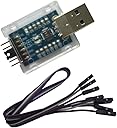
🔗 Unlock flawless serial communication — because your projects deserve the best!
The DSD TECH USB to TTL Serial Converter features the high-quality CP2102 chip from Silicon Labs, ensuring stable and efficient USB to TTL data transfer. Compatible across Windows, Linux, and Mac OS platforms, it supports multiple voltage pins (3.3V, 5V) and includes TX/RX LED indicators for real-time status. Compact and lightweight, it comes with a 12-month warranty and dedicated customer support, making it an essential tool for developers and makers seeking reliable MCU connectivity.
| ASIN | B072K3Z3TL |
| Best Sellers Rank | #1,942 in USB-to-USB Adapters #19,395 in USB Cables |
| Brand | DSD TECH |
| Color | Multicoloured |
| Compatible Devices | Linux, Mac OS, Windows |
| Connector Type | USB |
| Customer Reviews | 4.2 4.2 out of 5 stars (855) |
| Finish | Silicone |
| Input Voltage | 5 Volts |
| Item Dimensions | 2 x 0.8 x 0.25 inches |
| Item Weight | 0.18 Ounces |
| Manufacturer | DSD TECH |
| Model Number | DS-USB-TTL01 |
| Number of Items | 1 |
| Number of Ports | 1 |
| Package Quantity | 1 |
| Power Plug Type | No Plug |
| Specific Uses For Product | Arduino Board, ST MCU, Raspberry Pi |
| UPC | 603717226864 |
| Unit Count | 1.0 Count |
| Warranty Type | 12 months |
B**Y
This Little Device Is Nothing Short of Amazing
I was at the end of my wits and about to smash my bricked/dead router trying to flash the firmware and reflash it multiple times with no success. Still dead. I attempted just about every possible tip and power-switch reset routines found online. No success at all. Thus guilty of "killing" my router in an attempt to replace the stock firmware with an open-source version, I finally found a back door, a header connector inside the router hidden from view, accessible only after taking the router apart. So I did take it apart. Having found this last hope of hardware revival and the complete instructions to do it, all I needed was a USB-to-TTL adapter to break into the router through this back door. Enter this DSD TECH USB-to-TTL Serial Converter CP2102 picked out of a few I found on Amazon for no other reason that it was USB to TTL. When I received it and plugged it into my Windows 10 notebook, it was not recognized. Quickly, I went to the DST website; found and downloaded the driver, and after installing it in a flash, voila! Windows found it: There it was! Windows Device Manager--> Ports (COM and LPT)-->Silicon Labs CP210x USB to UART Bridge (COM3) Follow the instructions for resuscitating my router. Connected the wires to my router as indicated: GND to GND, Rx to Rx, and Tx to Tx (no need to reverse Rx to Tx and vice versa). With this device, I busted the back door wide open, ran the necessary programs, and there it came!!! My router, through this little adaapter, was talking to me sending to my notebook all kinds of cryptic Linux status messages. Proceeded to flash my router with this device. It took all but a short two minutes to get this done. My router came back from the dead. With my DSD gadget, I now can play with my router and flash any firmware I want. What a relief. DSD, I cannot thank you enough. Your little device saved me a lot of frustration, headaches, and grief. It turned my router from a dead paper weight into a useful, powerful machine. Thank you, thank you, thank you! One of the best $7.99 investments I have made in my life.
N**O
Worked really well, my first time using USB-serial
This worked really well to connect Windows 11 PC to MagicHome (ESP8266) devices, and program them for ESPHome. Worked with both the manual (command line) programming, and ESPHome web browser method. MY ONLY WISH: there needs to be a way to self-test whether the device and drivers are actually working via some loopback test... As it is, I had to take it on faith that it was working and only knew after a lot of steps, each of which could have gone wrong: I'd soldered a bunch of wires on the target circuit and used external programming software. Fortunately I got lucky the wiring right and ESPHome programming worked, but if it had failed, it's difficult to figure out if the error is in the USB, the wiring, or the target device or software.
B**9
Decent price, just works, great product
This does the job, I used it to interface various GPS modules to my Windows laptop. Just plugged-and-played and worked out of the box. As others have said, the snap-on plastic case is nice but it's an awkward fit and it comes apart easily, but this is not a priority. Note if you are using a USB power meter that this uses something like 80mW of power (a lot!), but you can just measure that and subtract from the load measurement. Only complaint is they don't offer a bulk purchase option if you want 2/4+ of them.
D**Z
Worked perfectly
Bought this to try and recover a dead router. The router turned out to have hardware issues but that was no fault of this adapter. In fact, watching the CFE boot sequence is what finally proved that the hardware was to blame. Frankly, I bougt it because it was inexpensive, but devices twice the price couldn't have worked any better. I rated 4 out of 5 stars only because the little plastic case that came with it doesn't fit the device very well. Anyone using a device like this is probably less interested in aesthetics than in functionality, but it's worth mentioning.
E**N
Worked nicely on suse linux after bugfix
I used the DSD TECH USB to TTL Serial Converter CP2102 on opensuse linux to flash tasmota to sonoff via arduino IDE. As far as the DSD CP2102 is concerned everything work perfectly. However, there is a known bug where the device is not loaded properly due to intercept by BRLTTY which prevents the device from loading as /dev/ttyUSB0. Brltty is a background process (daemon) which provides access to the Linux/Unix console (when in text mode) for a blind person using a refreshable braille display. Brltty takes control of the device and prevents it from loading properly so I just uninstalled brltty and then everything worked seamlessly with the kernel driver and the device showed up @ /dev/ttyUSB0.
A**S
Problems with High Sierra on a Mac
So DSD Tech claim that this device is compatible with Mac OS. I've just spent the last three hours attempting to get the device working on 10.13.5 (High Sierra) and I'm not sure that this claim is accurate. It seems that there is some kind problem with the way in which the kext (driver) is signed that prevents it being loaded correctly into the OS. During my first installation High Sierra requested that I approve installation of a third party kext - which I duly did. On reboot of the machine I could see that there was a CP2102 USB to UART Controller installed by looking at the System Hardware report. However there was no /dev/cu device showing up in the list of available devices. I checked the list of kexts installed and sure enough there wasn't one from Silicon Labs. There are in fact a number of threads regarding the fact that the latest driver (Version 5.0) doesn't work with 10.13.x posted on the Silicon Labs support community. Unfortunately none of them seem to provide an easy solution for fixing the problem. I suspect that I may end up returning this device and purchasing an FTID converter that (hopefully) will be more compatible with Mac OS. I'd warn Mac users to beware - I consider myself fairly savvy when it comes to the workings of Mac OS and can't make it work!
G**A
No DTR?
Works ok, but doesn't present DTR on the header interface.
R**R
wird genutzt um einen Batteriemonitor im Wohnmobil über dessen serielle Schnittstelle auszulesen. Gut verarbeitet und sauber beschriftet. Prima, guter USB - TTL Konverter Aber Achtung: eine ständige Verbindung zu einem von der Wohnraumbatterie mit Spannung versorgtem Raspberry, z.B. um Daten loggen, funktionierte bei mir nicht. Der Batteriecomputer zeigte sofort viel zu hohe Verbrauchswerte an ! Für diesen Anwendungsfall braucht man wohl einen USB-TTL Konverter mit durch Optokoppler getrennten Seiten wie beim Original-Konverter vom Hersteller. Ich werde mir zum testen dieses Ve.Direkt - Kabel bestellen.
G**N
Item as described - works well
J**E
Commandé en remplacement d'un adaptateur que je possédais et qui me faisait un code 10 sous windows. En y regardant de plus près, j'avais une contrefaçon de pl2303, incompatible avec les pilotes officiels. Celui ci a résolu le problème. Téléchargement des pilotes sur le site indiqué dans la doc et c'était bon. ( Testé aussi sur Mac pour programmer un sonoff). Que du bon 😀
C**D
Really awesome product, easy to use just plug everything in and you're off. You need to install the driver but instructions are provided and again its simple just a few clicks
S**O
Ad un ottimo prezzo, quello che trovò uno tra i migliori programmatori in circolazione. Funziona perfettamente ed inoltre è molto compatto. Non credo di esagerare se dico che è il meglio della sua categoria.
Trustpilot
2 weeks ago
2 months ago