🎮 Elevate your game with the G502 X LIGHTSPEED — where speed meets precision in wireless freedom.
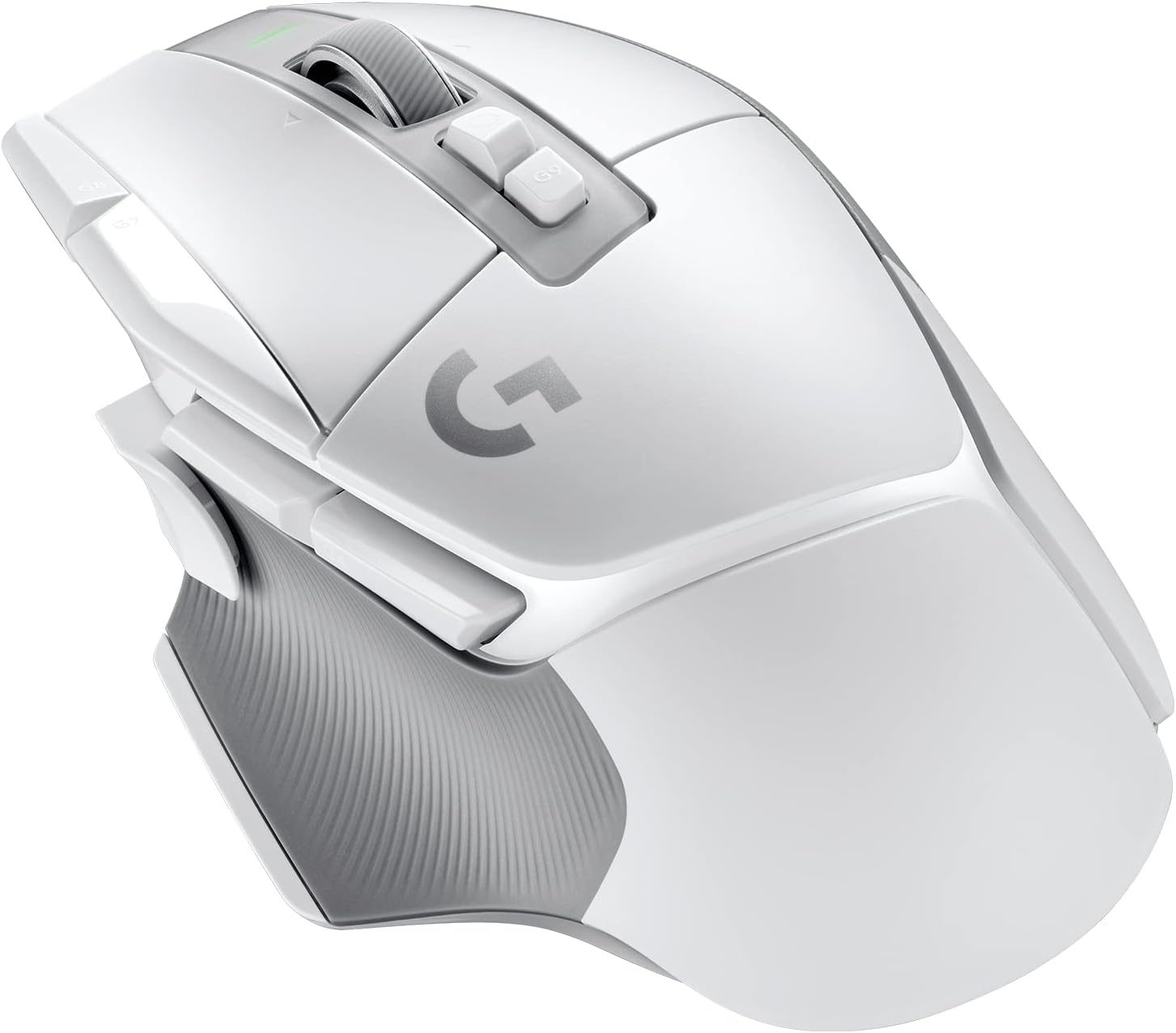
The Logitech G502 X LIGHTSPEED is a wireless gaming mouse engineered for professionals and enthusiasts, featuring LIGHTFORCE hybrid optical-mechanical switches, a HERO 25K sensor for sub-micron accuracy, and a 68% faster wireless response rate. With a lightweight design, customizable DPI-shift button, dual-mode scroll wheel, and compatibility with Powerplay wireless charging, it delivers cutting-edge performance for PC and macOS users seeking precision and reliability in every click.


| ASIN | B07W6HRN5N |
| Are Batteries Included | Yes |
| Average Battery Life (in hours) | 140 Hours |
| Batteries | 1 Lithium Polymer batteries required. (included) |
| Best Sellers Rank | 1,092 in PC & Video Games ( See Top 100 in PC & Video Games ) 52 in PC Gaming Mice |
| Brand | Logitech G |
| Colour | White |
| Customer Reviews | 4.4 4.4 out of 5 stars (1,123) |
| Date First Available | 30 Aug. 2022 |
| Delivery information | We cannot deliver certain products outside mainland UK ( Details ). We will only be able to confirm if this product can be delivered to your chosen address when you enter your delivery address at checkout. |
| Guaranteed software updates until | unknown |
| Hardware Platform | Mac, PC |
| Item Weight | 200 g |
| Item model number | 910-006189 |
| Lithium Battery Energy Content | 1.85 Watt Hours |
| Lithium Battery Packaging | Batteries contained in equipment |
| Manufacturer | Logitech |
| Number Of Lithium Ion Cells | 1 |
| Operating System | Windows 10 or later, macOS 10.14 or later |
| Power Source | Battery Powered |
| Product Dimensions | 7.92 x 4.11 x 13.1 cm; 200 g |
| Series | G502 X LIGHTSPEED Wireless Gaming Mouse |
M**!
Exvcellent Mouse but is it as good as the older G502 Hero?
Logitech G502X This is a direct comparison with the G502, which I have used in various forms for many years. The first thing to notice is that the price is about standard for a new Logitech G502. They all started out at about this level, given a little inflation. The mouse comes in standard 502 packaging, with nothing of note. One interesting thing that may upset some people is that there are no weights. It seems that Logitech have gone all out to just reduce weight because the mouse is very noticeably lighter than the old 502 Hero. The mouse does not work Logitech Gaming Software, it requires the new G HUB software, which can be downloaded from their website. There is no change to the sensor or specs of the mouse, which I think is fine, there really wasn’t any need for more sensitivity or anything. One reviewer pointed out that the cable is no longer covered in fabric. The problem with the fabric covered lead is that it was very thick and inflexible and tended to act as a drag on the mouse. The new cable is plastic and is much finer. Anyway, this “new” is not new at all, it has been standard with the G502 for at least two years now. I have had two G502’s Hero’s before this and both had the finer cable. The thumb has a little tab on it that effectively moves it forward a few mm. Personally, I find this to be a good thing but if you don’t like it the button, Logitech supply a replacement that is similar to the older G502 button. The wheel is a massive improvement. The old wheel had almost no grip, with it’s rubber coating, that’s now sorted. The sound of the button clicks are not as nice as the older G502, but nothing really to worry about. One thing I do find very disappointing is the lack of RGB. Given the price I would have expected it and it seems nuts to me that they added it to the battery version but not the standard wired version. The one LED that is on the mouse indicates the sensitivity of the mouse. This is a great option for some people, but useless for me, I never change the DPI anyway and the LED only lights up for a few seconds when you change the DPI. The Logitech G HUB software is horrible. It struggles to even power up. It’s powerful but very confusing, especially if you have used LGS before. The main difference is that you create profiles now that are stored on your PC. In LGS these are automatically stored on your mouse, but in G HUB you have to manually upload them. Switch memory mode and select the ones you want stored on the mouse. Click on the highlighted (blue) name of one of the three profiles to select and upload a new profile. Once you have established some profiles that have been saved in the mouse you don’t need to run G HUB at all. Phew. G HUB is definitely a backward step, unfortunately it won’t work with LGS. I can see lots of these mice being returned because people have issues with G HUB. I don’t like the way they have made the buttons behind the wheel smaller. All in all it’s definitely an improvement over the original G502, but really it’s not going to blow your socks off. The lower weight, rubber wheel and enhanced thumb button are really positive changes, but there are a few things that are backward steps - the click noise, smaller buttons behind the wheel and especially no RGB, oh and of course you do have to at least use the horrible G HUB with the G502X to set it up. Over the past weeks I have come to really appreciate the low weight. On that, alone, I would not go back to using the older 502. But that's a very personal preference. You may prefer the heavier G502. I’m going to give it five stars. It’s an excellent mouse. But it's not an automatic purchase. You may prefer some of the features of the older G502 in which case it will be difficult to justify the extra cost of the G502X.
R**N
Great value
I’ve been using the Logitech G502 X wired mouse for a few months now, and it’s been outstanding. The build feels solid and ergonomic, very comfortable even during long gaming sessions. The buttons are responsive and the scroll wheel is smooth and precise. Tracking is accurate whether I’m playing fast-paced games or doing regular desktop work. Great value for the price, and easily one of the best wired mice I’ve owned.
C**E
Brilliant Gaming mouse for a large hand
This has been my daily driver mouse for gaming for a long while now and I've got to say it's brilliant it's nice, feels good in the hand, is easy to use and the extra buttons you get to bind are amazing for gaming the ability to unlock the scroll wheel while used sparingly by me can be surprisingly useful, it also feels good to use the scroll wheel anyway but with the logitech software can sometimes be a bit buggy but that's on the software not this mouse, the battery life is also fairly solid but if you want it to never die you can buy the charging mouse mat for it too which is an expensive upgrade but a nice one.
A**C
Good quality
My son is obsessed with this
T**S
Huge improvements all over compared to Logitech G502 Hero Mouse.
Logitech G502 X wireless (No RGB) White, nice bright colour on my black Glass Pad mouse mat. Bought this to replace my old Logitech G502 Hero mouse. I feel there are a lot of noticeable upgrades. Firstly, size. It’s bigger, and for me that is better. I always felt like my ring and Pinky finger were hanging in the air on the Hero. On this X its wider and better shaped, so I’m actually gripping the mouse across its body through my thumb, instead of relying on pressure from the palm of my hand to my Glass Pad. The top of the body is more textured, making holding the mouse so it doesn’t slip a lot easier than the Hero whose body was smooth and shiny. The rubber on the sides of the mouse is greatly improved too, providing more grip. The feet are now PTFE feet, which as a Glass Pad gamer is a huge improvement. I no longer have to butcher the mouse, strip its old feet and replace them for PTFE, which I did on the Hero, they are there. The feet on glass glide smoothly, a lot better than the third party PTFE feet I installed on the Hero. The feet have a lot more surface area to them than the Hero, making moving the mouse a lot easier. This all gives me more precision when gaming. The disc underneath both mice is identical still. Probably so they are still compatible with all Logitech’s other technology, like their Powerplay wireless charging mouse pad. The scroll wheel has been vastly improved. It’s no longer so floppy I accidentally tap it right or left, I have to put a bit of effort into it, so I don’t catch it. The buttons below it have been made smaller, again, I no longer catch them. The side forward and back buttons are now closer to the top of my thumb. On the Hero, they felt as if they were a long way off, and I had to stretch to reach the forward button. The DPI shift at the front of the thumb, is more pronounced and I can hit it better with the front of my thumb, instead of feeling a long way off on the Hero. They even supply a cover so if you don’t want the DPI shift button, you can replace with the cover button that goes flush with the side of the mouse, using magnets to hold it. I opted for the version with no RGB. When I am gaming, my hand is over the mouse where it lights up, so I felt, now that Logitech is giving us the option of a wireless mouse without the RGB, I would take it, as its pointless being there when my hand was obscuring it. This could also potentially lengthen battery life over my old Hero that had the RGB. The cord is rubberised not braided, but then, so was the last of the Hero mice’s cords. I go for cordless as I don’t like cord drag at all. The dongle extender I feel wasn’t well thought out. It requires you to use the charging wire to connect it from the back of your computer to the extender, which you put the dongle in. However, when you turn your computer off after using it, and wish to charge your mouse, you have to unplug the wire from your computer that is no longer giving the mouse power, plug it into a USB plug, unplug it from the dongle, and into your mouse so you can charge it when you’re not using your computer. Seems a huge amount of hassle. Would have been better if they had supplied an additional USB cable for use with the dongle. I did find a third party wire to use for charging the mouse that fit it, so I could use the original wire for the dongle, so I would maintain the transfer speed to the computer from the mouse. I was unable to find a replacement original cable to use with the dongle. Granted, not everyone may need to use the dongle, and as the one wire supplied can be used for charging too, they may not have felt the need to. Would be good if they supplied original cables for a charge. They didn’t put the weights in this mouse. I didn’t use them in the Hero, as I felt like it was a heavy enough brick as it was. Making it even lighter is a huge bonus for me, and has reduced my wrist and hand strain on long gaming sessions, which has now subsided since using the G502 X. The software is the same as my Hero software, the G hub, and I find it very versatile for my gaming. It even allows me to program the settings to the mouse itself, a feature in the wireless mouse, the on board memory, so its very useful if I transfer it to my gaming laptop from my gaming desktop computers when I go on holiday. I also use it on my MacBook very successfully, meaning I only need to take one mouse. So in conclusion, I feel that the G502 X is a huge upgrade over the G502 Hero mouse. The mouse is wider, has a more textured body so I can grip it better. It’s a lot lighter, so I don’t feel like I am dragging a brick across my desk, the grip position is better and the buttons better placed. The scroll wheel is also vastly improved. On the whole, if you have the money, or need a new mouse, I would pay out for the wireless version of this mouse. As a side note, I would not pay out for the RGB version. For half again as much money, that is the only upgrade over this mouse it seems to have!
M**C
Fonctionne parfaitement. Je la recommande pour les personnes qui ont des petites mains comme moi. Elle est assez légère et grace au logiciel de logitec, elle est facilement paramètrable. PS: j'avais fais l'erreur de manger des chips, ce qui avait un peu coloré le clic gauche mais c'est facilement parti :D
J**N
Mycket bra mus som jag använder till gaming och programming
S**O
Sono un appassionato di giochi per PC e ho sempre cercato il mouse perfetto per le mie esigenze. Ho provato diversi modelli, ma nessuno mi ha soddisfatto completamente. Finché non ho scoperto il Logitech G G502 X LIGHTSPEED, un mouse wireless che ha superato le mie aspettative. Il Logitech G G502 X LIGHTSPEED è un mouse da gaming di alta qualità, che offre prestazioni eccellenti, comfort e personalizzazione. Il design è ergonomico e adatto alla mano destra, con una superficie gommata che garantisce una presa sicura. Il peso è ridotto rispetto al modello precedente, solo 99,7 grammi, ma si può aggiungere o togliere del peso in base alle proprie preferenze. Il mouse ha 13 pulsanti programmabili, che si possono assegnare a diverse funzioni tramite il software Logitech G Hub. Il pulsante vicino al pollice, che serve a cambiare i DPI, è magnetico e si può spostare o rimuovere a piacimento. Il punto di forza di questo mouse è il sensore Hero 25K, che offre una precisione incredibile, fino a 25.600 DPI, senza alcun tipo di smoothing, accelerazione o filtraggio. Il mouse è dotato anche della tecnologia wireless LIGHTSPEED, che garantisce una connessione stabile e veloce, senza ritardi o interferenze. La batteria dura fino a 140 ore con una singola carica, e si può ricaricare tramite il cavo USB-C in dotazione o con la base di ricarica wireless Powerplay (venduta separatamente). Ho confrontato questo mouse con altri modelli simili, come il Razer Basilisk Ultimate o il Corsair Dark Core RGB Pro, e devo dire che il Logitech G G502 X LIGHTSPEED li batte in quasi tutti gli aspetti. Ha un design più elegante e confortevole, un sensore più preciso e affidabile, una connessione wireless più performante e una batteria più duratura. L’unico svantaggio che ho trovato è che il cavo in dotazione è gommato e non intrecciato, il che lo rende meno flessibile e resistente. Inoltre, il mouse non ha luci RGB, se si esclude il logo Logitech, ma per me non è un problema, anzi preferisco un look più sobrio. In conclusione, posso dire che il Logitech G G502 X LIGHTSPEED è il miglior mouse da gaming che abbia mai usato. Lo consiglio a chi cerca un mouse wireless, leggero e preciso, che si adatta a qualsiasi tipo di gioco e di mano. Il prezzo è alto, ma ne vale la pena per la qualità e le prestazioni che offre. Voto: 5 stelle su 5
س**ن
افضل من النسخة القديمة بفرق شاسع جدا وخفيفه وجميلة
F**N
No se puede decir nada sobre este mouse q no se haya dicho ya. Es la evolución inalámbrica del mítico G502, uno de los mejores ratones gaming del mundo usado por cientos de jugadores profesionales en torneos mundiales. Ligero, rápido y preciso, muy preciso. Nada más q añadir.
Trustpilot
2 weeks ago
3 days ago