Buy anything from 5,000+ international stores. One checkout price. No surprise fees. Join 2M+ shoppers on Desertcart.
Desertcart purchases this item on your behalf and handles shipping, customs, and support to New Zealand.
๐ฆ๏ธ Own the Weather, Wherever You Are โ Stay Ahead with Wittboy Pro!
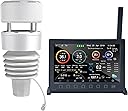
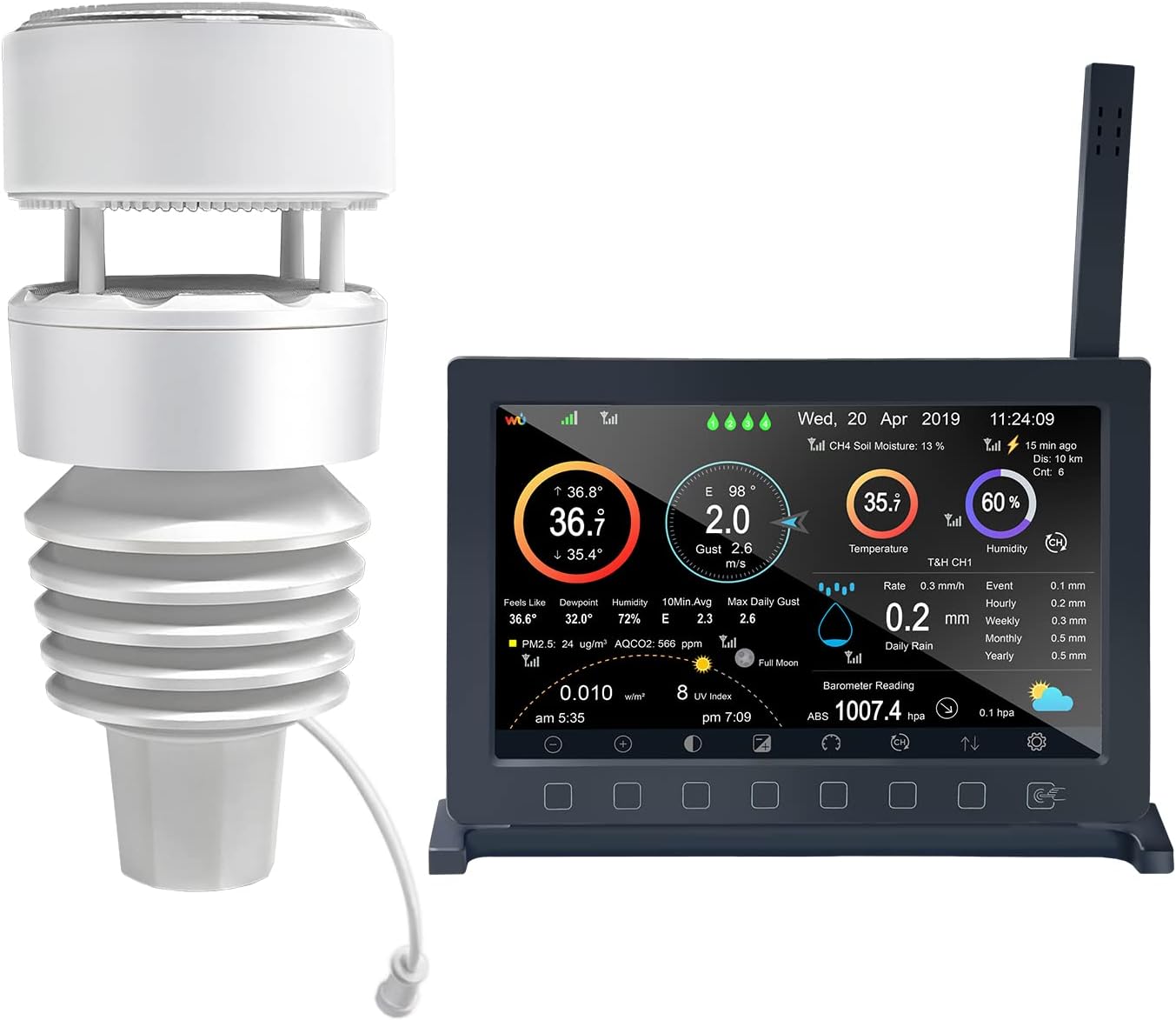
The ECOWITT Wittboy Pro HP2564 is a cutting-edge 7-in-1 weather station featuring a 7-inch TFT display console and a solar-powered WS90 outdoor sensor. It delivers precise environmental data including temperature (ยฑ0.3ยฐC accuracy), humidity, wind speed/direction, UV, light, and rainfall using a haptic piezoelectric rain sensor. With robust 915 MHz RF connectivity and Wi-Fi, it supports seamless data upload to major weather platforms like Weather Underground and Ecowitt. Expandable with multiple additional sensors, itโs designed for professionals and enthusiasts seeking reliable, customizable weather insights with real-time alerts and historical data tracking.


| ASIN | B0BM3BQ425 |
| Additional Features | Adjustable Brightness, Piezoelectric Rain Sensor, Supports WU/ WOW/ WeatherCloud/ Ecowitt Servers, TFT Display |
| Are batteries included? | No |
| Best Sellers Rank | #33,827 in Patio, Lawn & Garden ( See Top 100 in Patio, Lawn & Garden ) #26 in Weather Stations |
| Brand | ECOWITT |
| Brand Name | ECOWITT |
| Color | White+Black |
| Connectivity Technology | Wi-Fi |
| Customer Reviews | 4.3 out of 5 stars 234 Reviews |
| Display Type | TFT |
| Frequency | 915 MHz |
| Included Components | [HP2560 TFT display console, WS90 outdoor weather sensor, USB to 2.5*0.7mm DC 5V power cord] |
| Item Dimensions D x W x H | 4.8"D x 9.06"W x 7.2"H |
| Manufacturer | ECOWITT |
| Material | Plastic |
| Material Type | Plastic |
| Model | HP2564CA |
| Part Number | HP2564CA |
| Power Source | Indoor Console: Cord Powered. Outdoor Sensor: Solar Powered Or Battery Powered (Batteries Not Included). Power Source Indoor Console: Cord Powered. Outdoor Sensor: Solar Powered Or Battery Powered (Batteries Not Included). See more |
| Recommended Uses For Product | Garden, Home, Office |
| Sensor Technology | Multiple (Temperature, Humidity, Rain, Wind, Light) |
| Shape | Rectangular |
| Special Feature | Adjustable Brightness, Piezoelectric Rain Sensor, Supports WU/ WOW/ WeatherCloud/ Ecowitt Servers, TFT Display Special Feature Adjustable Brightness, Piezoelectric Rain Sensor, Supports WU/ WOW/ WeatherCloud/ Ecowitt Servers, TFT Display See more |
| Specific Uses For Product | HP2560 Indoor Display Console: with built-in temperature/humidity sensor and barometric pressure sensor; Pair with ecowitt developed sensors and send their data to the Internet., WS90 Outdoor Sensor Array: Temperature/ Humidity/ Piezoelectric Rain gauge/ Wind Speed&Direction/ UV light&solar Specific Uses For Product HP2560 Indoor Display Console: with built-in temperature/humidity sensor and barometric pressure sensor; Pair with ecowitt developed sensors and send their data to the Internet., WS90 Outdoor Sensor Array: Temperature/ Humidity/ Piezoelectric Rain gauge/ Wind Speed&Direction/ UV light&solar See more |
| Style Name | HP2564BU |
| Temperature Accuracy | + 0.3ยฐC |
B**N
Best weather station I've owned.
I have an Ecowitt WS 90 sensor and HP2560_C Display. I have had the unit for about 4 months now and I am so please and excited with it. I was worried about it when I ordered, but with the help of the Ecowitt support team. I have calabrated it and it works amazingly. The manual for the displays seems to be a cut and paste of several manuals and sensors. It is not a complete guide to the HP2560_C display. Cons first: 1. Very disappointed with the display size of the HP2560c. There is too much information to display on such a small screen. It looked so much larger in the advertisement photos. If Ecowitt comes out with larger I will buy it. I canโt read much of the display data unless I hold the display in my hands. I know I have the information on my phone, but I like the display and like showing it off. 2. in my Manual the QR code is not correct for HP2560c Wifi set up. 3. The manual for the HP2560c must be used for more than the WS90 sensor and is confusing, because of different references to other sensors. BhmMan: I suggest you go to the Ecowitt website and download the whole manual and quick start. Use the support tech team. They usually respond in 1 or 2 days, and be patient. Pros: Just about everything else. Easy to install, with a little help from support easy to set up, and most of all being able to calibrate your readings. Note: I have emailed the Ecowitt support team all the below questions. They have been super helpful, and maybe this will help you. Q. I have a Wittboy with a Mdl HP2560_C display, I also have a GW2000 hub. Do I get any advantages installing the Hub? I had my HP2560_c already connected to the internet but canโt connect to the Wunderground. It is connected to the Witt weather app though. Ecowitt - If you have HP2560 console, then there is not much use to have the hub GW2000, as they are doing the same job with different display method. (I returned my Hub) Q What am I doing wrong that I canโt connect to the Wunderground? I have wunderground set up. I have put the numbers into the console. Is it supposed to go automatic from there or am I missing a step? I finally deleted everything except my account, started over, and it finally worked. Ecowitt - Please check your spelling for the ID and password input. The characters from WU can be misleading for 8:B, l:1. Etc. (This was my problem) Fill in your WU ID and Password, if it is connected to WU server, the WU icon will be lit on the main display. (Mine is at the top left.) Q. Is the 32 gigabyte micro SD card used just for Backup or just for software and hardware updates? What else is the SD card used for? Can I use the small USB plug in for updates? Can you give me instructions for how to use updates? Can I go directly from computer or cell phone to the Micro USB to update? Ecowitt - You can use any SD card with size no larger than 32GB & 32 fats. Down load the update file to your computer unzip the file, copy user bin file to SD card (max 32GB), insert into console and upgrade will start automatically. BhmMan: The SD card is for firmware updates, you can also leave the SD card in and history data will be saved on your SD card. I guess that would be my back up since there is no battery in the monitor. When I lose power, I only lose data while the unit is off, all the old data is saved on the SD card. Q. How can I use my app on my other devices like my lap top, iPad, my wifeโs iPhone, and my neighbors mobile Phone. I know I can share for 30 days. But then I must reset each every 30 days. Iโd like to know if I can share permanently. Ecowitt - We are extending the sharing time to 90 days. But it is not possible to share it permanently. You can refresh the share lease time to 90days by click on the โrefreshโ button and your friends can keep using the same link. What you need to do is refresh the link within the expiring date. Q Main. The Manual for the Ecowitt HP2560_C has a calibration Screen. I Note the Solar, UV, Wind, and Rain. These have a series of Numbers called Gain. I do not understand what each setting does to my overall display. Question 1. In this Calibrations Mode: in Rain Setup โRain gainโ has a โ1โ showing as a Factory preset, meaning - Sight glass rain gauge with an aperture of at least 4โ. What do numbers 0.01 thru 5 Mean? Question 2. In Calibrations Mode: Rain Setup also has Piezo Rain1, Piezo Rain2, Piezo Rain3, Piezo Rain4, & Piezo Rain5. What do the numbers 0.01 thru 5 mean for each of these, and How do I Set these for my Ecowitt WS 90? Question 3. In Calibrations Mode: Wind Gain has a โ1โ showing as a Factory preset, meaning - Calibrated laboratory grade Wind meter. As in Question 1, What do numbers 0.10 thru 5 mean? Question 4. In Calibrations Mode: Solar Rad Gain has a โ0.10โ showing as a Factory preset, meaning - Solar radiation conversion from lux to w/m2 for wavelength correction - What do numbers 0.01 thru 5 mean? Question 5. In Calibrations Mode: UV Gain has a โ1โ showing as a Factory preset, meaning - Calibrated laboratory grade solar radiation sensor. What do numbers 0.05 thru 10 mean Ecowitt - Gain means factor thatโs used to multiply with your original sensor data. So if you set gain larger than 1.0, it amplifies, if you have the gain set below 1.0, then it minimizes. BhmMan โ this was especially helpful setting my rain gage. When I first set the unit out, my rain readings were way low. I set each rain setting to โ2โ and now it seems accurate with my Tube Style rain gage. So happy.
D**E
Glad I bought it.
Ok, I have had this weather station for a couple of months now and I am ready to give it my honest review. I had an Accurite 5 in 1 weather station before this one and I like the Ecowitt better. With the app I can access my data easily and from anywhere. It is intuitive and easy to read. The unit is providing me with what I believe to be very accurate information on Temp, humidity,pressure and wind speed/direction. The rainfall gauge is reading higher than my additional standalone rainfall gauge. I have read in the manual that I can go into the setting and make corrections to adjust the offset but I have not done that yet. I do use the rainfall data to know when it rained and what rate. It is easy to see this information using the graphs. I also like the fact that this devise links up to Weather Underground and and is a part of a large network of personal weather stations. I got it linked up and when I am looking at the forecast on WUnderground I can also compare my weather data to other surrounding sites. I placed my WS90 sensor about 150 feet away from the HP2560 console and have no problem with connectivity and receive full bars of signal. I also like that the sensor has solar recharging so I won't have to change out batteries like I did with you Accurite 5 in 1 station. The HP2560 Console is a bit techy with all the function/setting buttons but the data display is easy to see and read and nice to look at. I find that the build quality is quite good on both the sensor and console. It was important to me when deciding on this personal weather station that the temp and humidity sensor is a replaceable module. My Accurite failed after a reasonable life of about 6 years. Being able to replace the sensor in this unit is a good feature. All in all, I give Ecowitt a thumbs up.
D**E
I couldn't be happier, what an excellent weather station!
My wife gave me a Tempest weather station for my birthday, and to my disappointment it would never read the humidity correctly, being about 20 percent off other stations in my neighborhood or area. We sent it back for a refund and I decided to give this Ecowitt unit a try. I couldn't be happier! Setup was easy and the base station is excellent. It's customizable, you can calibrate the temperature, humidity levels, the barometric pressure, etc. This is a very useful feature. The best thing besides it working like a charm is all the other sensors you can purchase to use with it. Soil sensors if you are a gardener, air quality sensors to keep an eye on the air quality in your home, leak detectors so you have peace of mind, extra temperature sensors, etc. For the price it's a great product and I love the fact that sensors can be adjusted, changed, added, removed, etc.
D**R
After hours and a replacement it works OK
The outdoor sensor is very small and easy to mount. Setting up was easy including getting it on Weather Underground, Ecowitt weather page and Weather Cloud until the wind readings were questionable. The instructions are better than most Chinglish but not clear about calibration and wind direction. Attached is a downloaded, not included, diagram that made setting the direction obvious. The unclear instructions could have just said: "point the battery door north". The indoor temp was whacky until I found out the antenna isn't an antenna but the indoor temp sensor which must but up away from the display heat. The temp calibration is good as I checked it with a Fluke thermistor probe. You must calibrate the barometer. After several tries I got it tracking the local local airport well. I got rid of my Davis station because I was having trouble reading the displays. The Ecowitt display is easy to read and all info plus good graphs and history. . A problem was it was showing 1-2.5 mph when the wind was dead calm. I tried a sensor reset and calibration indoors while covered up. That didn't fix the problem but Amazon provided a replacement which was better. I did some inside testing. See attached. The touch buttons are annoying as after weeks I still tap the icons on the non-touch screen. The wind speed and direction updates slowly so as being a pilot it is hard to interpret what the wind is doing: definitely not like looking at a wind sock. The wind speed may be inaccurate, reads high with light wind and maybe low with higher winds. For $300 it is good OK but wish it had a touch screen and fast wind updates.
T**R
good product
works perfectly. only drawback no Wifi 5
T**R
Unbelievably difficult to set up!
For the cost you would think it would be easy to set up. It is the most difficult modern piece of electronics I have ever bought. If you have trouble setting things up donโt purchase.
K**R
Dorothy weather sensor.
This is a good product. Fairly user-friendly. I also purchased lightning detection for this unit. It didn't come with it. So I'm kind of disappointed with that. But it appears that everything is very accurate. You need to do your research so that you don't get false. Readings and wrong information. I think it's a little overpriced. But I have bought other units from this company as well. So, but I did buy them when they were on sale. I do recommend these products for anyone serious about weather.
P**E
Impressive engineering and Simplicity of setup
Impressive, intelligent engineering. Amazingly simple setup. Install two AA batteries in the sensor unit. Plug in the display console. Enter WIFI information. Itโs up and running. (The last failed experiment with a different brand required an 18-19 step process to reconnect whenever it [often] lost signal.) Download the Ecowitt mobile app. Set up an account. Input MAC address in manual procedure. Login to Ecowitt.net on your PC. Eureka! You have both mobile and PC displays. This may well be the last weather station brand I ever buy. An aside: the display follows the Ambient Weather design with copious amounts of historical data available. Very pleased with this unit.
A**T
Great product
I've had this for 18months now. Great product, easy to set up, accurate readings and fuss free. Very happy with it.
V**D
ECOWITT Wittboy Pro Weather Station HP2564, Includes 7 Inch HP2560
Great weather station with many weather info, additional sensors can be added. I have no issues with connection dropouts from sensors /wifi - all works fine. During sunny days, roof sensor is powered solely by solar panel, it uses AA batteries only after capacitor discharges during few days of darkness/clouds. (solar doesn't charge internal AA batteries but supercapacitor) To get accurate readings, some settings need to be done after 1st powerup (like altitude/pressure). Only small drawback i found so far is that lcd brightness in auto mode is controlled by exterior light hitting the outdoor sensor, there's no ambient light sensor on indoor lcd unit
T**9
Gardeners best friend
Fantastic item for gardeners Using with soil temp and moisture meters, to help keep an eye on raised garden beds Accurate and easy to setup.
D**N
Prompt Delivery
Great product and no complsints regarding price and delivery A great seller
B**E
Great weather station
The new weather station is an exceptional addition, providing comprehensive and accurate weather data. It features real-time updates on temperature, humidity, wind speed, and precipitation levels, making it highly informative for daily planning. The intuitive interface and detailed analytics offer valuable insights into weather patterns, making it a reliable tool for both casual users and weather enthusiasts.
Trustpilot
2 weeks ago
2 months ago