Desertcart purchases this item on your behalf and handles shipping, customs, and support to New Zealand.
๐ Elevate your office fax gameโfast, paperless, and always connected!
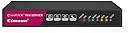
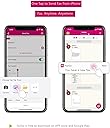
The CimFAX A5 is a portable, Ethernet-enabled fax server designed for professional offices. It delivers up to 20 black & white pages per minute, supports 5 users simultaneously, and automatically saves faxes as PDFs for seamless paperless workflows. With easy setup, remote Android control, and smartphone compatibility, it modernizes faxing without the need for extra modems or bulky hardware.


| ASIN | B00WJXFDO4 |
| Additional Printer Functions | Fax |
| B&W Pages per Minute | 20 ppm |
| Box Contents | Fax Server Software, Client Software |
| Brand | CIMSUN |
| Brand Name | CIMSUN |
| Color Pages per Minute | 1 ppm |
| Colour | BLACK |
| Compatible Devices | Smartphones |
| Connectivity technology | Ethernet |
| Control Method | Remote |
| Controller Type | Android |
| Customer Reviews | 4.0 out of 5 stars 183 Reviews |
| Dual-sided printing | Yes |
| Duplex | Automatic |
| Global Trade Identification Number | 06959805100016 |
| Hardware Interface | Ethernet |
| Ink Colour | BLACK |
| Item Weight | 499 g |
| Manufacturer | CIMSUN |
| Maximum Copy Speed Black and White | 20 ppm |
| Maximum Sheet Capacity | 150 |
| Maximum Supported Paper Size | A4 |
| Model Name | A5 |
| Model Number | CF-C2102 |
| Model Series | 2102 |
| Model name | A5 |
| Network Connectivity Technology | Ethernet |
| Number of Licenses | 5 |
| Number of Trays | 2 |
| Other Special Features of the Product | Portable |
| Print media | Unknown |
| Printer Output Type | Monochrome |
| Printer Type | Dot Matrix |
| Printing technology | Dot Matrix |
| Processor Count | 1 |
| Scanner Type | Flatbed |
| Series Number | 2102 |
| Special feature | Portable |
| Specific Uses For Product | Office |
| Wattage | 5 watts |
V**R
Great product.
This little box is fantastic! Itโs easy to set up and configure. Works perfect in my office. I love the right click to fax and auto export. Makes fax sending and archiving much easier. And it doesnโt need any more fax modem to work with. Better than those expensive fax software. I highly recommend this product!
Q**Q
The last (hopefully) fax machine you'll ever need.
This device was employed at a medical practice that receives roughly around 2000- 3000 pages of faxes a month (more on this later). As a relatively new practice we tried to go digital as much as possible. This led us to first trying fax machines that used client software to export faxes from the machine to a file server (in this case Brother pc-fax rx). The problem with this is the client was unstable and would constantly crash, so after enduring that for a few years (made a script to restart the program when it crashed) we decided to move on. On to the next thing. Online fax companies, the worst decision for an (apparently) high volume fax business. We were pitched an unlimited plan from company V. Great! Sign us up! Unfortunately the salesperson neglected to mention in the fine print "unlimited" means below 500 faxes a month. Refer to the number I gave for faxes above. Overages, all the overages. Frantic searching for an alternative ensues. Enter Cimfax. Setup was honestly the worst part of the experience. Do yourself a favor and just have their customer service rep remote into your computer to get the IP address set up. Not sure why it isn't set to DHCP as default but it is what it is. I repeat, save yourself the aggravation and just have their rep remote in and configure it. Consider it part of the setup process if you're too arrogant to ask for help. Their rep was very nice and accommodating 10/10. Just do it. (I used Skype chat, remote in was done via TeamViewer) Once it was successfully connected to the network I was given instructions on how to do Fax to Email and Export Faxes to server (as PDF). I opted for sending faxes to our file server and sending to email if the file server is down (nice feature). I should mention there is a client side app but once the fax server is pointed to your file server the client does not need to be run (moot point if the computer you're running the client on is also your file server). Would have been great if it could integrate directly with online storage options but that does not seem to be an option at this point though I haven't played around with that yet. I currently have it set to export to a Google drive folder on a computer, not elegant but it works. We have also used the remote fax feature which does require the client to be installed. Works great once ports are forwarded. Zero issues. So as of this initial writing 8/21/17 it has been roughly a week since CimFAX was up and running. No issues (yet). It is quietly chugging away pushing faxes to where they need to be and in PDF format. As a good fax server should. No monthly fees, no overages, no gimmick, no incessantly crashing client. I didn't know a fax machine could cause me to feel relief but, for now, CimFAX has done so. TL:DR Pros: - Small - Works (for now) - PDF conversion - Remote feature - No monthly fees - Excellent customer service Cons - Initial setup Will update with any issues after a month.
A**H
Excellent device for faxing and receiving faxes.
Very easy to set up and works impressively well even with VOIP. Amazing customer service which is very responsive with instant messaging. Would recommend to any organizations that may require faxing which is compact and very efficient and paperless.
L**.
Great Product & Support
2/24/26 Review Update: 3 years later and we are still loving the CimFax! I started having a problem connecting to the CimFax and would have to restart the device, this got progressively worse until it would not connect to it at all. I emailed the company and asked if it was time for a new one. Even though they were closed for 2 weeks for the new Lunar Year, they replied promptly and told me how to reset it. It worked like a charm, and I did not have to replace the device!! OUTSTANDING customer service!!! I still highly recommend the CimFax! We had been using our printer/copier to receive faxes that would then forward them by email to our email inbox but every time the printer/copier broke down it would not receive faxes even though it supposedly had storage. I found this fax server on Amazon and I am so glad I did. It arrived promptly. I installed it myself and it was receiving faxes within minutes. I did run into a problem getting it to email the faxes from the program but I sent an email to Cimsun/Cimfax and they promptly returned my email and asked for screenshots of my settings. They knew right away what the issue was and we corrected it. Another great thing about this is that there are no monthly fees or limitations like there are with fax services. I would highly recommend this product.
S**9
Works with google voice and an obi200 device
Had to edit my review. The product works well for receiving faxes, but is terrible for sending. It simply does not work to send a fax due to the buggy software. When you try to import a file, it simply opens up a folder. They claim "To send a fax, you just need to right click the document, enter fax number and click send." This does not work. We tried installing in a bunch of different workstations, from clean win 7 images to clean win 10 images. It has never worked properly. Document conversion is rough too. tried every option in the software but it turns documents into unreadable text. Text support doesnt respond either. Their support is a chinese phone number and nobody answers their skype inbox.
M**E
CimFAX A5 fax server is a great value for the money.
The CimFAX A5 fax server is a great product! I did have a little trouble setting it up but after I figured it out it works perfect sending and receiving faxes. The initial cost of the CimFAX A5 is a little expensive but if you consider how much a high end table top fax machine cost I believe you would agree it is well worth the money. It takes up very little space 7" wide, 4" deep and 1" high. You never have to worry about buying a drum, ink or paper since everything is digital. You connect it to your network and never have to worry about receiving a fax because it is a mini computer by itself always on which means you can turn your computer off and still receive faxes. You can even have incoming faxes sent to your email. I would definitely recommend a Cimfax fax server no matter which model you buy I am sure you will be pleased.
Trustpilot
1 month ago
1 month ago