๐ Elevate Your Storage Game!
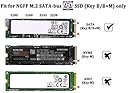
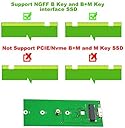
The M.2 SATA SSD to USB 3.0 External SSD Reader Converter Adapter Enclosure is a sleek, portable solution designed for seamless data transfer. With support for various M.2 SATA SSD sizes and blazing speeds of up to 6Gbps, this aluminum enclosure maximizes performance while ensuring durability. Perfect for professionals on the go, it offers plug-and-play convenience and hot-swap capability, making it an essential tool for efficient data management.


| ASIN | B076DCNZM3 |
| Best Sellers Rank | #824 in Enclosures |
| Brand | HIGHFINE |
| Color | Black |
| Compatible Devices | Laptop |
| Connectivity Technology | usb |
| Customer Reviews | 4.2 out of 5 stars 1,681 Reviews |
| Data Transfer Rate | 5 GHz |
| Enclosure Material | Aluminum |
| Hard Disk Form Factor | 2.5 inches |
| Hardware Interface | USB 3.0 |
| Hardware Platform | Windows |
| Item Dimensions L x W x H | 3.82"L x 1.5"W x 0.38"H |
| Item Weight | 0.07 kg |
| Manufacturer | HIGHFINE |
| Material | Aluminum |
| Memory Storage Capacity | 1000 GB |
| Mfr Part Number | M.2 SSD-USB3.0 |
| Model Number | M.2 SSD-USB3.0 |
| Product Dimensions | 3.82"L x 1.5"W x 0.38"H |
| Supported Devices Quantity | 1 |
R**Y
Worked like a charm to clone drive
Needed to upgrade the C drive on my laptop to do updates. In conjunction with Macrium Reflect software, this was a simple process. I simply cloned the C 128G drive to the new 512G drive, following some YouTube instructions...and it was done in about 4 minutes. Booted down, undid the power, removed old C drive, installed the new C drive, re-powered and it booted up and I was able to install Windows 11 and update my graphics card. I can now use the old C drive with the adapter, reformat it and either use it and make a copy of Win11 in case there's an issue...or use it as storage for business files to protect them in case the laptop crashes. Nice little device.
J**H
Worked as Advertised
I bought this solely to extract user-created files from a working SSD (Samsung MZNLN256HCHP - 256GB M.2 2280 SATA III NGFF) in my wifeโs otherwise dead laptop. For that, it worked flawlessly. As others noted, it came with no instructions but it wasnโt hard to figure out. I slid the SSD into place (I didnโt use the enclosure), plugged it into a powered USB 3.0 hub and Windows recognized it immediately (Windows assigned two drives letters which I assumed matched partitions on the SSD). I copied about 42GB of standard user-created-files from the old SSD onto an attached external drive in under two hours. Zero issues. Once the wifeโs new computer arrives and Iโve confirmed a good transfer to it, Iโll slide the package into its enclosure, format it and see how it holds up as external storage
W**M
Pleasantly surprised
First off it is nothing other than a dongle that takes a m.2 form factor sata ssd and lets you use it as a usb device and it does that job perfectly. The quality of the material and the fit and finish of the item is incredible. It will definitely protect a ssd that is within from most light to medium damage. It is a little fiddly since you have to remove some screws to take the cover plate off to slide out the device and actually attach the sata ssd to it, and these screws are very small and very easy to lose. But after securing your drive within it is just plug and play. I bought this to pull data off of a drive from a tablet that just quit working and I will be buying a couple more for future use.
J**C
Tiny screws
It worked for my M.2 SSD that came from a dead laptop. So I'm happy about that -- I was able to get the data off of it and wipe it so I could sell it on eBay. However, the enclosure has two tiny screws that hold the cover on. I mean, really tiny. It does come with a tiny screwdriver for them, but when you work on this, be sure to work somewhere where you'll be able to find a screw if you drop it. Carpet is not good. Also, it helps if you magnetize the little screwdriver so it will hold the screws. Run the blade of the screwdriver over a strong magnet a few times to magnetize it.
L**B
Unreliable: Random Disconnects
I installed a brand new Crucial MX500 500GB M.2 SATA drive into the unit, closed it up, and plugged it in to my laptop. The system saw it immediately, I successfully partitioned the drive, and successfully did a small file copy to the drive. However, when I started a very large file copy operation, the unit abruptly stopped working after a few minutes. The system logs report that the USB device spontaneously disconnected from the host, causing the file transfer to error out (and probably corrupting the filesystem as well). I opened up the case and double-checked that the M.2 drive was seated properly. I also inspected the board under a magnifying loupe, but didn't see any solder blobs or other obvious manufacturing defects. I tried the unit once more, and it once again disconnected in the middle of the file transfer. I did notice the unit becoming somewhat warm during the file transfer. During my inspection, I found no heatsink on the main controller chip, nor was the chip in physical contact with the aluminum case -- a technique used by some makers to dissipate heat. My *guess* is that the controller chip in the housing is overheating, causing it to fail. So, alas, this unit will be returned.
J**N
Very good external m.2 enclosure
I bought this product to transfer some data from my old m.2 SSD onto a new computer. The quality of materials seems very good with a strong metal enclosure, the only problem I could imagine someone having with this is in a place that shakes or vibrates a lot as the internal parts are not fastened to anything and are held in place by rails it can slide on. That being said, for most people this will not be a problem in a static position. The only issues I have are that there are no instructions that came with it although it was easy enough for me to figure out; the combined standoff/m.2 screw part did take a minute to figure out. Also, the USB cord that comes with it is very short (maybe 3 inches) and pretty stiff out of the box. Overall, this worked perfectly for my needs and was easy to use but could be a little easier with instructions.
J**M
Exactly what I needed!
Exactly what I needed! I visited 2 different tech stores for emergency assistance to recover data from damaged laptop. Received two different recommendations to purchase products from them. Finally did my own research to determine THIS is what I needed. Arrived on time and worked perfectly!
H**L
Works as expected, functions as needed.
Easy set up with Windows 10 (albeit somewhat slow with initial system recognition). Fast response when connected with speedy transfers. No drivers issues or hardware malfunctions (unlike my previous brand's purchase). Hardware is sturdy and built with quality & blue LED when connected. The only thing I could complain about is the incredibly short usb cable at 1 foot. Even connected to my lowest available monitor port it won't lay flat, but that's not a real gripe once I get a proper hub.
P**O
Super Service
Super service Gerne wieder.
S**M
Great device!!
Great device for recoverring data from an old lap top that had died.
D**Y
works as advertised
Used it to clone my small ssd to a new larger ssd in my laptop. Worked fine!
F**I
It works exactly as advertised
This works exactly as advertised. In addition, a nice touch is the inclusion of the little screw driver that fits the little screws. I appreciated this thoughtfulness as I didn't have the exactly fitting screwdriver and could have damaged a screw. I used this adaptor to clone a Samsung SSD that went into upgrading my laptop giving it a new lease of life.
J**E
Quick delivery and good packaging
Great product and highly recommended
Trustpilot
2 weeks ago
1 month ago