Buy anything from 5,000+ international stores. One checkout price. No surprise fees. Join 2M+ shoppers on Desertcart.
Desertcart purchases this item on your behalf and handles shipping, customs, and support to New Zealand.
โก Upgrade your WiFi game with the Nighthawk 6E adapterโspeed, power, and freedom in your pocket!
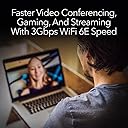
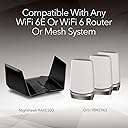
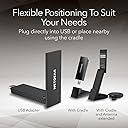
The NETGEAR Nighthawk WiFi 6E USB 3.0 Adapter (A8000) delivers ultra-fast tri-band wireless speeds up to 3Gbps by leveraging the new 6GHz WiFi 6E band. Designed for Windows PCs, it offers plug-and-play USB 3.0 connectivity with a flippable antenna for enhanced signal strength and coverage. Compatible with any WiFi 6 or 6E router or mesh system, this compact adapter future-proofs your wireless setup for gaming, HD streaming, and video conferencing with minimal hassle.


| ASIN | B0B94R78N7 |
| Best Sellers Rank | #20 in USB Computer Network Adapters |
| Brand | NETGEAR |
| Built-In Media | WiFi 6E |
| Color | Black |
| Compatible Devices | Laptop |
| Compatible Operating System Family | Windows |
| Customer Reviews | 4.3 4.3 out of 5 stars (1,368) |
| Data Link Protocol | USB |
| Data Transfer Rate | 1201 Megabits Per Second |
| Hardware Interface | USB 3.0 |
| Item Dimensions L x W x H | 3.66"L x 1.24"W x 0.57"H |
| Item Weight | 28 Grams |
| Manufacturer | Netgear |
| Mfr Part Number | A8000-100PAS |
| Minimum Required Operating System Version | Windows 10 |
| Model Number | A8000-100PAS |
| UPC | 606449160987 |
| Unit Count | 1.0 Count |
| Warranty Description | 1 year warranty |
R**N
Worth the money and great connectivity
This is a great wireless adapter. A little expensive but worth it for its ease of install and quality. I have never received a device with a USB included which Iโm assuming are for the drivers. I wish more manufacturers did this! I already had access to WiFi so I downloaded the latest drivers from the NETGEAR site. The speeds are great, and the dock allows me to place the card on my desk instead of the back of the PC. A nice upgrade over my WiFi 6e card. Only thing I wish was the USB to be a little longer, or the stand to be magnetic for case mount. But it functions well and gets good signal.
A**R
Definitely prefer the external wifi card.
I just received this today and I am experiencing better Wi-Fi coverage than I have in MONTHS. I operate off of an Alienware M16 Laptop positioned on the second floor of a townhouse, on the opposite side of the residency from where my router is. Even with a Wi-Fi extender, my internet was cutting out regularly. I did a lot of troubleshooting and was confidently able to determine: it has to either be the Wi-Fi card on the laptop, or the distance from the router, or both. Out of the box, this Nighthawk USB Adapter works fantastic. Adding yet another device that can more powerfully receive and send Wi-Fi signals, I am now getting Download speeds of 228mbps (whereas before with the built-in card, I was only getting 30-130mbps. The red flag should have been how much it was varying throughout the day). I think eventually when I upgrade back to a desktop I will use this. It's fast and easy to setup. Driver support is easy. And as for gaming? I am having better play experiences than I've had in MONTHS. This is probably better than the built in wifi card.
B**3
Exceptional NETGEAR Nighthawk WiFi 6E USB Adapter - 5/5 Rating!
I recently purchased the NETGEAR Nighthawk WiFi 6E USB 3.0 Adapter (A8000), and I am thrilled to share that it has exceeded all my expectations. I confidently rate it a perfect 5 out of 5 stars! This WiFi 6E USB adapter offers impressive tri-band wireless gigabit speed, delivering speeds of up to 3Gbps. The addition of the new 6GHz band further enhances its performance, ensuring a seamless and lag-free wireless connection. Setting up the adapter on my Windows PC was a breeze, and it worked flawlessly with my WiFi 6E router. The compatibility with any WiFi 6 or 6E router or mesh system makes it a versatile and future-proof choice for various networking setups. The gigabit speed ensures lightning-fast data transfer and streaming capabilities, making it perfect for gaming, video conferencing, or HD streaming without any interruptions. I appreciate the compact and portable design of the adapter, allowing me to take it on the go and use it with multiple devices effortlessly. The USB 3.0 connection ensures a reliable and stable connection, providing consistent performance. In summary, the NETGEAR Nighthawk WiFi 6E USB 3.0 Adapter (A8000) is nothing but perfect! Its outstanding tri-band wireless gigabit speed, 6GHz band support, and ease of use have made it a game-changer for my network setup. If you're looking to upgrade your PC's wireless connectivity to the latest WiFi 6E standard, this adapter is a fantastic choice that will not disappoint. Sincerely, Mark
K**N
Incredible Increase In Signal Strength
Just had it delivered, installed it, and it works perfectly. Unless the device gets delivered broken, there's no reason this shouldn't work for everyone. 1. Take the included USB thumb drive and insert it into the computer (and nothing else) you're trying to get internet for. 2. Copy the files on the USB thumb drive ANYWHERE to the computer your trying to get internet for. 3. Plug in the Nighthawk adapter to any available USB drive. You can use the cradle that's included IF YOU WANT MORE RANGE. You can also just use the USB adapter by itself, without cradle. 4. Double-click the install file you copied from the USB thumb drive; it will go through the install process. 5. During install, it will ask if you want to disable any other WIFI adapter that's currently installed. Click YES. 6. After install, the Windows 10/11 desktop will return to normal; install has completed. 7. Go to the lower right corner, where you normally see your internet, double click on the Internet Connection there, then just find the name of your router in the list, enter the password, and you're connected. 8. You will immediately see a difference in your signal strength. I installed this for my dad, in a micro PC desktop in my parents garage, and the signal went from barely a signal, like it was before, to 5 full bars on the signal strength, with the Nighthawk adapter. I only wish I knew about this sooner.
M**N
Complete insanity and an Update
The product was great And worked as advertised. Unfortunately you cannot register it with Netgear as the Company website cannot recognize the serial number printed on the box. It maintains that the products country of is incorrect. Because the serial number is not valid you cannot file an action with Customer Service since the serial number is not recognized by Netgear. I doubt that Amazon is selling fakes but it appears that I am cut off from software updates, firmware updates and any advice from Netgear because they cannot recognize the serial number printed on the box housing the product. This has been an amazingly painful customer experience. After calling Netgear and complaining about my experience I found and CSR who was willing to help solve my problem. The same Serial Number that was rejected when I used it worked for her and the product is now registered. However, the experience with the actual install worsened. Although the installation software indicates that it will disable other Wi-Fi adapters, it did not do so, as there was a low speed Intel modem integrated in the PC motherboard that I had to disable. After doing that I found that the AXE3000 was not working correctly and that there had been an update to the installation software, although I had used the fob included with the product for the install (and it was this that was out-of-date). So I installed the new software and somewhere in the process other software on the computer was damaged. I was moving a computer for my spouse's use to a room she had chosen that did not have a LAN connection so I thought the AXE3000 would be a good choice. It was for most things as its speed is quite high. However, somewhere in the process the installation damaged data for Battlenet and Worlds of Warcraft and the game (played by my spouse for two decades) is now unplayble and I am unable to find a fix. Thanks Netgear.
R**N
This got my internet speeds up by double and installation was easy
Was tearing my hair out trying to figure out why my laptop and iPhone were easily getting 500 Mbps download speeds while my PC was not. I tried so many things, and then tried this as a last attempt. It comes with a little USB drive with the executable file to download the software to formally install it, but it also states you can download the installation file from the internet. I did the latter and watched nervously as the installation files ran. It gave me the option to disable my current Wifi adapter, which I suspected was the issue, and gladly did. I immediately noticed that websites were loading faster. I went to a famous internet speed test website and lo and behold, I got my full 500+ Mbps! I was so happy. After days of troubleshooting, I finally figured out that the issue was the hardware that came with my PC (shocking as it was supposed to be modern technology). My old hardware had only one antenna/single channel (something like that), while this superb piece of hardware was utilising a multi-channel system (sorry, I am not too tech savvy, but that was the bottom line). Although it was quite pricey, this was totally worth the money. It looks great sitting on top of my PC, and I love that there is a long enough cable to connect it to the USB port at the back of my PC, allowing a quality signal to be intercepted from my router. So relieved. Amazing product; amazing company. Will consider this my Christmas gift!
J**N
Solid WiFi 6E Adapter With Minor Connection Quirks
Product: Netgear Nighthawk WiFi 6E USB 3.0 Adapter Used for: 1 year and 8 months Key Features: โ WiFi 6E support for faster speeds and lower latency โ Simple plug-and-play setup (may need software on some systems) โ Sturdy build quality with a sleek design Ratings: Quality: The build quality feels solid and durable, and the design is well thought out. After nearly two years of use, mine still works greatโand I even bought a second one, which says a lot about my trust in it. Rating: 5/5 Performance: Speeds and stability are generally very good, making it great for gaming and streaming. The only downside is that every now and then it randomly refuses to connect, and I have to unplug and plug it back in to fix it. Not a dealbreaker, but definitely annoying when it happens. Rating: 4/5 Value: Itโs a bit on the pricey side, but if you can catch it on sale, itโs definitely worth it. For solid WiFi 6E performance in a USB adapter, it does its job well. Rating: 4/5 Pros: โ Strong build quality and design โ Fast WiFi 6E speeds โ Easy setup Cons: โ Random connection drop that requires replugging โ A little expensive unless bought on sale Summary: The Netgear Nighthawk WiFi 6E USB 3.0 Adapter is a solid choice if you need fast and stable WiFi on a desktop or laptop. Itโs built well, performs great most of the time, and delivers the speed youโd expect from a 6E adapter. The occasional connection hiccup is frustrating, but overall itโs a reliable optionโespecially if you can grab it on discount. Overall Rating: 4/5 Disclaimer: This review is based on my personal experience using the product. Iโm not an expertโjust sharing my honest thoughts to help others make an informed decision.
J**H
Excellent WiFi 7 adapter! Great speeds!
Fast WiFi adapter for my 1g fiber internet. I receive about 600up and down with this wireless adapter. Looks nice and seems to be about the best WiFi 7 adapter out right now! My old adapter was not WiFi 7 and I was lucky to get 200 up and down speeds.
J**M
The speed incease makes the effort to setup worth it.
I moved my laptop around and found my WiFi speed increased a lot. So I thought why not have the laptop aerial closer to my modem and leave the laptop where it was. Using the NETGEAR Nighthawk WiFi 7 USB 3.0 Adapter (A9000) โ BE6500 I got 5 times the speed. From 200 Gbps to 1.1 Gbps. Your results will depend on your modems internet speed. Remember after your extension cable increases past 10 feet you must have a power source. The Nighthawk cable is around 3 feet long. I plugged a 10 Foot USB Extension Cable into a Powered USB Hub 3.0 USB Splitter and the Nighthawk into the powered USB Hub, this placed the aerial 13 feet from my laptop. Disable the computer's built-in WiFi when using this adapter for best results. This may not be the easiest setup but the results can be worth it. Be aware that this Nighthawk does not work with Windows 10.
H**D
Large for one of these, higher end, very good performance, fairly easy to install
TL;DR: pricy, delivers barely adequately (200 Mb/s) under desk, and but performs well when included cradle is used to move antenna higher. (connection is close to saturated for me). Do not purchase if you have only USB 2.0 connections -- most PCs within the last 7 years or so should be fine there, though. It will work, but you'll be wasting your money as a cheaper device will suffice. What I'll first cover is: 1. should you even be looking at this? What scenarios seem to make sense for buying it? 2. Setup Experience 3. Performance 1. Should you even look at this/buy this? This is expensive. If you want very basic wifi internet access for a PC/mac/other USB-capable device, then you can get reasonable quality lower performance brand-name gear in the $20-$30 range at time of writing. If you want to try your luck you can get some random unknown brand that may claim on paper to be as good as this for a third the price. While I wouldn't go the random brand approach (tech can be a pain to configure, networking doubly so, and wifi networking even more so), a good quality $25 adapter for basic internet access is not at all a bad choice. So why pay four times as much (say) for this? For me, I was used to 2.5 Gb/s and 1.0 Gb/s wired ethernet speed. When a lightning storm took out the local switch, I bought this as a temporary workaround for my wi-fi-less desktop. I'm happy. The other possibility is that you've got a good quality slightly older notebook (or NUC or desktop) that you want to use WiFi 6E on. This is a great choice in that scenario, but only if you need the added speed or different frequencies. (Possibly useful in situations where you are close to router and there is heavy WiFi use in your area, but only if your local router supports Wifi 6E. Check first.). The third scenario: you've got a basic device where the existing wifi got fried and your primary uses are light browsing and email, then I'd probably get a cheaper device unless you find the prospect of slightly slower internet just too horrible for words, and you know your local router/WAP is capable of giving you added speed via at least Wifi 6. Another scenario is that you really care about aesthetics: this is a pretty nice looking device, and while larger than very small portable adapters, it's still small, and a lot better looking than most of the "Shove a big antenna on something and see what happens" solutions. A final scenario is that you just want to future proof. Buy this for basic use today and hope to use it for something fancier in a year's time when you upgrade a router or whatever. Not crazy about that scenario since prices do come down, but I can just barely see the appeal. Certainly if you're intending only to use advanced features such as Wifi 6E in 2026 or later, I'd forget it. Prices will likely be cheaper then, barring inflation and a whole Mad-Max scenario. 2. Setup Experience IMPORTANT: Something they don't mention explicitly and should: plug into a USB 3.0 or better. 3.0 is fine; you don't need 3.1, 3.2, 3.0 gen 1 blah blah. But USB 2.0 will limit you to about a third of the potential bandwidth this device can deliver. My goodness. They included a USB thumb drive with the software (for Windows) on it. A lot of cheaper solutions don't bother with this, but obviously, if you're installing onto a computer with a precarious or non-existent internet access situation, this is worth its weight in, well, silver at least. (Admittedly it's a pretty light drive!) The documentation with my device included an English-language quickstart guide, a list of links to guides in other languages (20 all told, ranging from Finnish through Greek and Hungarian to Chinese, Korean and Japanese), and a legalistic pamphlet on warranty and disclaimers. The quickstart guide was excellent, complete with pictures and symbols. If my English was very poor, I might have struggled with it and been forced to download one of their other 19 language guides first. That said, the guide and software were aimed completely at Windows 10/11 PC's. I couldn't have completed the installation without the guide; that said, I'm pretty unfamiliar with installing Wifi (hardware and software) on a device that's never used it before. I followed the guide and it was absolutely straightforward. It would have been nice if the installer had given the same hints as the guide but this is just being lazy. 3. Performance Here is a negative. The performance was mediocre when plugged directly into a desktop underneath a desk. It was about one sixth the potential capacity. Still nice, but not worth paying for when you could get the same from a $25 brandname device. Another negative: the quite elegant cradle had a very short cable (two feet?) making it very difficult to position the device for improved performance. I managed to perch it precariously on the edge of my desk and performance improved to the point where I was saturating a half gig connection. (I can't test further at this time). That said, it definitely performs considerably better than a budget device once the cradle is used and the antenna is more exposed. So what would make it better? - wizard -- in different languages -- brought up automatically by installation software - longer cable - some means of easily testing maximum performance to router - coupled with above, an automated means of telling you where antenna was best positioned ("Hold it here for 2 seconds, now move it. etc.") Overall it met and exceeded my expectations. I would buy it again, and this is my first Netgear product ever.
D**.
My best Nighthawk WIFI 6E savor
Thus Nighthawk works very well in my room, excellent choice with WIFI 6E best buys. Recommed others to buys
D**R
Lightning fast wifi
I had recently bought a WiFi 6 Router, so decided to buy this product hoping to improve WiFi performance on my laptop. In summary: 1. Installation was very easy. Go to the Netgear website, download the drivers, run the downloaded file, plug the device in, and that was it. A bit of configuration on the Router is required (eg enable 160mhz). 2. The build quality is OK. It's made of plastic and feels a bit flimsy - but its good enough. 3. The Wifi speed I've achieve is incredible. The device is only about 4 meters from the router, but using a LAN Speedtest tool, I consistently get about 260 mbps upload and 470 mbps download. A massive improvement on my previous Wifi 4 speeds. 4. The consistency of the performance is also good. But for the main reason I bought this device - Speed - its has surpassed my expectations.
H**O
Get Connected No Hassle
Top shelf WIFi network adapter specially designed for Windows 11 Install software and drivers with supplied USB key that will eventually redirect you to updates if you have connection otherwise install and start connections where you could not previously reach a network Allow the application to disable the previously installed adapters for best results Suddenly "you can see the light"
Trustpilot
1 month ago
2 months ago