We remain fully operational. Our teams are working around the clock to ensure your deliveries continue safely.

DOWNLOAD THE APP


Copyright © 2025 Desertcart Holdings Limited
DOWNLOAD THE APP
Buy anything from 5,000+ international stores. One checkout price. No surprise fees. Join 2M+ shoppers on Desertcart.
Desertcart purchases this item on your behalf and handles shipping, customs, and support to New Zealand.
🚗 Capture Every Moment, Day or Night — Drive with Confidence and Style!
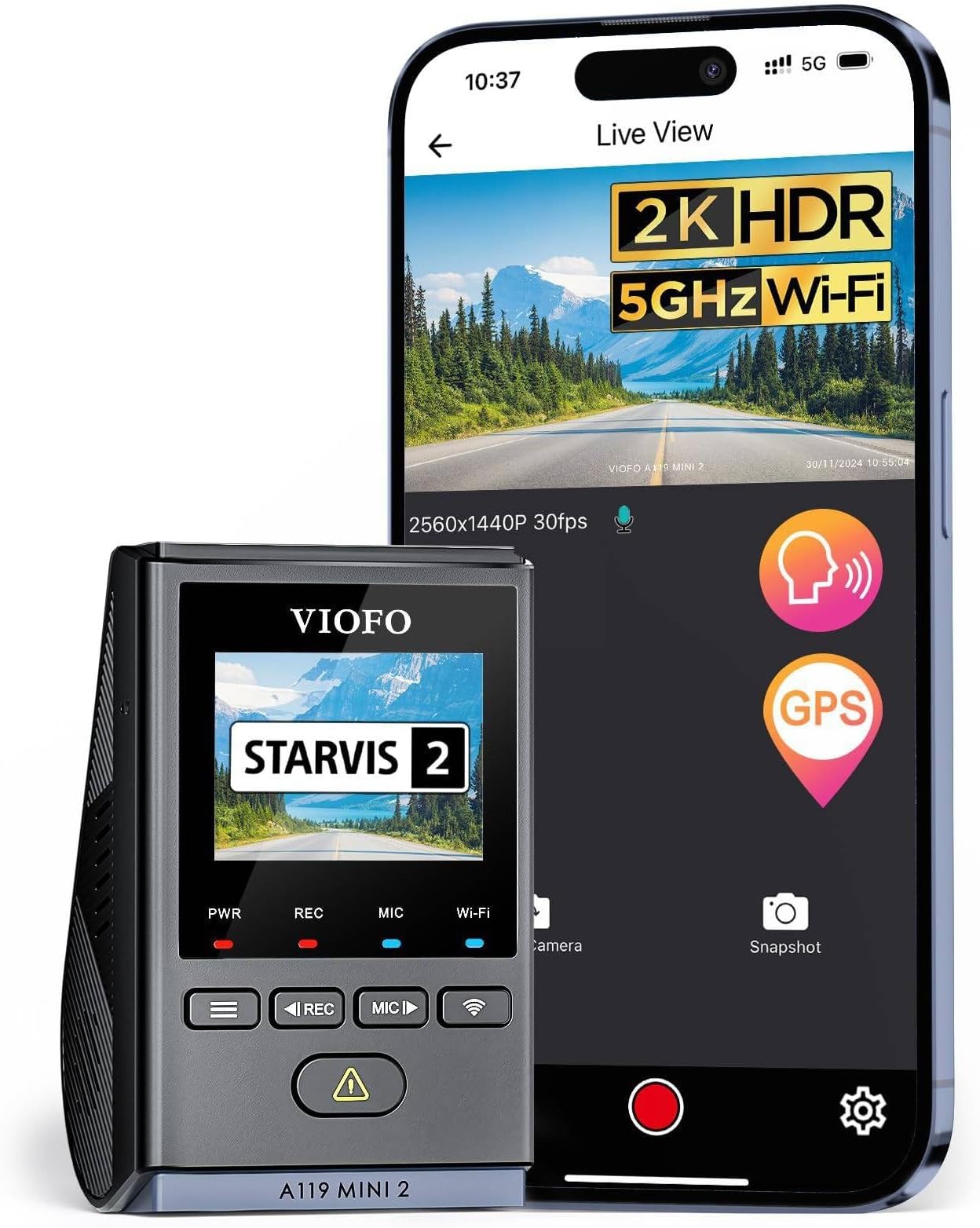
The VIOFO Dash Cam A119 Mini 2 is a compact, front-facing dash camera featuring the latest STARVIS 2 IMX675 sensor for stunning 2K video at 60fps and enhanced HDR night vision. Its 140° wide-angle lens captures crisp, blur-free footage in all lighting conditions. Equipped with 5GHz Wi-Fi for rapid file transfers, built-in GPS for route tracking, and smart voice control for hands-free operation, it offers professional-grade security and convenience. The dash cam also supports 24/7 buffered parking mode with a reliable supercapacitor, ensuring durability and continuous protection even in extreme weather. (SD card sold separately.)


| ASIN | B0C5MVB7NX |
| Are Batteries Included | No |
| Auto Part Orientation | Front |
| Auto Part Position | Front |
| Best Sellers Rank | #1,921 in Electronics ( See Top 100 in Electronics ) #29 in Car On-Dash Mounted Cameras |
| Brand | VIOFO |
| Built-In Media | 1 * A119 MINI 2 Dash Cam, 1 * Car Charger, 1 * Type-C Data Cable, 1 * GPS Module, 1 * A119 MINI 2 Manual, 1 * Trim Removal Tool, 1 * Spare Mount Sticker, 2 * Windshield Static Stickers; (NOTE! MicroSD card not included; HK4 hardwire kit not included) |
| Color | black |
| Compatible Devices | Smartphone |
| Compatible with Vehicle Type | Car, Minivan, RV |
| Connectivity Technology | Wi-Fi |
| Control Method | App |
| Customer Reviews | 4.3 4.3 out of 5 stars (2,050) |
| Display Type | LCD |
| Field Of View | 140 Degrees |
| Flash Memory Supported Size Maximum | 512 GB |
| Flash Memory Type | microSD |
| Frame Rate | 60fps |
| Item Dimensions D x W x H | 1.63"D x 1.81"W x 2.93"H |
| Manufacturer | VIOFO |
| Maximum Aperture | 1.6 f |
| Memory Slots Available | 1 |
| Mfr Part Number | A119 Mini 2 |
| Model Name | A119 Mini 2 |
| Model Number | A119 Mini 2 |
| Mounting Type | Windshield Mount |
| Optical Sensor Technology | CMOS |
| Other Special Features of the Product | *Note: SD Cards are sold separately, Not included in the package., 24/7 Buffered Parking Mode, Loop Recording, G-Sensor & Emergency Lock, Support MicroSD card up to 512GB(Not Included); 140° Wide Angle F1.6 Large Aperture 7-Glass Lens, 1.5'' HD LCD Screen, Screen Saver, 2560x1440P 60fps, 2K HDR 30fps, STARVIS 2 Sensor IMX675, DOL-HDR Super Night Vision 2.0, Smart Voice Control,, Mini Design, 5GHz … |
| Photo Sensor Size | 1/2.55 inches |
| Real Angle of View | 140 Degrees |
| Screen Size | 5 Centimeters |
| Supported Standards | 2K 2560x1440P, 2592x1944P, microSD |
| Unit Count | 1.0 Count |
| Video Capture Resolution | 2K 2560x1440P; 2592x1944P |
| Warranty Description | 18-Month waranty and 6 months registered extended warranty, Lifetime technical support |
F**K
Great Dash Cam, Highly recommend
Excellent video quality with very clear 2K HDR footage, even at night. The camera is compact, easy to install, and doesn’t block my view while driving. Wi-Fi connection works fast for downloading videos to my phone, and the GPS and parking mode add extra peace of mind. Reliable, high-quality dash cam — definitely worth the purchase!
R**.
Good dashcam great image quality. Experiencing some memory card issues working to resolve
Very small and easy to setup. I had issues with the add on hardwire kit and am still working through that. I have one on the front window of my Chevy Tahoe using the lighter power plug and one on the rear window using the lighter plug and a wireless power switch to allow on and off without having to get in via the lift glass and manually unplug. I am having some issues with off brand 128gb micro sd cards. They are fully up to spec V30 U 3 etc but keep clearing the cards and only keeping most recent 2 videos. I have formatted them in camera and even re-flashed one of the 2 cameras to ensure it had the right firmware and it is the same as what shipped on cameras. I have ordered brand that manufacturers memory and will try those once they arrive. I will update my review at that point. So far the image quality is great on the 2 videos it has on the card and I look forward to more testing with name brand memory cards.
S**Z
It occasionally turns on the Wi-Fi and recording functions by itself.
The video quality is better than cheaper models, but it’s not particularly impressive. During the day, license plates are generally visible, but not always perfectly clear — you still need to look carefully to recognize them. At night, the reliability drops even further, possibly due to light interference. Voice control is a nice feature, but one thing I don’t like is that the device sometimes accidentally turns on the recording or Wi-Fi functions by itself. I’m not sure what causes it — occasionally, these features just activate randomly while driving. The Wi-Fi feature works, but the overall experience isn’t great. First, the connection process is rather cumbersome; you have to switch back and forth between the app and your phone’s Wi-Fi settings. I suspect it may conflict with my car’s built-in Wi-Fi network. Second, downloading videos over Wi-Fi is quite slow — transferring a three-minute clip can take about five minutes or even longer. I didn’t time it precisely, but the wait definitely feels long. It might have something to do with the memory card, though I’m using a SanDisk high-performance card. I only use the dash cam while driving, not for 24-hour recording, even though the brand recommends the MAX series.
A**S
Best Option!! Read If You're On The Fence!
After my Nexar dash cam had an expanded battery, I started looking for a new dash cam. I no longer wanted to be with Nexar because of their products becoming hit or miss and them no longer offering cloud video storage for free. I did quite a bit of research on various dash cams and heard lots of good things about the VIOFO. I purchased the A119 Mini 2 along with a Samsung EVO 512GB microSD card. I've currently been using it for 10 months. Setup was quick and the setup guide was easy to follow. I was very satisfied with the quality of the product as well as the size of the color display. The menus are easy to navigate and the information bar that's burned into the recording is fully customizable. You can add or remove speed to the recording which is nice depending on if you want speed evidence in your video! ;) I do appreciate that the display turns off after a specified time, which prevents screen burn-in. The included cable was the perfect size to run inside the interior trim down to under my center console for power. The app has worked fine for me; however, I find it easiest to remove the microSD and offload to a computer whenever I desire footage. One thing I dislike about this is that the only mounting option available is adhesive to your windshield. However, it was not able to come off my windshield at all. The unit comes with 2 sheets of clear adhesive to stick between the dash cam and the windshield. One of the videos is of a hit-and-run suspect where the dark grey Lincoln MKZ at the end of the video hits a car off-camera and makes a U-turn. You can hear where they side-swiped the car next to me. The photo includes the information that is embedded in the bottom of the recordings. All in all, I am very happy with my purchase and have recommended this unit to others!
C**N
Excelente dashcam. Lo compré después de investigar mucho y las Viofo siempre sale como la mejor en calidad de imagen, resolución y resistencia al calor y al paso del tiempo. Ni siquiera las 4 k tienen más resolución. Es más cara que las demás pero porque simplemente es la mejor. De qué sirve otra si no puedes distinguir unas placas o detalles importantes. La recomiendo totalmente.
G**E
Video quality is as expected...
D**C
Outstanding image quality, and a very user friendly app that connects via Wi-Fi. All settings are easily adjusted to your preferences using the Wi-Fi app. It is a pleasure to use, no need to frustratingly try to press the small buttons on the camera, all you need to do is enable Wi-Fi and make all camera adjustments through the app. The Sony starvis 2 image sensor is outstanding in both day and night time use. Far better than other cameras in this price range. Installation was easy and straightforward, everything that was required was included in the package. It even came with additional adhesive pads if I need to move it from one car to another.
J**T
My first dash cam and I'm really impressed. The app is abit here and there but it works and that's what you need. Viofo is very good with keeping up with firmware updates so that's a plus too. I've ordered the polarising lens on eBay as it's not on Amazon so I'll be putting that on later on and see how it compares as I'm a day time driver. other than that it's great for my first dashcam alot of settings. still figuring a few things out but it's great.
J**.
The video is of good quality with such a mini size dash cam. As a senior, I did a lot of research before choosing this Viofo A119 mini 2. Happy with my purchase and recommending others to use this for road safety. Now my wife has a peace of mind because it will automatically turn on and the parking mode monitoring will be on after the ignition of the vehicle is turned off. It can provide peace of mind by recording my drives automatically. It helps protect me by capturing video evidence in case of accidents, disputes, or even minor incidents, which can be crucial for insurance claims or police reports. It acts as a "silent witness," providing clear video evidence in collisions, hit-and-runs, or even traffic stops, which can streamline insurance claims and reduce stress from "he said, she said" arguments. At the size of a car key, it's easy to mount behind the rear-view mirror without blocking the driver's sightline—a crucial feature for seniors who may already deal with reduced peripheral vision or prefer a clutter-free windshield. Installation is straightforward via a simple adhesive mount and Type-C USB connection to the car's cigarette lighter, minimizing hassle (though professional help is an option if needed). With the HK4 hardwire kit which I purchased separately and installed to my 2024 crosstrek (see attached fuse slots #17 ACC and #32 battery), it enables motion-activated parking surveillance to monitor the car 24/7, deterring theft and capturing evidence—adding security for seniors who park in public spaces. The supercapacitor design (no battery) ensures it works in extreme temperatures (-4°F to 149°F) without failure, and it's built to last without ongoing maintenance. Overall, at an affordable price point (around CAD$1500–$180), the A119 Mini 2 combines pro-level performance with senior-focused simplicity, making it a smart, low-maintenance investment for safer, stress-free driving. After using it for a few days, I have the following tips to share with others. Maintenance - Format every few months for smooth performance. Maintenance: Wipe the lens monthly; update firmware via the app for new features. Battery Protection: It draws little power but I will unplug if leaving the vehicle for my vacation days. It is Still Recording When the Screen Turns Off. The dash cam is still recording even after the screen turns off after a few minutes. This is a built-in screen saver feature designed to save battery and prevent the LCD from overheating or draining power unnecessarily during long drives. The camera continues looping video in the background without interruption ; if you'd prefer the screen to stay on longer, you can adjust the screen saver timer in the settings menu (options like Off, 1 minute, 3 minutes, etc.) Last but not the least, the after sales service is excellent with good support from Layla. Thanks
Trustpilot
3 weeks ago
2 weeks ago