Buy anything from 5,000+ international stores. One checkout price. No surprise fees. Join 2M+ shoppers on Desertcart.
Desertcart purchases this item on your behalf and handles shipping, customs, and support to New Zealand.
๐ฎ Master your multi-device domain with lightning-fast 4K clarity!
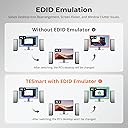
The TESmart HKS401-P23 is a professional-grade 4-in-1 HDMI KVM switch designed for multitasking pros and gamers. It supports seamless switching between four computers using a single keyboard, mouse, and 4K monitor at 60Hz. Featuring USB 3.0 for rapid peripheral sharing and charging, integrated microphone and audio outputs, plus advanced EDID emulators, it ensures smooth, lag-free operation and crystal-clear visuals. Multiple switching methods including remote control and hotkeys provide ultimate convenience, making it a versatile hub for complex setups across Windows, Mac, Linux, and more.


| ASIN | B0C617965F |
| Audio Output Mode | Stereo |
| Best Sellers Rank | #42 in KVM Switches |
| Brand | TESmart |
| Cable Type | HDMI |
| Color | Black |
| Compatible Devices | Desktops and laptops with HDMI outputs running Unix, Windows, Debian, Ubuntu, Fedora, Mac OS X, Raspbian, Ubuntu for Raspberry Pi, and other Linux basic systems Compatible Devices Desktops and laptops with HDMI outputs running Unix, Windows, Debian, Ubuntu, Fedora, Mac OS X, Raspbian, Ubuntu for Raspberry Pi, and other Linux basic systems See more |
| Connector Type | Plug In |
| Connector Type Used on Cable | Plug In |
| Customer Reviews | 3.5 out of 5 stars 64 Reviews |
| Item Weight | 1.01 Pounds |
| Manufacturer | TESmart |
| Mfr Part Number | TES-HKS0401A3U-USBK |
| Model Number | HKS401-P23 |
| Number of Ports | 5 |
| Power Source | DC power supply |
| Smart Home Compatibility | Not Smart Home Compatible |
| Unit Count | 1.0 Count |
P**Y
Great KVM at a reasonable cost for 4 computers or HDMI-based devices
Great KVM at a reasonable cost for my setup (I have 4 computers). This is the second product I bought from this company, and so far a definite improvement over the earlier version a few years back. I appreciate that the somewhat annoying beep when switching ports was removed. I mounted it underneath my desk because I use an L shaped desk and the monitor and keyboard are in the corner. Remote works great, but you can also use hotkeys to switch. So far my keyboard and mouse (both wireless) work flawlessly, including scroll-wheel etc, on both macs and windows machines. Resolution on the hdmi is crisp and without artifacts. Sounds works well, just as expected. Did not test microphone as my setup is different. I have not had a chance to test the new usb 3.0 passthrough port, but looking forward to connecting a drive to make cross-platform data sharing much easier than dealing w/ the networking between macs and windows. Great support as well from the TESmart team, they quickly responded to an issue I had with my earlier device from 4 years ago and gave me a reasonable path to resolution.
V**R
Significant issues from the start, one key feature finally failed utterly
Update after 3 months of use: The issue with the keyboard skipping characters never improved and was becoming more and more of a problem since I use this thing for work, and am on a computer a large part of the day. Transposed characters (e..g "dgo" when I meant to type "dog") happened too often to be operator error. I'd been debating moving it back to my pre-TESMart configuration (mechanical keyboard connected to a powered USB hub, and that USB hub connected to the KVM) for quite some time, but I didn't want to give up the keyboard switching feature. I put up with it for far too long. Well, keyboard switching gave up the ghost yesterday. No clue why - I had not reconfigured anything. Just ctrl-ctrl-1 (etc.) no longer did anything. Turning it off and on did not fix things. at this point, there was absolutely no reason to try to put up with the other problems any more. I moved the keyboard to the external hub, plugged that into the KVM, and suddenly typing has become massively more accurate. I've lost the ability to switch via the keyboard, but the remote works (for now.....). I'll have to Velcro it to the keyboard so it's always handy. All in all, this has been a huge waste of money. I should have gotten a less expensive KVM that did NOT claim to be compatible with mechanical keyboards, and just included a remote. Update after a week of use: The keyboard switching works just fine - ctrl-ctrl-1 / 2 / 3 / 4 switches computers quite nicely. The remote does as well. But I'm downgrading to 2 stars, because I'm having MAJOR problems with keystrokes not registering. For example "Mary Had A Little Lamb" will show up as "MaryHa A Little Lam". It also seems like more swapped letters are happening, e.g. I type "Lamb" and see "Labm". I don't know if that's an artifact of the keyboard's connection, or if it's operator error - I certainly can make such mistakes, so I don't insist that the switch is the problem. I did make sure things were plugged in correctly and securely, which has not solved the problem. My next step will be to try plugging the keyboard into a powered external USB hub, then feed that to the KVM - precisely what I did before buying the TesMart. That would also render the hotkey switching useless - and that was the main reason I bought this model! Oh well, at least the remote should still work. ******************************************************************** (Since there are several models shown: I have the 4 port, 1 monitor, USB 3.0 model) I was using another brand of KVM, but when I switched to a Corsair K70 mechanical keyboard, I found that I'd lost the ability to switch computers using keyboard hotkeys. In fact, to get it to work at all, I had to plug both cables into a powered USB hub, and feed THAT to the device - otherwise, it either didn't work at all or the computer showed garbage when I tried typing. The other device didn't have a remote, either, so when I wanted to switch, I had to lean up to where the KVM was mounted (not within easy reach) to make the switch. TESmart claimed that theirs works with mechanical keyboards, so I gave it a try. Observations after having JUST set it up: - Keyboard switching DOES work. That was the sole reason I went for this new KVM switch. - Mouse gesture switching does not (may be operator error, but I never used that before, so I'm not too worried). I'll likely play with it some more - may have disabled when I meant to enable, or something. - The included cables really are needed: the computer-to-device plug is a different one than my older device. Both are USB-B, but apparently the 3.0 version of USB-B is actually configured differently. So if, like us, you've got a pile of USB-B cables lying around, they won't help you here. - The included cables are QUITE stiff. My setup involves wire shelving, with a shallow shelf for the KVM; the cable stiffness meant that attaching them all, and shoving the whole mess back onto the shelf, was more of a challenge than it needed to be. At some point I may purchase separate USB-B 3.0 cables to see if that's easier to manage, though I don't anticipate needing to move things around all that often. I also worry a bit about the stiff cables putting stress on the computer ports they are attached to. - The product description claims there is no delay when switching. That is simply not true - I counted, and it's roughly 3 seconds before the new computer's screen shows. Not a big deal for my purposes, but if you need a truly instantaneous switch, this may not be the right device for you. - Pass-through functionality is not perfect. My keyboard has a USB port on it - which I frequently use to plug in my USB headset. This simply did not work: the computer did not detect the headset. Weirdly, it worked just fine when I tried plugging a spare mouse into the keyboard. I don't know if this has anything at all to do with the switch's audio functionality (which I have not explored, as I don't need it). The headset works fine when plugged into the port on the front of the switch, so I'll likely just do that. Still, it's annoying. I have both keyboard cables plugged into the kb/mouse USB plugs, and the mouse plugged into the other plug on the back of the device. I may try alternate configurations (e.g. moving one of the keyboard plugs to the alternate) to see if that solves the passthrough issue. If so, I'll update this review.
M**N
Solid construction, begain to have problems after a year which needed firmware update to fix.
The case is metal and feels solid. It uses proper USB 3 cables with USBA plugs on one end and USB-B 3.0 on the other. the buttons work well. I did have problems with it that developed after about a year. My keyboards wouldn't work on the proper keyboard socket in the back and it would lock up sometimes when switching from one PC to another, requiring me to power off the KVM switch and power it back on. I contacted the manufacturer 2 weeks, who sent me updated firmware by email. The updated firmware has fixed the problems.
C**E
I'd buy again
Second TESmart KVM switches I've owned. This replaced the first which after about four years of use had two ports die. I've heard this complaint from others but four years for daily is an acceptable lifespan based on all of the KVMs I've owned over the last thirty years. I particularly like the hotkey switching and the single button press when switching computers. I've had it about three months and so far, so good...no complaints.
K**A
Doesn't work with several keyboards
I wanted to like these units- the video switching worked fine. However, I tried the unit with several keyboards, and not only did the hot keys not work, the keyboards didn't even with with the computer. I tried this with 2 computers, and the keyboards I tried were a cheap dell keyboard, a Microsoft Wireless 850, and a new HyperX gaming keyboard (which didn't even light up when plugged into this). Thinking I may have received a bad unit, I ordered another TESmart 4x1 unit, along with one of the their 4x2 units. Both of the new ones also had the same problem that they would not work with any of the keyboards I had. Another KVM switch I ordered from Terived had no issues working with the keyboards... so something seems wrong with this TESmart brand.
B**M
Does not really seem to support Mac OS
A good unit if you are not running an Apple Mac device on it. Though the description says is supports Mac OS, it does note seem to fully support it. It does display the Mac display output, but it does not allow for Keyboard and mouse use. I tried all 4 ports and a couple different sets of cables. All same result. Display is perfect, but unable to mouse or type anything. My one Mac device is a 2 year old Mac Mini M1. For this reason alone, this unit will not work for me. Note that is intended to be a replacement for a 5 year old TESmart 4 port KVM that had recently become problematic in that it no longer always recognized a sleeping device when switched. Often showing no display or allowing no keyboard/mouse use, without rebooting the connected device.
J**.
Easy installation
Works flawlessly with my two computers, I'd got the four port unit ,easy installation .love it....
R**L
Just okay... then it breaks.
I purchased this KVM in October of last year, or 8 months ago. Initially, within the first two weeks or so, it was fantastic. I could switch between work and home PCs with no issue. Then... I noticed my mouse cursor was getting a little laggy. Sometimes the mouse inputs would seem a little "duller" than expected. Then they started alternating between being too dull and too extreme and my mouse was jumping all over the place. Honestly, not the end of the world. It really sucked in gaming, but it was manageable during business hours and I could always plug my mouse directly into my home PC after work. Then... the keyboard started dropping keystrokes. I use a mechanical keyboard and I'm a fast typer (~120 wpm), and mistakes I've never made started popping up everywhere. Misspelled words. Missed letters. Again, I thought, okay.... whatever, I'll just go a little slower. Then... the keyboard started duplicating keystrokes. I'll be typing a word and it will just randomly decide to keep sending a keypress such that the last letter gets repeated indefinitely until I hit it again. Or one of the modifier keys will get "stuck" (CTRL, ALT, or Shift) and I'll have to hunt around trying to figure out wth is going on. All of that was manageable. I didn't like it, but I was willing to ignore it for the convenience of the instant switching (when it worked), and the device driver virtualization. Then it died. My usb devices no longer seem to receive any power from the unit. When plugged directly into my PCs, they work fine. When plugged into the TESmart device, they are invisible. It doesn't matter which ports I use or which of the 4 selector settings, I just get nothing. In 8 months, I've had very shoddy performance, and now a $180 paperweight. Do not recommend.
Trustpilot
2 months ago
1 month ago