

⌨️ Work smarter, not harder — the left-hand keypad revolution is here!
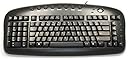
The Black Left-Handed Keypad Keyboard by The Keyboard Company is a corded, ergonomic PC keyboard designed specifically for Windows users who want to maximize productivity. Featuring a unique left-hand numeric keypad, an A-shaped key layout for natural wrist positioning, and convenient hotkeys, it reduces right-hand travel distance to the mouse and enhances comfort during extended use.
| Brand | The Keyboard Company |
| Product Dimensions | 20.5 x 45 x 2.5 cm; 750 g |
| Item model number | KBC-3504 |
| Manufacturer | The Keyboard Company |
| Colour | black |
| Power Source | Corded Electric |
| Hardware Platform | PC |
| Operating System | Windows |
| Are Batteries Included | No |
| Item Weight | 750 g |
| Guaranteed software updates until | unknown |
D**G
It's the best keyboard I have ever used.
This is the best keyboard I have used for my PC. Now I have a decent keyboard layout instead of the awkward "standard" design. This has the numeric keypad on the left, so I can have my mouse on the right, and the main keys are in the middle making typing with this much easier than before with the old keyboard I used. It has some buttons along the top for opening email, web browser and adjusting volume, etc., which is nice. It has the arrow keys bottom right which is also a good place to put them, and because of the clever layout, the whole keyboard takes up less space than the old standard keyboard -- which is important is I have limited space for my keyboard. I would recommend this keyboard to anyone -- you do not have to be left handed, although if you want to use the numeric keypad, using it with the left hand is not difficult at all for a right-handed person. The keys themselves are easy to type with and a good feel, not too soft nor too slow at moving. And, as it is a British keyboard, it has a £ sign in the right place. It has 3 lights, for the lock keys (numlock, scroll lock and caps lock) on the right side. It has a USB connection which works great. No problems at all.
M**P
The number keys are on the left side
This is our third purchase over many years. Absolutely brilliant for left handers to be able to use the number keyboard with the left hand yet using the mouse with the right hand. My husband, a right hander does not use the number part of the keyboard so he has no difficulty with it being a left handed keyboard.
R**F
All the best people ;)
it's ok... not entirely ergonomic. The delete button on the number keypad on the left just gives me .......... so, still reaching for the delete when doing numbers...
C**A
Really good keyboard that lasts well.
I bought this as a replacement for an identical keyboard that I bought over a decade ago which outlasted 3 computers! The only reason I changed it was that occasionally the tab key did not register; and that was probably due to what I dropped on the keyboard and not a fault of the keyboard itself. Well laid out with the important key pad to the left of the main keyboard keys. The keys are crisp and pleasant to use with a size useful to those of us whose fingers resemble sausages. The only improvement I would suggest is for the raising tabs at the back to allow a higher lift.
M**S
Perfect
This is a replacement from the previous I bought about 12 years ago, the last only had issues after I spilt coke on the number 9 key!!!!Keys are not clunkey, light to use, with the extra buttons on top to use email etc.The only criticism I have is the legs are not high enough so have pieces under to increase the height
D**N
Excellent product
I have Cerebral Palsy affecting my right side. I’m predominantly left handed so this keyboard is a godsend. And very comfortable to use with its ergonomic shape
N**Y
The numbers are on the right side for a Lefty!
If you have to put your keyboard at an angle to use the number keys whether it be at home or work then this is the keyboard for you, it makes life so much easier & more comfortable. The keys are in a "Natural A" meaning the keys are slanted & possibly ever so slightly narrower than normal to form the "A" (If you enlarge the photo shown you can see what I mean) so it does take a little while to get used to, but you do quite quickly. It has a USB connection with a lead long enough so you don't need to have the keyboard too close to the tower, it can be used with enough space between the two to work in comfort.If you are new to Left Handed keyboards PLEASE NOTE: If you want to use the @ sign, it's NOT where you think it is looking at the keyboard, i.e. on top of the number 2 key, you need to hold the shift key down press " & vice versa, it took me a while to find it the first time I used a left handed keyboard!
B**R
I love having the numbers on the left
Still getting used to it, so too early for 5 stars anyway. I love having the numbers on the left, when I remember they are there. After a lot of years of having Ctrl & Shift keys on extreme left, have to get used tyo them not being there. Some quite alarming results in CAD when one forgets and holds down the enter or + keys instead. Keys are quite a bit closer together than I have been used to, but that doesn't appear to be a problem for my two finger typing. I guess that a touch typist might well struggle with it for a while.The addition of the keys which are normally on the extreme left, on the left of the number pad would make it much better.
Trustpilot
2 weeks ago
1 month ago