We remain fully operational. Our teams are working around the clock to ensure your deliveries continue safely.

DOWNLOAD THE APP


Copyright © 2025 Desertcart Holdings Limited
DOWNLOAD THE APP
Buy anything from 5,000+ international stores. One checkout price. No surprise fees. Join 2M+ shoppers on Desertcart.
Desertcart purchases this item on your behalf and handles shipping, customs, and support to New Zealand.
❄️ Stay cool, stay ahead — elite liquid cooling for the discerning pro.
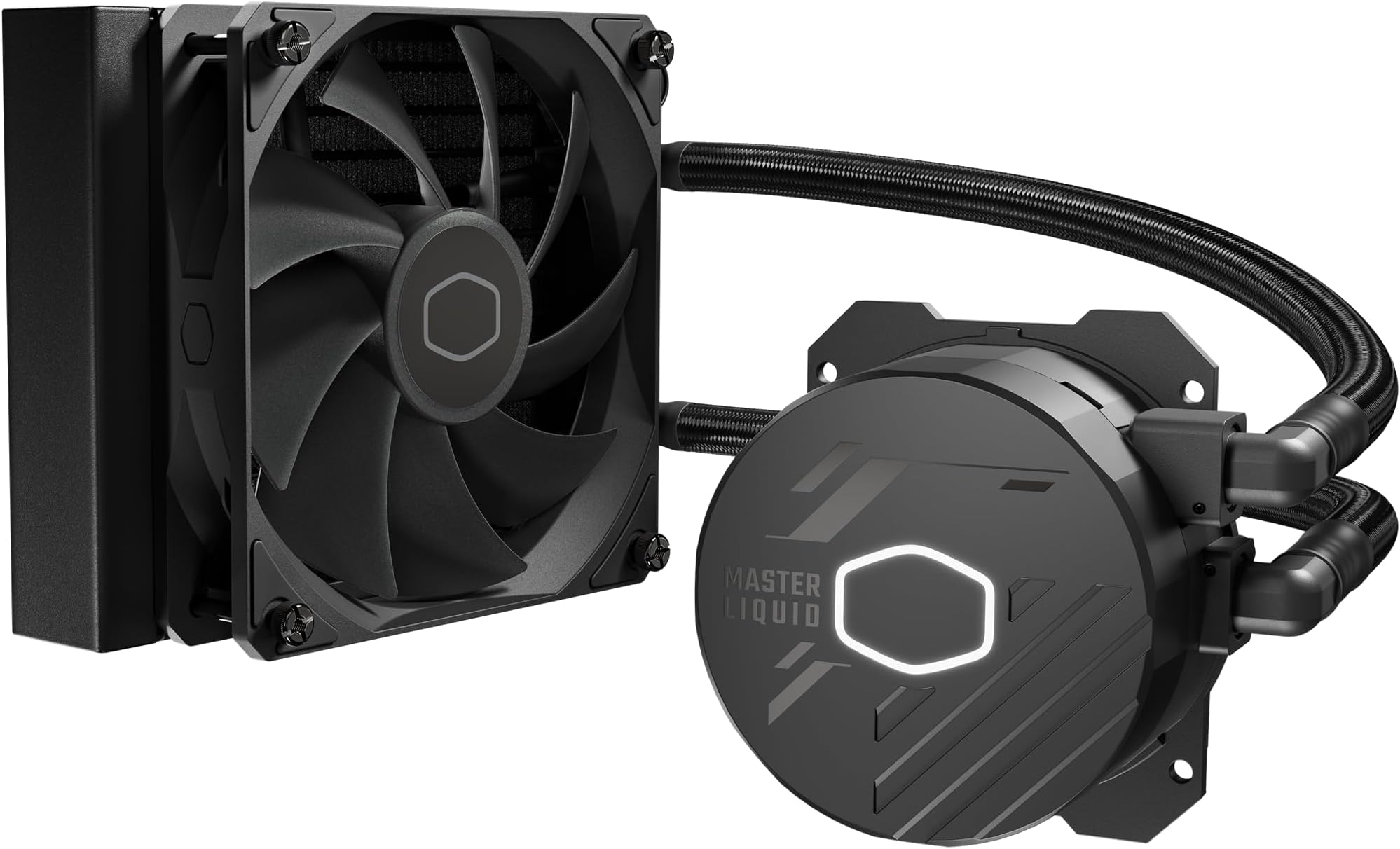
The Cooler Master 120L Core AIO liquid cooler features a patented Gen S dual chamber pump that maximizes water pressure and flow directly to CPU hotspots, compatible with AMD AM5/AM4 and Intel LGA1851/1700 sockets. Its 120mm SickleFlow PWM fan offers adjustable speeds from 650 to 1750 RPM for optimal noise-to-performance balance. Designed with a minimalist all-black aesthetic and white LED pump lighting, it includes premium CryoFuze thermal paste and simplified mounting brackets for easy installation. This high-performance cooler ensures efficient heat dissipation, making it ideal for professional-grade desktop builds seeking reliable, quiet, and stylish cooling.









| ASIN | B0CDF9343N |
| Best Sellers Rank | #52 in Water Cooling Systems |
| Brand Name | Cooler Master |
| Compatible Devices | Desktop |
| Cooling Method | Liquid |
| Customer Reviews | 4.4 4.4 out of 5 stars (632) |
| Included Components | ML 120L Core, CryoFuze Thermal Paste, Install Kits, Manual |
| Item Dimensions L x W x H | 6.2"L x 4.7"W x 1.1"H |
| Item Weight | 2.8 Pounds |
| Manufacturer | Cooler Master |
| Material Type | Aluminum, Copper, Plastic |
| Maximum Rotational Speed | 1800 RPM |
| Noise Level | 12 Decibels |
| Power Connector Type | 4-Pin |
| UPC | 884102111037 |
| Unit Count | 1.0 Count |
| Voltage | 12 Volts |
| Warranty Description | 3 Years |
| Wattage | 12 watts |
D**1
Excellent 240L water cooler
This 240L water cooler from Cooler Master is replacing and Enermax made 120L RGB water cooler than served me well for approx. 2 years, but the pump developed a rattling noise that was very disturbing, and CPU temps were reaching 100C. I realized that the water pump was going to leave me. This was for an Intel 8 core I7 9700 CPU. I removed the Enermax and replaced with the Intel air cooler that came with the CPU. The system became quiet and temps stabilized around 50C which are normal. I ordered ths Cooler master that had excellent reviews. Very nice and quality built. Instl instructions were very easy to follow. CAme with the Creo fuse thermal paste that was fairly easy to apply, without any applicator. Straight from the tube. Installed everything and presto. System works very quietly and the temp stabilized around 32 C. the 2 fans are actually very quiet. Very happy with this new water cooler. The only con is the RGB. It's suited for 3 pin RGB headers while my motherboard, an Asus Z390-P model, comes with a 4 pin RGB header that is unusable. But this is a minor con. I will look for a 4 pin to 3 pin adapter cable, then this will work with RGB lights. Not an issue.
N**1
Good price, Works well, and easy to install if you read the instructions. :)
This is a great unit and all you have to do is carefully read the instructions and you will have a great cooler at a very good price that should last for years. I bought the 120L to replace a 120m. There was nothing wrong with the 120m, but it was installed for 10 years and it is important to keep the CPU cool or it will crash. Cooler Master writes their coolers last up to 8 years, so I was pushing it. I had to remove the 120m to install the 120L, and thought it would be the same, so I did not read the instructions, which was a mistake, as it was not going the way I expected. So, I read the instructions for the 120L, which is only photos, but if you look at the photos it is easy to install. If you ignore the photos, it will not be easy to install.
C**T
Happy with my purchase
I've never been dissatisfied with a Cooler Master product and this is my first water cooled CPU. Far as I can tell it handles the temps appropriately for my AMD 9800x3d CPU. Installation was a little tricky, but that was only the fault of my case and not the cooler. For the price, I am very happy with the build quality of the cooler. My favorite part of the instructions was the bit that reads: "As a result of bubbles in the coolant, you might hear sounds coming from your cooler on the first run. Just chill out for 15 minutes and the sounds will disappear." I appreciated the good laugh after spending the time putting everything together.
T**Y
Better then average air coolers
Never owned a 120mm Water cooler so I was a little skeptical on how it would do compared to some air coolers I had but I was surprised at the results. Kept my Ryzen 7700 at 34C on idle. Beats my AMD Prysim cooler by 4C. Gaming Temps were between 4-8C cooler as well. However the mounting system could be a little better I had some problems mounting it at first otherwise would give 5 stars. The Water cooler itself is basically silent but the fan can get a little loud at full RPM. For 55$ when I got it on sale it’s definitely worth getting.
K**H
Only solution possible for my Lenovo
I own a Lenovo ThinkCentre Neo 50T Gen3 Tower with 64GB RAM, an Intel i9-12900K, and a 4TB NVMe SSD. To support four monitors, I installed a new graphics card, but the system immediately started overheating—understandably. Upon researching solutions, I discovered a major limitation: the proprietary motherboard prevents transferring the components to a larger case for better airflow. Additionally, the mounting plate for the CPU cooler is soldered to the motherboard, which made traditional cooling solutions impossible. After trying several unsuccessful cooling setups, I came across this one. The pump mounted perfectly, and I installed the fan and radiator on the exterior of the case. While it's not the most aesthetically pleasing setup, I don’t care about appearances—I’m an attorney and just need my computer to run reliably without the constant fear of overheating. As for noise, I’m still adjusting to how quiet the system is. It’s strange not hearing the fan whirring, and I often worry it’s not functioning. However, stress tests have consistently shown the CPU stays below 43°C, which is a huge relief. This solution may not win any design awards, but it gets the job done efficiently and quietly.
M**E
Quiet!
Ok. I have an Asus G10DK with Ryzen 7 5700G CPU and AMD RTX 3060 GPU. I wasn't sure if this would fit in the casing but thought I would try. The reason I got this cooling system was I wanted less noise when playing games (Minecraft made the stock fan go crazy), and the PC shut down on me once because hair (from my cats and dogs) clogged the cooling system and it overheated (after 1.5 years of use with no maintenance). So a water cooling seemed more efficient and quiet. It was a beast to figure out the connection because what was in the pictorial instructions (fan connectors) did not match what I was seeing on my motherboard. Eventually I realized not everything needed a connection and that they sent a cable system that had extra cables/connections depending on your system. Long story short, my pc is quiet, and it is cooler. Now I need to add a splitter for the exhaust fan for the pc and these fans as they connect to the same location. So still need some accessories to get everything going. Update: Everything up and running. The fans are snuggly fitting. The 3 fan configuration would never work. These fans are big and the 90mm exhaust fans are what the G10DK system is configured for, or 90mm/120mm single CPU fan. The 240mm 2-fan config is the max.
P**M
I bought this after my previous water cooler pump failed. I have an older computer and wasn’t sure if this would work, but it works excellently! The instructions are hard to follow as there are only titles and pictures. Each computer model requires different replacement instructions and techniques. I had to watch a lot of videos to figure out how to get my old one out and put this in. Once I realized that the brackets are for new install only and that all I had to do was put on the thermal paste and put in the proper screw mounts (you just screw them into the slots already there), it was smooth sailing. BE AWARE- if you have installed this with your computer laying on its side, you need to stand it upright after you are done and let it sit for 15-20 minutes so the cooling fluid migrates where it should be.
S**I
Great product works very well and lowered my cpu temp from 95 Celsius to 80max under full load. But when I used the included paste it was hard and worn out so temp was still spikingto 95c I purchased another high quality paste now much better max 79c under load.
Z**H
Work as intended…if you want better cooling performance get those expensive models…you can always check product reviews with cooling tests online like from Tom’s hardware etc.
E**E
Un buen producto, ya tenia días pensando en comprar este enfriamiento liquido por su precio y sus buenas reseñas, mi paquete llego hoy a buena hora, bien cuidado y sin duda alguna de buena calidad este producto.
シ**ィ
コアi5 14400Fに取り付け。友人用に組んだので実際に私が使っている訳ではありませんが、とてもよく冷えているとのことでした。 コルセアのようなドライバが見当たらなかったので、付けるだけなんですが、やはりドライバは欲しいですね。 上を見たらキリがないCPUクーラーですが、コイツは割と安くて性能は良いようです。ハイエンドのコアに取り付けて、ゲーミング時にきちんと冷えるのかどうかは分かりません
Trustpilot
3 weeks ago
1 month ago