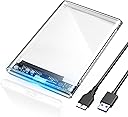
🚀 Slide into speed and style with POSUGEAR’s crystal-clear power move!
The POSUGEAR 2.5'' External Hard Drive Enclosure offers tool-free installation and USB 3.0 speeds up to 5Gbps with UASP+TRIM support, housed in a transparent, shock-resistant case. It supports 7mm/9.5mm SATA SSDs/HDDs up to 4TB, features smart chip protection, and is compatible across Windows, Mac, Linux, and gaming consoles like PS5 and Xbox—delivering fast, safe, and stylish external storage.


| ASIN | B0C9TGQ8F5 |
| Best Sellers Rank | #73 in Enclosures |
| Compatible Devices | PS5, Router, TV, Xbox |
| Customer Reviews | 4.6 4.6 out of 5 stars (507) |
| Data Transfer Rate | 5120 Megabytes Per Second |
| Date First Available | June 30, 2023 |
| Hard Disk Form Factor | 2.5 Inches |
| Item Weight | 2.89 ounces |
| Item model number | CLEAR-USB3.0 |
| Manufacturer | POSUGEAR |
| Material | Acrylonitrile Butadiene Styrene (ABS) |
| Max Number of Supported Devices | 1 |
| Memory Storage Capacity | 4 TB |
| Product Dimensions | 4.9 x 3.1 x 0.5 inches |
W**1
a device that works intuitively
This hard drive external case works without a hitch. You open the cover, position the slot, and plug it into a USB port. That's it. It was immediately recognized by the PC in detail. The brand, the capacity, and the speed were all displayed. I did not have to initialize it since it already had data on it from previous PC use. Later, when I wanted to use it for backup, it formatted to my choice of NTFS. Not a glitch. I think it goes into sleep mode when not being used, but I am not sure. I have been using my PC for hours, sometimes as much as eight, and there have been no signs of overheating or any malfunction. The only problem I had was with the cover. It seemed that once I got it on, it wanted to stay shut forever. It was difficult to put the cover on or off. Great to prevent children from accessing it, but it was a hassle. I like it a lot for its simplicity and clear plastic see-through. The plastic is not the strongest, but with the HDD in it, it was more than strong enough. For its functionality, ease of use, and low price, it is a winner.
K**E
What I paid for
Worked exactly as expected. Good product at a good price.
R**N
Clear case 2.5" Drive enclosure, Can label drives under clear case, 3.0 type connection
POSUGEAR 2.5'' External Hard Drive Enclosure THis is a decent 2.5" external drive enclosure, will accomodate both HDD and SSD drives. is a 3.0 compliant The only problem is figuring out how to get the case open. They tell you to press or slide at the mark where it says "OPEN" Only, now where does it say OPEN. It kind of snaps together, be careful when you try to open it so you dont break any holding fingers on the case. The case is decent, will protdect your drive, and I wanted clear to have access to the drive information and any notes I needed to add in / on the case for filing/storage. I RECOMMEND I do not know the seller nor did I receive any money (darn) or product for my random review 250423 1246
O**W
Worked great.
This worked like a charm. I had a one terabyte hard drive from an older laptop that I was going to trash. I bought this so that I could use the drive to back up photos and documents. The drive slid right into the case. I plugged it into my laptop, formatted it, and it was ready to use.
D**R
Works As Expected, but Maybe a Drive Recognition Issue
I found it super easy to open, and install the drive. I would probably buy another one, when I need it. However… I had a strange “drive recognition” problem. The SSD tech support said, the problem just should not have happened, so I am thinking it is related to this case. If you have this case, and a drive that does not “show up” under “My PC”, but the drive IS listed and working in Device Manager, AND you see this device listed where you eject USB devices, …YOU CAN FIX IT! I have older DELL computers, maybe that contributes…we do not know. DO THIS, get to your Disk Management screen (not Device Manager). Scroll down, find the drive that says it is NOT initialized. Right click and initialize it. Then it may say “unassigned”, so right click, assign it, and give it a Drive Letter. Like a small miracle, your drive is now fine, accessible, and shows up in all of the expected places. For some reason, for some of us users, this is a necessary step to finish setting up the drive. There is a good chance it is this USB box, but it really is an easy fix, when you know what the issue is.
H**E
Great price. Easy to use
I bought 1 a year ago. After using it for a bit, I bought 3 more as I had many extra hd's laying about. They are simple to use and well made. I'm not carrying them around...they are used for archival purposes. Highly recommended.
R**H
Very cool enclosure!
Very happy with the Posugear 2.5 hard drive enclosure . It fits our hard drive with a very fit and snug case, and it being clear and see through is very neat because it has a blue flashing light that is pretty cool to see when there is hard drive activity.
A**M
Sturdy, simple and gets the job done
Love the transparency. Top cover feels secure, yet with a reasonable amount of force it will slide right off for easy drive switching. Definitely plan to buy more to have around!
Trustpilot
1 month ago
4 days ago