Buy anything from 5,000+ international stores. One checkout price. No surprise fees. Join 2M+ shoppers on Desertcart.
Desertcart purchases this item on your behalf and handles shipping, customs, and support to New Zealand.
๐ Print Fast, Print Smart, Print Like a Pro!
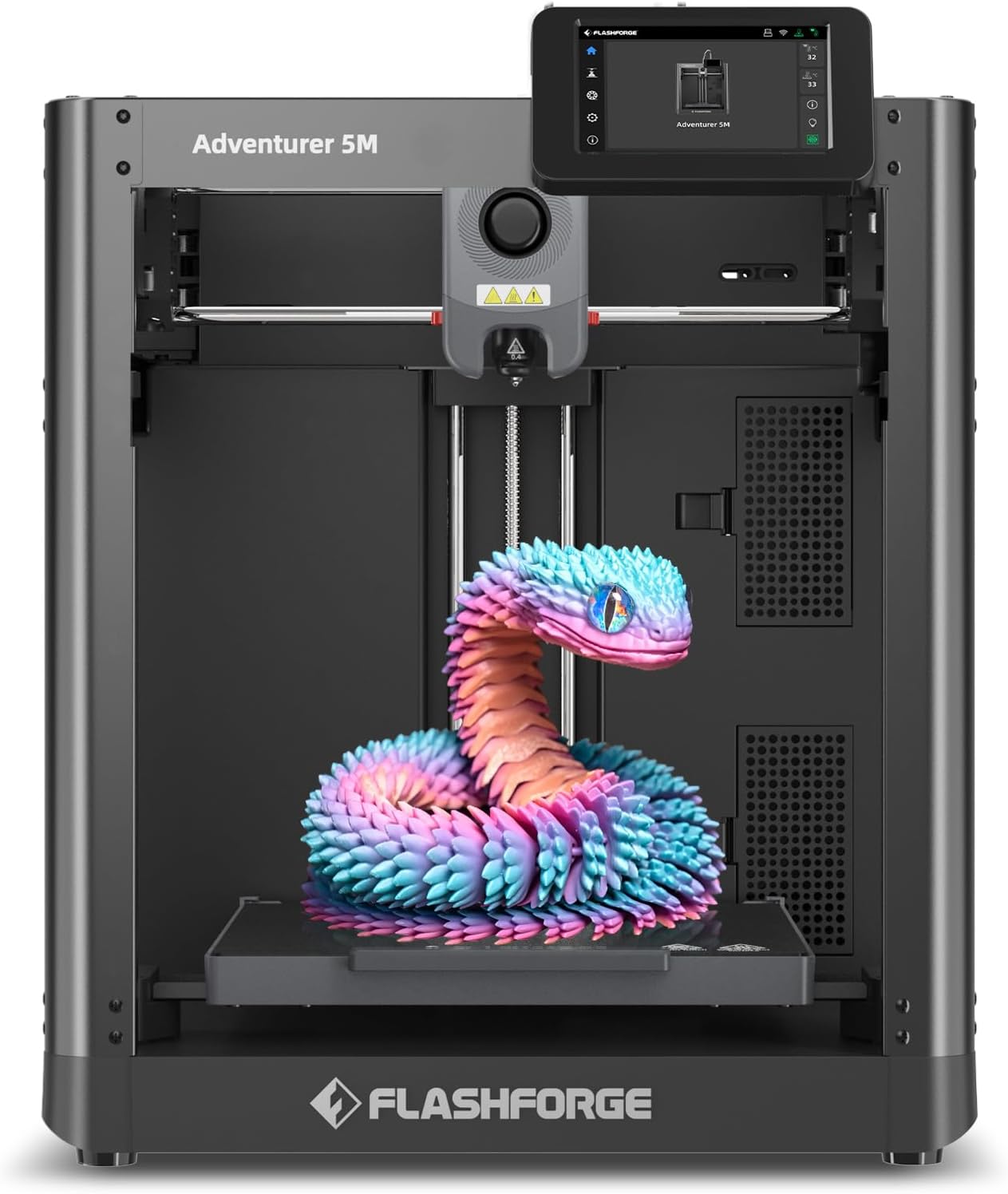
The FLASHFORGE Adventurer 5M is a professional-grade 3D printer featuring a CoreXY all-metal structure, ultra-fast 600mm/s printing speed, and a 280ยฐC direct extruder with a detachable nozzle for quick swaps. Its fully automatic bed leveling and dual-fan system ensure superior print quality, while the Flash Maker app enables real-time remote monitoring. Designed for rapid prototyping and reliable mass production, it offers a 220x220x220mm build volume and user-friendly operation that eliminates common 3D printing frustrations.


| Best Sellers Rank | #581 in Industrial & Scientific ( See Top 100 in Industrial & Scientific ) #1 in 3D Printers |
| Brand | FLASHFORGE |
| Color | Black |
| Customer Reviews | 4.0 out of 5 stars 2,260 Reviews |
| Item Weight | 23.8 Pounds |
| Material | Metal, PC |
| Product Dimensions | 15.83"D x 14.29"W x 17.64"H |
S**S
Amazing printer at an amazing price, but does need some improvements; getting better though
This review is for the 5M model, not the Pro model, but they are very similar and a big plus is the ease with which this can be upgraded by the user to the Pro version. It is fully on par with similar offerings from Bambu Labs and Creality. TL;DR - There is no printer less than $600 that I would recommend. This printer is fast, extremely accurate, and trouble-free. Pros: * Blazing fast - about 4 times faster than my Ender5 * Extremely accurate. This is my 4th 3D Printer and the first one that passes various tolerance tests without a lot of tweaking (not that I was ever able to fully get there with other printers). This one passed the nickel test as well as the Tolerance Coin without any tweaks at all. * Plug and play. Only unpacking and plugging in the display, followed by automatic calibration. * Absolutely perfect bed leveling and adhesion. Supposedly application of a glue stick is required for PLA, but I have zero problems across the bed. Parts do pop off at the slightest touch when done, but so far have not come loose during printing. Perhaps taller parts may have problems that required either a gluestick or another bed plate material. * Perfect configuration for OrcaSlicer which is a good choice. * LCD display is easy to read, easy to use, and intuitive. Cons: * It is very loud. Part of it has to do with the high print speed. However, some optimization of fan noise should be investigated. Every online review I have seen speaks of the noise from the motherboard cooling fan when not printing. I do not find that noise to be that bad. What is bad is the two fans for the hotend. One is to cool the hotend and the other is to cool the part when printing PLA. I suspect both the choice of fans as well as excessive shrouding by the plastic enclosure are major contributors. UPDATE: the worst of the noise is actually from the motors and/or motion. This may be part of the high-speed nature. * No wifi support except for their own slicer (which is junk). At this writing, a fork of Orca supposedly supports wifi uploading. Also missing are various Klipper Web UIs. A fix for this may also be in the mix. UPDATE: Wifi is now supported. I can send prints directly from OrcaSlicer now. General UPDATE: After owning the printer for a few months now, and 300 hours of usage, I have upgraded my rating to 5 stars. This printer at $300 to $350 is the absolute best value and extremely reliable. No fussing is necessary to get good results. Recommendations to users: 1. I started having adhesion problems, and the supplied glue stick was worse than no glue stick. I heard that buffing the surface with ScotchBrite pad would fix it, and it did. No glue stick or anything is needed now. Adhesion is great with both PLA & PETG. I also bumped up the heated bed temps to 60 & 70 deg respectively. 2. I found I needed to print PETG at a much higher temperature - 265 degrees in order to maintain a glossy finish (which indicates the correct temp). 3. Print out the spool holder for the upgrade - it makes filament changing much easier. 4. You can add a camera from Flashforge (I did, but haven't installed it yet). 5. A nice upgrade would be a 2nd spool holder (or make the upgraded one into a dual holder) to make color swapping easier. If you don't need the run-out sensor for the 2nd color, just bypass the entire Bowden tube assembly and feed straight into the extruder. 6. For color changes, add M25 to the Change Filament G-Code in OrcaSlicer, then check the Manual Filament Change box under the MultiMaterial Tab (it took me a while to figure that out) in order to prevent the printer from pausing at the start of the print when a color change is inserted. Suggestions to Flashforge: 1. Fix the fan noise for the hotend and motor/motion noise. I am not sure if an upgrade can be made available to existing customers, but that would be nice if you can fix this problem. 2. Incorporate Klipper WebUI into the regular firmware (that can be upgraded OTA). 3. Provide replacement nozzle tips in addition to the current all-in-one nozzle. It would be nice to be able to replace this inexpensive part when needed without buying an entire new nozzle. 4. To the printer screen, add the time remaining and the current layer. 5. Add a filament swapping system. Even a simple two-filament system would be great.
M**E
Great printer, great value. TLDR This thing is amazing for the money.
I run a small business and had been using two printers: an Elegoo resin printer (fantastic printer) for prototypes, and an Creality Ender 3 S1 (below average experience) for tools and fittings. The Adventurer 5M was added to the stable in a fit of rage and desperation incrimentally fueled daily by the Ender 3 S1. This is a review for the Adventurer, but I need to share the behavior I'd been accustomed to from my eldest workhorse, context is important. I acquired the Ender 3 new in box at the end of November 2024. The first, second, third, and fourth things it produced were various sized nests of knotted filament. The plate had no adhesion to speak of, the self leveling feature...didn't, the physical distance the nozzle was from the print bed seemed to have little concern for the numbers indicating the Z-offset. I just figured it was my own inexperience and ineptitude preventing the machine from doing it's best work. Over a time span of roughly 3 months, countless instructional videos step by step articles helped me to triangulate an almost acceptable, almost reliable combination of settings, adjustments, and physical add-ons that would allow the printer to do it's job, most of the time. The best thing about the Creality product, is that it forced me into a level of competence I never would have attained with a reliable printer. It's a lot like owning a cheap Ford: It's just barely good enough to be called a car. Since the Ender 3 was my first foray into 3d printing, I just assumed that's just how printers are: Frustratingly sensitive to EVERYTHING. A few days ago I realized the errors I was dealing with were repeating frequently enough that I knew how to counter most of the behaviors before the wheels came off (The adjustment knobs literally came off 18 hours into a rather large print last month). After steadily escalating jaw clenching frustration was no longer tenable, I tried resetting it to factory spec...which it wouldn't do, it just beeped at me like a petulent child. Fine, I thought, I'll update the firmware. A word to the anyone considering purchasing a Creality product: I would recommend against it. The firmware update process ignores the fact that most people don't wish disassemble their machine to access a port that Creality decided shouldn't be on the OUTSIDE of the machine. Also, the old addage "Keep is Simple, Stupid" isn't terribly popular in that part of China. So, after doing my best to decode the cryptic instructions that later became clear, I loaded the update onto the SD card that came with the printer (which required the card to be reformatted for some reason) and followed the instructions in the helpful readme file. The read me file was one of FIVE files included in the download. I soon discovered that you need to load only ONE of those files to upgrade the control board's firmware. The instructions were originally in Chinese and obviously passed through Google translate a few times to ensure adequate user confusion. The result? My Ender 3 S1 is now a brick. I could feel the veins in my forehead pulsing as I pulled up Amazon. I ordered the Adventurer in an act that I can only describe as "rage quitting" Creality products, never to look back. Boy am I glad I did. The new printer arrived this morning. Well played to the distributor, that was a turn around of less than 12 hours. After some minor assembly and a few downloads, the Adventurer roared to life with a happy little tune. With zero adjustments, no tuning required, no bed leveling, and no drama, the thing just works perfectly. I printed the included benchmark models one after the other with none of the abrasive behaviors Creality built into their "good enough" S1. I then switched the filament to PETG and began running calibration models. Again, perfect performance and holy cow it's fast. It's not a quiet printer, I wouldn't recemmend locating it near a sleeping child, but that's really no concern to me. I'm very pleased with my purchase.
C**T
Good Printer, please read warning.
Shipping was fast. Install easy. If not there is plenty of support and videos to help someone if lost. WARNING: Do not put filament sample that is shipped with this printer on its holder. Doing so may cause damage to the machine. Ask me how I know. My filament sample was wounded up and I thought I Had it completely untangled and set the filament on its designed location but since this filament doesnโt come on a roll the filament just has a mind of its own. My filament was no longer sliding and ended up becoming too tight for the printer to pull the filament to the nozzle. I may have a damaged product now because of this. We will see. And I will update weather support is helpful or not. Iโm a complete amateur on 3D design and the printing process. I did run TinkerCad and was able to print a few things with a little bit of a learning curve. Without YouTube I would have been lost. Best of luck. UPDATED: It has taken time for me to learn how to design things and after a few weeks I put this printer to use. Long story short, this printer has failed me after 7 different prints. I mean actual printers where something takes 30 mins to 3 hours to complete. My failure started when I was printing things back to back trying to fine tone my design and I ended up with a lot of Filament in a large blob pile instead of any sort of design. I tried to clean the nozzle right quick and try my luck again but I only ended up with a smaller blob of plastic. I decided to give the printer a rest and to try my design again but only doing one part on the layout instead of 2 or 3. This didn't go so well. The printer didn't go home or calibrate correctly on its on and when it started to print the nozzle dug into the base plate causing deem scoring marks. I tried to buff them out and the plate is probably going to be ok for what i need out of the printer but that's not the issue now. My issue continues to be filament not coming out when changing filament. More so I cant get the printer to even print a practice cube. I've tried completely cleaning the nozzle, removed the extruder and filament completely and made sure the extruder gears are messed with no missing or broken wheel cogs or teeth and watched the gears spin and feed the filament into the nozzle. My nozzle temp gets up to 280 degrees but still things are not feeding or spray out even the smallest practice designs. I cant even get a line up mark on the base plate. This printer is supposedly suppose to be simple and great for beginners. With my background in fixing robots and machinery this thing is giving me hell. I can only hope flash forge does away with this model. I would love nothing more than my money back or a newer model this thing needs to go in the trash. I had a feeling things would go south after the issue at setup and they did.
B**X
FLASHFORGE Adventurer 5M 3D Printer is SOLID!
Iโve had my Flashforge Adventurer 5M since February 3, 2026 and overall itโs been a great experience.. That said, I think itโs important for new buyers to understand what theyโre getting into. This isnโt a โtake it out of the box and everything works perfectly foreverโ type of product. 3D printing.. no matter the brand or price.. comes with a learning curve. Flashforge does a solid job with packaging and making setup as smooth as possible but during shipping, things can shift. Some of the complaints Iโve seen.. like missing filament colors, prints not coming out right or the bed not moving properly.. often come down to user setup or expectations, not defects. For example, the printer ships with screws securing the bed for transport and you need to remove those before using it. Thatโs in the manual but itโs easy to miss if you donโt read it. You will need to learn how to slice models, use supports, and troubleshoot prints. Even very expensive printers still require supports for overhangs and dialing in settings. This machine is no different. Thereโs definitely some trial and error involved and you should expect to spend time learning and adjusting things. In my case.. I ran into a few issues early on and spent hours researching and figuring things out but thatโs part of the process and I was able to get everything working pretty good. Once dialed in, the printer performs great. Itโs very fast and I love being able to send prints over Wi-Fi. Occasionally Iโve had connection issues but thatโs usually on my end (like not being logged into the slicer). There are a couple areas that could be improved. The manual could do a better job explaining basic maintenance.. especially like what to do with the included lubricants. I also had one situation where filament got tangled on the spool and the printer didnโt detect it, which led to some wasted material. A detection feature for that would be a nice future improvement.. Overall, this is a great beginner friendly printer, as long as you go in with the right expectations. If youโre buying any 3D printer, be prepared to learn, troubleshoot and experiment. Once you do, this machine is fast, capable and really enjoyable to use.
A**R
Awesome
Picked up the Flashforge Adventurer 5M as my first real 3D printer, and man, it's been a blast. Unbox it, quick assembly, plug in, and you're printing in no timeโauto-leveling just works, no messing around with bed tweaks. Super fast too; what used to take hours on slower machines flies off in minutes, especially with PLA. Prints come out smooth and detailed right away, touchscreen is nice and responsive, and it's dead easy for beginners like me. I've cranked out tons of little projects, toys, organizersโeverything sticks great on the flex plate. Feels reliable day after day, and the price was a steal for how capable it is. Love this thing. Total winner if you're jumping into 3D printing!
B**.
High detail
This product is impressive. I want to give it five stars but must drop it to four due to a small reason. * First off, let me State this is by no means a junkie printer. This is great for medium to beginner level people. Set up was a snap and I was ready in 20 min. The detail is pretty close to what I do with liquid resin 3D printers. I own two of them. * This PLA 3D printer is good for larger scale stuff like making hard figures, giant tavern mugs for D&ds, dice boxes and cosplay items like Oni masks and such. * The printing speed of this guy is incredibly it zips and weaves like nobody's business if you stick to one strict print rather than a jumping all over the place for multiple things. This would print a large-scale mug in less than 2 hours which is very impressive. It promised high performance speed and accuracy and I will say this does deliver. * If I remember correctly I can print a 22 inch tall figure and have 16 inch wide so it's a nice size printer for large models * The downside I have with this. I've bought two liquide 3D printers. They always came with a USB drive and the programs in it. This one did not have that. You have to go to the website. Download the program onto your computer. Yes, if you still own Windows 7 it still works and operates the program but the programe is a little bare Bones old school for me. Meaning if you want to do anything you must click the icon for each task you wish to do, so click to size it, turn it, move it, scale it, It's not kind of all tied into one. You can only do one thing at a time so a little old school basics to me but this by no means a deal breaker for me just my opinion. * As I said before the print quality is nice you are strictly stuck with a 0.4 mm nozzle and are strict to a 1.75mm film. At first, I thought I was doomed and got the wrong type of printer to do those large scale soda can tavern mugs, but luckily that's not the case. As you see from the pictures, the quality is nice and I have a very small tavern mug that was fully printed. I tried my best to snap that handle off with some good force and it did not break or budge. So that means on a larger scale this printer will give you a strong sturdy handle mug. The machine is smart enough and programmed automatically to do a nice cube or honeycomb based exoskeleton built in as it prints to give it maximum strength and sturdiness. I was very impressed with this feature. (Please see all photos). Please not One photo you will see not a completed mug. Sadly I ran out of the sample filament that is sent with it. The pic are what I was able to print with that film so it goes far but that uncompleted mug I tried to snap that off and gave it a good force and still didn't break so that will tell you the strength on a large scale one Closing argument...mainly 5 stars but I dropped 1 cause of the old school program way. But by no means is it a deal breaking .this is a very impressive pla 3D printer..so impressed infact I wish to own 5 for large scale tasks but I can't. I will say I am definitely getting 1 more for certain.
P**R
The 5M is a great entry-level printer
I've had the 5M for about a month now and I've already done a bunch of nifty things with it -- not useless shelf decorations like the Eiffel Tower, but brackets and trays and a shampoo bottle rack for the shower shelf. Every single thing you try is a valuable learning experience, no matter how it turns out. During the unpacking process, I dropped one of the black packing screws and could not find it. Turns out it was lurking back behind the rear screws for the platform. When the platform came down, the screw jammed and made the belt jump a few notches on the pulley. That threw the platform off by about 5mm. I had to get underneath and figure how to reset the belt correctly. The machine seems to be very capable, sturdy and quick. I like the Wifi connection convenience for sending g-code to the printer. I'm a little disappointed that Cura and Prusa do not support this printer, but I've been using Flashprint for slicing and it's satisfactory. I will eventually get around to trying Orca. I wanted to get some lighting in there to monitor the printing but was not impressed with the LED strips that are available. I found an LED "sewing machine" light that is perfect. It has a magnetic base and a nice flexible goose neck that puts the light right where I want it, just beneath the display screen. It's Amazon product "B0FJ7KW154". As others have noted, the display screen is a bit insensitive, so I use a soft-tip stylus pen which works very well. Other than that, I have little to complain about. For the money, it is a great entry-level printer.
D**.
A great device - especially to start with.
I bought this 3D Printer about 2 weeks ago to work on a case prototype for a electronic device I am making. I didn't know much about it so I went on YouTube and watched a bunch of video reviews and unboxing videos to get an idea of how it works. Everything I found was positive and explained the pain points pretty clearly. They didn't seem that bad, so I went ahead and made the purchase. I think it was about $270 at the time. It arrived 10 hours later. I don't know 3D Printers at all but I know technology and devices. This is a solid quality device as far as materials and structure. I thought I would end up needing to wait until the weekend to get started using it but I was shocked that I was able to start about 30 minutes in. I had a file I already made and it printed without issue. I then tried some of the test prints that come preinstalled and let my kids print some stuff. I have not had any issues with adhesion, nozzle clogs, filament feeding, removal of the prints, or getting everything to work properly. I did have a few times where I would see a part that wasn't all the way flat or when it should and just restarted the print since I caught it early but it was fine the next print. Not using any glue and I've just been washing the plate with soap and water. The quality is great. It all just basically seems based on the settings I use in OrcaSlicer. I've tried a bunch of different PLA filaments and had no issues there either. I ended up buying a enclosure kit, new plate, a 0.25mm nozzle, and some spool holders/rollers (The only problem I have with the actual device is that the spool holder is absolute garbage, which I suspect they know and did on purpose to sell the enclosure kit). I bought the enclosure kit because this thing is noticeably loud when it is actually printing. I am able to hear it at night and wanted to quiet it down. I wish I bought the Pro but at the same time, I love how much I was able to customize it before I printed the actual enclosure parts. I think I am somewhere around 80 hours printed in the past 2 weeks since I bought it (I can't find out right now because I'm currently printing). This has been a great purchase and I have no regret. Sure, not having to print a enclosure and assemble it all by just buying the Pro model would have been great to start with now that I've learned about the process and device but I feel like my initial prints and the process to print and assemble the enclosure gave me a better understanding of the device and its abilities, so it is still a positive, plus I got to put the colors I wanted on it.
J**E
Acheter la pro pour 100$ de plus
Je l adore
A**I
Bad quality
The printer had a problem, poor quality.
Trustpilot
2 weeks ago
1 week ago