Desert Online General Trading LLC
Dubai, United Arab Emirates
Desert Online General Trading LLC
Dubai, United Arab Emirates


🖨️ Print smarter, live bolder — the MegaTank revolution is here!
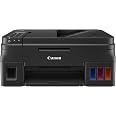
The Canon PIXMA G4210 is a wireless all-in-one MegaTank printer that combines high-capacity refillable ink tanks with advanced features like AirPrint, auto document feeder, and voice control. Delivering ultra-high 4800 x 1200 dpi print resolution, it supports seamless mobile printing and multi-function capabilities (print, copy, scan, fax) designed for busy professionals who demand efficiency and quality without compromise.


| Product Dimensions | 13"D x 17.6"W x 7.8"H |
| Controller Type | Amazon Alexa |
| Maximum Media Size | Photo - 4" x 6", Legal - 8.50" x 14", Letter - 8.50" x 11", A4 - 8.30" x 11.70", 5" x 5", 5" x 7", 8" x 10", Envelope No. 10 |
| Included Components | Pixma G4210 Wireless MegaTank All-In-Printer |
| Print media | Paper (plain) |
| Scanner Type | Flatbed |
| Max Input Sheet Capacity | 100 |
| Compatible Devices | Printer |
| Maximum Color Print Resolution | 4800 x 1200 dpi |
| Sheet Size | 4 x 6, 8.50 x 14, 8.50 x 11, 8.30 x 11.70, 5 x 5, 5 x 7, 8 x 10 |
| Maximum Black and White Print Resolution | 4800 x 1200 dpi |
| Warranty Type | limited warranty |
| Color Depth | 48 bpp |
| Dual-sided printing | Yes |
| Maximum copies per run | 2.5 (estimated, assuming 60-second minute) |
| Max copy resolution color | 4800 x 1200 dpi |
| Max copy resolution black-white | 1200 dpi |
| Duplex | Automatic |
| Hardware Interface | USB |
| Ink Color | Black |
| Additional Printer functions | All In One |
| Control Method | Voice |
| Output sheet capacity | 100 |
| Number of Trays | 1 |
| Processor Count | 1 |
| Number of USB 2 Ports | 1 |
| Total USB Ports | 1 |
| Model Series | PIXMA |
| UPC | 013803292527 |
| Printer Ink Type | Pigment Black, Dye Based Color |
| Global Trade Identification Number | 00013803292527 |
| Memory Storage Capacity | 64 MB |
| Wireless Type | 2.4 GHz Radio Frequency |
| Item model number | 2316C002 |
| Operating System | Mac, Windows |
| Item Weight | 16 pounds |
| Item Dimensions LxWxH | 17.6 x 13 x 7.8 inches |
| Power Source | AC Supply |
| Manufacturer | Canon USA Inc. |
| ASIN | B078Z65VQY |
| Is Discontinued By Manufacturer | No |
| Date First Available | January 9, 2018 |
P**K
Good quality for the value, going strong even after 18 months
UPDATED Jan. 2022:I've now had this Canon Pixma 4210 printer for over 18 months. It has worked well overall for my purposes. It does a nice job of printing color photos on glossy photo paper, and does it so inexpensively when compared to ink-jet printers and their relatively expensive cartridges. I also use the Pixma 4210 when I print or copy stuff with lots of color graphics. While it does NOT print on both sides (no auto-duplex), and the LCD panel is hard to read without good light (we use a small flashlight kept next to the printer), I have yet to replace ANY of the inks (tanks are still over half full after 18 months).If I need fast color laser printing with auto-duplex, I print to my HP Color LaserJet Pro M252. But it costs over $400 each time I need to replace the 4 cartridges (with HP brand), and I've done that several times in the past 5 years! The HP is NOT a bargain--costing me about $1,300 more so far for a $200 printer, way less than the Canon which cost me about $300 new and still using the original ink in the 4 megatanks. Not only is the HP a lot more expensive to use, the PHOTO quality on the M252 is poor and unacceptable. Yes, the Canon uses more paper (because it prints only on one side), but paper is way cheaper than HP laser cartridges.As for reliability, the Canon needs a little more attention occasionally. The biggest issue I've found is that if it has not been used in a while (several weeks or more), the inkjet nozzles can dry out and clog, and eventually one of the colors stops working. However, using the Canon firmware that does printhead cleaning has solved the problem each time (though sometimes it takes several iterations). I've also had that same problem with ink-jet cartridge printers in the past, where the only solution was to replace the expensive cartridges or even buy new printheads (even more expensive). The HP Color LaserJet M252 has been super reliable, but very expensive to use for that convenience and speed. I'm considering replacement of the HP with a fast, black-and-white laser printer with duplexing, even though it has grayscale graphics.--------------------------------------------------------------------------ORIGINAL REVIEW:I have a 10+ year old HP AiO printer that is no longer supported, and it is increasingly difficult and more expensive to get cartridge replacements. I also have a very good laser printer that is fast and prints on both sides of the paper, which I use for professional writing and proofing. However, the laser color photo quality is not satisfactory for making good quality prints on glossy photo paper.I was attracted to the Canon Pixma G4210 because of the Consumer Reports review, and bought it for the better photo quality when compared with most of the other inkjets reviewed, and especially for economy of use for refilling ink tanks. The real cost of inkjets is, of course, the long-term expense of replacing ink cartridges; and replacing the plastic cartridge housings every time is wasteful. I knew that the 4210 would print on one side only, and the LCD display was hard to read in poor lighting, but this printer is for light use and occasional photo printing where quality matters, and also for copying and scanning. That it does not do auto duplex was a trade off for better photo quality and low maintenance costs.I almost cancelled my order after reading many of the Amazon negative reviews, but I am giving the G4210 a try based on the Consumer Reports review. I have a variety of devices in the wi-fi network that I print from, including MacOS, Windows 10, Linux, iOS, and iPadOS.For me, the setup went very smoothly. I followed the job-aid, and it worked as it should right out of the box. I did not have any wi-fi issues, as some reviewers report. The only thing unexpected with the default settings was that the printer turned itself off after a few hours of non-use, and was no longer connected to my wi-fi network. I used the web interface to the printer, with the serial number for the admin password, which I changed to something different. Then I changed the energy settings so that auto power off was disabled, and auto power on enabled. You must click the OK button to save the changed settings.I would agree with Consumer Reports that photo print quality is very good on glossy photo paper, and sharpness of text printed is also excellent. Speed is so-so, but that was less important to me than quality and inexpensive ink replacement. To deal with the LCD display issue I've put a cheap LED flashlight next to the printer, since the area lighting is poor where the printer sits.I have had decades of experience with many different kinds of printers. With any mechanical device, it needs to be treated properly and maintained. Otherwise, trouble will eventually occur, whether it is cars, lawn mowers, dishwashers or printers.Only time will tell if the Pixma G4210 is a good value, and I'm willing to see how it goes in the long run. If this one lasts 10+ years as has my HP8500, then it will be an even better investment. This is my first foray with a Canon, but they have been around for many years and have a good reputation for quality for their better products. The G4210 was designed for economy overall. Lack of auto duplex and poor LCD are a good trade-off in my view. Most of the time, I do print jobs from apps on my devices and just go pick up the output, seldom using the buttons and display on the printer. If I want fast auto-duplex for text and fair quality graphics, I use a laser printer for economy.
M**S
Awesome as long as you know what this is for
Awesome as long as you know what this is forI used to hate printers. I've had numerous HP printers in the past, but the ink was always so expensive, I could never print out everything I wanted to, which defeats the whole point of having a printer. I used to buy #62 HP cartridges and for the most part, they give you maybe 30 pages of color then they go dry? And they're $40 dollars! Total ripoff.Helloooooooo Canon PIXMA G4210.First of all, I want to get the main complaints about this printer out of the way.- Yeah okay, it doesn't do Duplex printing- Yes, it's not the fastest printer in the worldMy response to both of those complaints would be ...so what. Canon advertises this as a home or small office bulk printer and at that job it excels. So far, I've printed out around 200 color pages and the ink level has barely moved. Let me write that again; around 200 pages. If I still had my HP printer that would have been about 6 + ink cartridges I would have went through. Six HP cartridges x $40 a cartridge = OH what do you know? About the price of this printer. The savings from using this printer is outstanding. It's not just this particular canon that I think is great. It's this type of printer. These mega tank printers are awesome. Epson makes an EcoTank Supertank printer and that's awesome too and I'm pretty sure some of them have duplex printing, which I don't care about.The G4210 can hook up to your wireless network so you can print wirelessly from your computer, laptop, tablet, phone, toaster, or whatever else you want to print from. I've read some complaints about printing from mobile phones not working properly. What I've discovered is if you are printing from your phone there are two apps that you have to download to make it work properly. One is the "Canon Print Service" app and the other is the "PRINT" app. It's not explained all that well when you're setting it up, but that's not a biggie in my book. Another problem I've noticed is people trying to print when they're behind a VPN. To make things simple, just shut off your VPN when you want to print something. There is a way to setup secure printing, but do you really want to get into that right now? Trust me you don't.There are other features about this printer that you can read from the box. It scans, it faxes, it copies. One thing that does kinda suck, is that when you scan, you can't scan to a jump drive or a usb drive. You can save to your computer, but that's not a biggie either. That's just a little inconvenience thing. The manual is 500+ pages and that's kinda scary, but for the most part, no one reads it until they need to.The quality of the print is awesome too. You can read about the print quality if you want, but it's more then I'll ever need. I mostly use this to print out PDF's, manuals I want hard copies for, calendars, the kids' homework, blah stuff like that.So I love this printer. The main selling point for me is the money you save with the ink. You get a massive amount of ink when you buy the printer and it lasts a long time. I will never buy another HP again. And if you think HP's Instant Ink program that they have to "save" you money is good, you should read up on it.I don't have anything against HP, I just think their products aren't worth what they charge...at all. And when I think of all the money I've spent on HP ink cartridges, it makes me wish this printer was around a long time ago. If you're somebody that wants to print out a lot of material and you don't want to shell out hundreds of dollars every month on ink, this is your baby.5 stars, I love it.
P**Y
Great printer but...
First, it is wonderful to have a printer that doesn't force you to constantly buy new ink cartridges. That alone is worth the investment. And it is an investment, because the company is apparently trying to recover revenue they won't make on cartridges by making the printer artificially expensive. So, that's a real downside. However, I think in a year or two, those costs will be compensated by what I save on ink. Hoping it's going to live long, the net result will be cost saving.Second, while it overall works quite well, it does not communicate with the Apple AirPort router. So, we are using the direct wireless to the printer, which is a bit slower that via router and Ethernet. That, too, is tolerable, though not optimal.Third, print quality is fine but not spectacular. It's reasonably fast, though not like a laser printer. It's good for everyday use, but I would not use it to print photos, for instance. The colors are a bit on the dull and lusterless side.So, all in all, a good printer for home office use, but it has some areas of compromise. Hence, only 4 stars.
Trustpilot
1 month ago
2 weeks ago