Desertcart purchases this item on your behalf and handles shipping, customs, and support to New Zealand.
๐ Slim, silent, sustainable โ the mouse that keeps pace with your professional vibe.
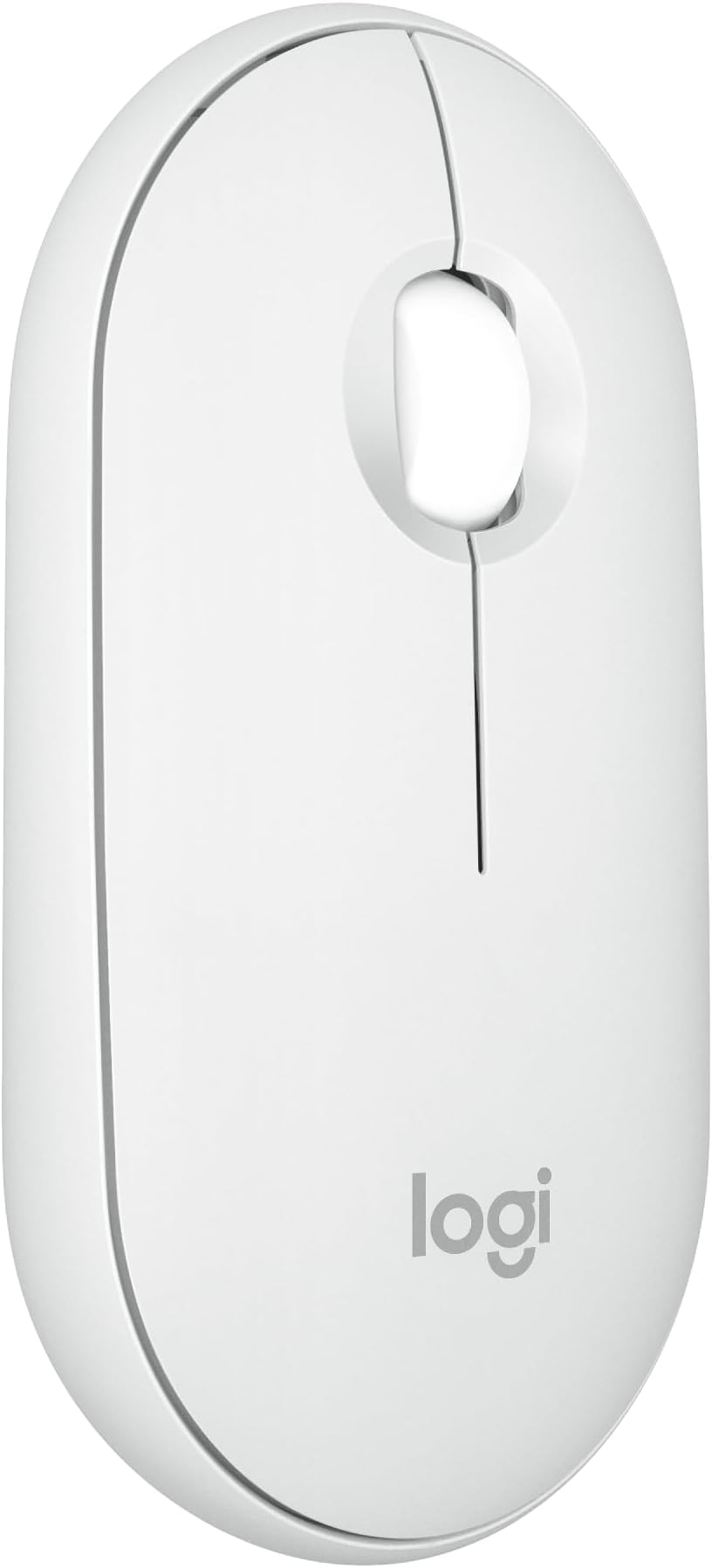
The Logitech Pebble Mouse 2 M350s is a slim, portable Bluetooth wireless mouse designed for professionals on the move. It connects seamlessly to up to three devices across multiple operating systems and features a quiet click mechanism that reduces noise by 90%. Made with over 58% recycled plastic, it combines eco-conscious design with a 24-month battery life and customizable buttons for enhanced productivity.


| ASIN | B0BT48897L |
| Additional Features | Lightweight, Portable, Soundless, Wireless |
| Antenna Location | Gaming, Office |
| Battery Average Life | 18 months |
| Best Sellers Rank | #29 in Computer Mice |
| Brand | Logitech |
| Built-In Media | Item |
| Button Quantity | 3 |
| Color | Tonal White |
| Compatible Devices | Windows, macOS, iPadOS, Android, Chrome OS |
| Connectivity Technology | Bluetooth, Radio Frequency , USB |
| Customer Reviews | 4.6 out of 5 stars 2,098 Reviews |
| Enclosure Material | Plastic |
| Hand Orientation | Ambidextrous |
| Hardware Platform | Linux, Mac, PC |
| Item Dimensions L x W | 4.3"L x 3"W |
| Item Type Name | Mouse |
| Item Weight | 76 g |
| Manufacturer | Logitech |
| Mfr Part Number | 910-007022 |
| Minimum Required Operating System Version | ChromeOs 134 |
| Model Name | M350s |
| Model Number | 910-007022 |
| Movement Detection | Optical |
| Movement Detection Technology | Optical |
| Number of Batteries | 1 Lithium Polymer batteries required. (included) |
| Number of Buttons | 3 |
| Operating System | Chrome OS |
| Power Source | Battery Powered |
| Range | 10.0 meters |
| Special Feature | Lightweight, Portable, Soundless, Wireless |
| Style Name | Pebble 2 |
| UPC | 097855185532 |
| Unit Count | 1 Count |
| Warranty Description | 1 Year Limited Hardware Warranty |
K**B
Excellent Wireless Mouse
This is a great Bluetooth mouse, inexpensive and very comfortable in the hand with great battery life. I've been very happy with a USB version of this mouse and decided to purchase this Bluetooth version to use with a new laptop. The buttons are quiet, and mouse tracking and motion is very smooth. There is a button on the bottom of the mouse that allows it to be paired with up to three devices. This feature works well, I have it paired with a couple different laptops and it is nice to be able to use it with either one without moving a USB receiver from one to the other. The battery is accessed by removing the top cover which is held securely in place by a few magnets, a nice design feature that eliminates sliding covers and plastic latches.
C**R
Sort of forgot the Pebble. Reacquainted myself after 10 months. A seamless Apple accessory.
I purchased this in August 2025, primarily for use with my 13in iPad Air. For that purpose, the Pebble Mouse was less useful than my Magic Keyboard folio. So, I stuck the device in a drawer and forgot about it. Recently, I found my desktop Magic Mouse out of charge and still had a bit of work to do. So I fired up the Pebble, and it was excellent with my desktop MacAir laptop and hub setup. The device immediately paired. I like a highly responsive mouse, and this one is. Left and right controls and the scroll wheel work precisely, smoothly, and as seamlessly as the Magic Mouse. I love my Apple stuff and use Apple devices exclusively, including a Magic Track Pad, Magic Mouse, of course, and the trackpads on two different iPads. All are excellent. The Logitech Pebble Mouse fits right as a smaller, lighter alternative, perfect as a stand-in, but now I realize how well it will work with MacAir when traveling as more precise pointer control for editing music projects in Logic Pro and complex writing projects, both for which the trackpad is not as easy to use.
K**.
Mouse Envy
Who knew a mouse could bring a little sunshine to the day? I needed a bluetooth mouse to pair with my Surface Pro since there is only one USB port that use to attach a keyboard. I kept bypassing the Logi, but after reading the print off the screen in reviews, I finally chose the Logi Pebble Mouse 2 not only for its compact size but it checked off all the boxes for compatiblity, connectibility, quietness, build, etc. I really never considered the noise of a mouse, but indeed, it has none. Although there is a paring process, it was not necessary right out of the box. I am just a recreational user with my Surface, but the Pebble 2 has a lot of customizations available for those still in the rat race. For a woman, I probably have medium size hands, but the fit is good. And in the brief 24 hours with this mouse, It has worked smoothly and effortlessly on every surface to include leather sofa, fabric sofa, occasional pillows, granite counters, etc. I love this mouse so much, I think I will buy back-up. What I did discover on the Logi website, is many more choices in color and pattern if you like a mouse with some personality. If it only lasts a year, I will still be happy with this purchase.
S**M
Stylish, Slim, and Surprisingly Comfortable โ A Great Portable Mouse
I recently picked up the Logitech Pebble Mouse 2 (M350s), and Iโm really happy with it. The slim and minimalist design caught my eye firstโitโs easy to carry around and fits into my laptop bag without adding bulk. When Iโm working on the go, the lightweight build makes a real difference. Performance wise, the Bluetooth connection is solid and easy to pair with my laptop. The clicks are quiet, smooth, and feel nice under the fingersโfar better than cheap travel mice Iโve used. Itโs also comfortable enough for longer sessions, even though itโs small. The design strikes a good balance between portability and usability. One of the things I appreciate most is how it works seamlessly across multiple devices. Switching between my laptop and tablet during work was smooth, and the battery life has been impressive so far. I havenโt had any hiccups or lag in my daily use. If you want a dependable, good-looking travel mouse that doesnโt feel like an afterthought, this one is a very strong choice. Stylish, functional, and truly portable.
M**I
Use
Good for aesthetic, and short term use. But if you use it for more than 2 hrs daily, Buy a different one. the quality is ok. Good for the price. Bluetooth works, no interference or anything. Works on my ipad 10th gen 2022.
J**Z
Great Travel or Backup Mouse
I'm mostly agnostic about technology brands. I lost my travel mouse and needed a new one in a hurry. This kept popping up in back to school sales. Figured it was worth a shot due to sales. Was pleasantly surprised about how quick and smooth it is and the connection options. I mostly use ergonomic gadgets but this one is not a problem. Not too big and not too small. Works great for presentations at conferences and is easy to pack.
L**E
A Logical Choice
I like as much of my gear and tools to be compact without sacrificing usability and durability. This mouse has been perfect for me. The plastic is nicely textured and feels like it can handle moderate abuse. The top comes off easily which is nice for access to the battery, however a light drop of the mouse can cause the top to pop off. It is just a minor inconvenience though as there are not a multitude of moving parts to be lost. I have not used the function of switching devices since I only use this with one device. I use this with an Apple Macbook Pro, so I can confirm that this is compatible with some Apple products. The bluetooth connection is very fast and remembers devices. The mouse is very responsive with my device, every movement is real smooth and accurate. I love the size and feel, no complaints at all with this mouse. It is small, not everyone will be able to use this comfortably.
B**6
Sleek and Portable Precision
The Logitech Pebble Mouse 2 M350s has been a fantastic addition to my workspace. This slim and stylish Bluetooth wireless mouse combines portability, precision, and ease of use, making it a great choice for anyone on the go or working from home. The first thing that caught my eye was its sleek design. The minimalist aesthetic fits seamlessly with my setup, and the compact size makes it incredibly portable. It easily slips into my bag without taking up much space, making it perfect for travel. Despite its slim profile, the Pebble Mouse 2 M350s offers excellent performance. The optical tracking is precise and responsive, whether Iโm working on a desk or a softer surface like a couch. The Bluetooth connectivity is seamless, and I've experienced no lag or dropouts during use. One of the standout features is the silent clicking. Itโs whisper-quiet, making it ideal for quiet environments like libraries or shared workspaces. The battery life is impressive too. With just a single AA battery, it lasts for months, reducing the hassle of frequent replacements. The ergonomic design ensures comfortable use over extended periods, despite its compact size. Itโs ambidextrous, catering to both left- and right-handed users, and the buttons are well-placed for easy access. Overall, the Logitech Pebble Mouse 2 M350s is a stylish, portable, and highly functional mouse that enhances any workspace. Highly recommended for anyone looking for a reliable and travel-friendly mouse!
R**H
My go to travel mouse
I've spent a long time trying to find an ideal travel mouse that is lightweight, compact and comfortable to use. My previous travel mice include the Logitech M590, Logitech MX Anywhere 3, Apple Magic Mouse, Surface mouse, Cheersdot 2 and many other compact ones. When I needed to pack ultra light but still needed a mouse, the Cheersdot 2 was by far the most compact but it was not comfortable to use and the clicks were not silent. The other Logitech mice were more bulky and found it hard to fit into my Aer slim electronics organizer. This Logitech Pebble 2 mouse looked like an ideal travel mouse as it has a slim profile and could fit into my pouch easily. But the size is not ultra compact so it would still be comfortable to grip. In fact, it is a bit longer than the MX Anywhere 3. For a mouse under $30, it can pair and switch between 3 different devices, so I can pair this with my laptop, tablet and phone making it great for travel. It is also silent, great for use at night without waking up the wife. The slim profile does mean it's not the most ergonomic, but I did find it easy to grip and use. Because it's Logitech, it works great. It pairs easily, is responsive and had no problems with any device I've paired with. The sensor won't work on glass however and the scroll wheel is basic, but is wide and comfortable to use. For the low price, the travel friendly design and features included, the Pebble 2 is an ideal travel mouse.
J**O
BEST MOUSE FOR YOUR DAILY USE ...!!!!
Exceptional Multi-Device Mouse with Soft Clicks and Comfortable Design. I recently had the pleasure of using what I can confidently say is the best mouse I've ever laid my hands on โ the Logitech Pebble Mouse 2 M350s and i bought it to pair with my MacBook air. This one has set a new standard for a computer mouse with Its soft clicks, easy multi-device switching, ergonomic design, and smooth performance make it the best mouse I have ever used. If you're in the market for a best mouse that enhances your computing experience, look no further than the the Logitech Pebble Mouse 2 M350s. It's a game-changer that combines style, comfort, and functionality seamlessly. Im using 3 laptop which includes mac & windows , you can switch the device with a click of the button which is my favourite function apart from the soft click. If you are looking for a normal mouse with super soft - silent click and easy switching between the devices , This is the one...!!!!!!
B**R
Perfect for travel
Great little mouse. Works fine. Can pair to multiple devices. Great for traveling. Itโs compact, but large enough that itโs still comfortable to use.
K**N
Simple functional wireless mouse
Bought 2 of these mice for my work-from-home setup, and they're still working great years later. I don't remember when I last changed the batteries on them. They work great with the wireless Bluetooth connections, no annoying lag. They're really basic and probably not the most ergonomic, but I like the clean, simple look and have never had issues with hand fatigue using them.
R**D
Best mouse that i've owned
This is my preferred mouse for all of my Macs. Quiet clicks, smooth operation, and I've set up the middle button as a shortcut to Mission Control. Super handy. I've dropped it plenty of times with no damage at all. And if i break it, I'd absolutely buy another one.
Trustpilot
2 months ago
2 weeks ago