


Desertcart purchases this item on your behalf and handles shipping, customs, and support to New Zealand.
🚀 Unlock next-level CAN bus debugging with zero hassle!
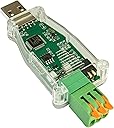
The DSD TECH SH-C31A USB to CAN Adapter is a robust, field-hardened device based on CANable 2.0, delivering seamless CAN FD communication at 5 Mbit/s. It features built-in electrical protections, a user-friendly screw terminal, and open-source hardware transparency. Perfect for professionals needing reliable, plug-and-play CAN bus analysis and control, backed by responsive support and a 1-year warranty.


| ASIN | B0CDGD1FSH |
| Best Sellers Rank | 34,227 in Computers & Accessories ( See Top 100 in Computers & Accessories ) 627 in USB to USB Adapters |
| Brand | DSD TECH |
| Brand Name | DSD TECH |
| Color | Green |
| Colour | Green |
| Compatible Devices | Personal computer, laptop, desktop |
| Compatible Operating System Family | Linux |
| Compatible devices | Personal computer, laptop, desktop |
| Country of Origin | China |
| Customer Reviews | 4.3 out of 5 stars 71 Reviews |
| Data Link Protocol | USB |
| Data Transfer Rate | 5 Megabits Per Second |
| Data link protocol | USB |
| Data transfer rate | 5 Megabits Per Second |
| EU Spare Part Availability Duration | 1 Years |
| Global Trade Identification Number | 00794251080989 |
| Hardware Interface | USB |
| Hardware interface | USB |
| Item Weight | 0.02 Kilograms |
| Manufacturer | DSD TECH |
| Manufacturer Part Number | SH-C31A |
| Model Number | SH-C31A |
| Number of Items | 1 |
| Number of Packs | 1 |
| UPC | 794251080989 |
| Unit Count | 1.0 count |
B**N
Perfect for can analysis or sending commands
Worked great straight from the box. Could.not have been better.
S**E
Great value USB to Canbus controller and sniffer
Used in an automation environment to help debug and diagnose logic controllers. Used once so far, great to keep in tool kit for future use. Price good against what the device achieves. Very happy.
N**X
Worked perfectly, easy to setup
Simply plug and play installation. Works well with free windows software. Easy to connect with screw terminals. Looks nice with the clear case. No buffer overflows or "filters" to configure to use, a simple stream of CAN data from the bus instead.
S**N
Does the job
Works flawlessly on a raspberry pi with Home Assistant.
O**C
Works with CANgaroo, but required a WinUSB/GUID fix
I had an issue using this SH-C31A with CANgaroo under Windows 11. This may be specific to my adapter/firmware, but I reproduced the same issue on two different PCs. On both computers, Windows did not automatically install a usable driver for the CAN interface. I installed WinUSB using Zadig (select canable2 gs_usb (Interface 0), USB VID:PID 1D50:606F). However, CANgaroo still could not see the adapter. I found that the DeviceInterfaceGUIDs registry value created during the Zadig installation did not match the GUID expected by CANgaroo/CandleAPI. Interestingly, Zadig generated a different GUID on each of my two PCs. If you have the same problem, this is what worked for me: Install WinUSB for canable2 gs_usb (Interface 0) using Zadig. Open PowerShell as Administrator and run: $dev = Get-PnpDevice -PresentOnly | Where-Object {$_.InstanceId -like 'VID_1D50&PID_606F&MI_00'} $path = "HKLM:\SYSTEM\CurrentControlSet\Enum$($dev.InstanceId)\Device Parameters" Set-ItemProperty -Path $path -Name DeviceInterfaceGUIDs ` -Value '{c15b4308-04d3-11e6-b3ea-6057189e6443}' Unplug and reconnect the SH-C31A, then restart CANgaroo. After doing this, CANgaroo immediately detected the adapter as candle0_ch0, and CAN reception works correctly. Again, I don't know whether this affects all SH-C31A adapters or only the firmware/version of mine, but hopefully this helps anyone experiencing the same issue.
C**T
Works with Savvycan on Linux
The first thing that I did when I got this was install the candlelight firmware from the canable website. This went smoothly with no issues. I have successfully used this with SavvyCan running on Linux mint with minimal configuration. Mine came with the screw down connectors for the wires which is not as convenient as the lever type it is shown with but it still works fine. Overall, this is a good option for an all in one can bus reader that is mostly ready to go out of the box. I was able to connect to my car first try after installing the candlelight firmware as mentioned. This does what an esp32 plus a can transceiver like the mcp2562 with the added benefit of can-fd support, which the esp32 cannot do, in one compact package and a very reasonable price for everything this can do.
V**R
CAN通信状態の確認に利用
LINKG4XのCAN通信状態確認用に利用 通信内容についての取得については問題なく出来ました。
C**N
Ottimo convertitore
Ho preso questo adattatore da USB a CAN per un progetto che sto preparando da collegare alla mia auto, ed è stata una scelta eccellente. Il dispositivo si è rivelato subito pratico ed efficace, con una configurazione molto semplice e intuitiva. È compatibile con diverse piattaforme, e ho potuto utilizzarlo senza problemi sia su Windows che su Linux, con un’ottima integrazione nel mio ambiente di lavoro. La qualità costruttiva è sorprendentemente buona per un prodotto di questa fascia di prezzo. Il corpo è robusto, compatto e abbastanza resistente per un utilizzo frequente. Durante l’uso, la connessione è stabile e affidabile, e il dispositivo è riuscito a gestire flussi di dati senza interruzioni o perdite. Anche l’aggiornamento del firmware è stato semplice, nella parte posteriore sono presenti due interruttori in miniatura, uno per attivare la resistenza da 120 ohm per il terminatore, e l’altro per avviarlo in modalità boot e scaricare quindi il firmware aggiornato. Finora si è rivelato un ottimo aiuto, e non posso che consigliarlo.
Trustpilot
1 month ago
2 months ago