


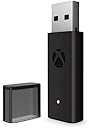
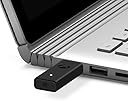
Wireless Adapter for Windows 10 (Xbox One)
Product ID: 56621143
🎮Connects up to 8 controllers
🔊Supports wireless stereo audio
🔌Plug & play USB Type A
Buy anything from 5,000+ international stores. One checkout price. No surprise fees. Join 2M+ shoppers on Desertcart.
Desertcart purchases this item on your behalf and handles shipping, customs, and support to New Zealand.
🎮 Level up your PC gaming with flawless Xbox wireless freedom!
The Xbox Wireless Adapter for Windows 10 lets you effortlessly connect your Xbox Wireless Controllers to PCs, laptops, and tablets with USB Type A ports. Supporting up to 8 controllers and multiple headsets, it delivers high-quality stereo audio and in-game chat with a compact, plug-and-play design. Perfect for seamless multiplayer gaming and reliable wireless performance, this adapter eliminates Bluetooth connectivity issues for a smooth, immersive experience.

| ASIN | B074QMN4YW |
| Best Sellers Rank | 4,259 in PC & Video Games ( See Top 100 in PC & Video Games ) 5 in Xbox One Adapters |
| Customer reviews | 4.4 4.4 out of 5 stars (8,377) |
| Is discontinued by manufacturer | No |
| Item model number | 6HN-00003 |
| Product Dimensions | 14 x 7.39 x 5 cm; 10 g |
| Rated | Not PEGI rated |
N**I
Works flawlessly.
Brilliant and easy to use, wireless adapter for Xbox controllers, on windows 10. Packaged well. Arrived neatly presented in a white cardboard box. This is a brilliant little adapter. This also comes with an extended adapter too. The extended adapter is for just incase the adapter interferes with another adapter close. I would use one of these adapter's, even if you have a Bluetooth receiver, they can be notoriously unreliable for signal and connection issues. You can also get cheaper versions of this adapter but in the long run, for hassle free play, no loss of signal or no loss of connection, stick to this brand, it works flawlessly. Simply plug in the adapter, click the pairing button on the adapter and the pairing button on the control pad. This will connect to your pc in the same fashion as it would your Xbox. That's it, ready to go! Signal is strong, even walking around a large room. The pc automatically switches for games as it knows there is a controller connected. No issues at all. I would recommend this adapter. It's brilliant and easy to use.
L**S
Works Perfectly.
TLDR - Works perfectly out of the box, you can sync up to 8 controllers to it at once. After buying a Bluetooth dongle on amazon (that was highly rated) and testing it on my pc with my xbox one controller (with Bluetooth) and having connection issues where it would fail to connect, I decided to take the plunge and just get the Microsoft official one... and I don't regret it at all. The device is well packaged, and is literally plug and play. There is a sync button on the top of the very small receiver that you press alongside the sync button on your controller and it instantly pairs, and stores the controller in its memory, meaning no more opening the Bluetooth device drivers and pairing every time you want to use a controller. This adapter also allows up to 8 controllers to be synced to it, which is definitely more than I need, but nice to have if you decide to play split screen games.
M**W
It's good, does the job.
It took me a while to set it up as the drivers it came with werent updated, I had to look online for ones that were updatd enough so my controller would connect to it. That aside, this is a great product. I had the previous generation, the tall, wide, slim version of this and because of how wide it was I didnt really like using it because it blocked off other usb ports at the back of my PC, but this new one is all-around just small, it's great.
M**N
My thoughts
Despite what some reviewers mentioned, this came in a retail box with included usb extension cable and paperwork, all sealed and unopened and not by itself in a padded envelope. Unit preforms as expected and I’ve had no issues with it, was easy to install, connection to the controller (elite series 2) does not drop unlike the bluetooth option which I previously used. Worth noting: -first install, it loaded in as XBOX ACC and was not recognised. I remedied by right clicking the Device in device manager and clicking ‘uninstall’, unplug and replug. Then I did the same except this time I went to ‘update drivers’ and it found it via windows update. The device also gets pretty warm, so to preserve life I would say only plug this in when you’re using it and not leaving it in 24/7 with your system. Otherwise all good.
E**A
Recommended even if you're using bluetooth connection
The price may seem quite high and you might be tempted to buy a cheaper bluetooth adapter, but I don't recommend it unless you actually need bluetooth for other things. In fact, even if you already have bluetooth, I'd still recommend buying this if you have some extra cash; especially if you're using more than one controller, otherwise you'll see some serious input delay. This adapter uses its own propriatary 2.4ghz rather than bluetooth technology (which is also 2.4ghz, but can suffer interference with other bluetooth devices) which gives it a much more stable connection; especially if you have more than one controller in use. My pc has quite strong bluetooth 4.0, but still suffered from input delay and occasional disconnects especially when I connected 2 other controllers for my family to play games with me. I decided to purchase this adapter and have no regrets. Aside from the superior connection, using the wireless adapter instead of standard bluetooth does have some (albiet, most likely gimmicky for most users) extra features such as being able to profile your controllers individually such as remapping your controller. Personally, I don't need to remap my controllers, but if that's something you're interested in such as wanting to invert your controls, you can just do it universally through the Xbox Accessories app (need to download it for free from the Windows 10 App Store) rather than change the setting in every game you play. You will need to make sure your drivers are updated and you may need to go into your device manager, but if your windows is up to date, this is unlikely to be an issue. Another feature is that you can use xbox headsets with this adapter, though if you're a pc user, I'm fairly sure you'd have a far superior headset or speakers you can just use, but I suppose it could be useful for splitscreen with friends if you all have your own seperate headsets. If you already connected your controllers through bluetooth and you decide to buy this, you'll need to make your pc forget these connections before connecting your controllers through this device as sometimes Windows will make bluetooth top priority and you'll just go back to the inferior connection. In the end, £40 for a far superior, lag free connection even without all the other benefits such as controller remapping and xbox headset support that I don't use? Its a must buy for me. I don't regret this purchase at all.
M**É
Does exactly what it says on the tin
Works just fine on Win 10 with an Xbox one elite and a general Xbox one controller. Regular USB sized dongle though is on the slimmer side. Range is quite nice on it, have used a controller from the other side of the room (about 4-5 meters) without any problems. No input lag noticeable either. Housing is made with nice soft plastic so it looks high quality. The built in white LED is helpful during pairing. It is continuously on while something is connected to it, but it isn't too bright, not distracting at all. Only annoying is that, the little connection cover that comes with it doesn't fit on the back of it... Another piece of plastic to store and try not to loose..
P**I
Software has a wide room for improvements in case of errors, but still a comfy tool
It is a small adapter, and it is quite an improvement over the previous bulky generation (same specs, but much smaller footprint). If you have Windows 10, plug it, and it just works™. Sadly, that's not always the case, and when things don't work is quite a hassle, with very fragmented documentation and no real error feedback from the device itself. Following a few things that could go wrong: - If you have wake-on-lan that could be an issue. I tried to activate it on my Asus ROG Z370-I motherboard and the previous adapter stopped working. I thought it was the adapter broken, but turns out it's the bios configuration for wake-on-lan (so I actually could have avoided to purchase the new adapter) - The xbox controller might disconnect often (and with the new adapter way more than the old bulky one), and it seems a very, very common problem. Solution is to go in the usb hub settings (not the controller, but the whole usb settings in device manager) and disable the power management for all connected device. - God knows why, it might fail to startup, and a random amount of deletion from device manager, unplug / plug and restart get it solved. All considered, it's not often that it gives troubles, but when it does it needs a bit of time to solve them (and when you have a couple of hours free and you spend one on fixing the stupid yok, you're not amused). I'd give 3.5 stars, since it is low latency (I cannot notice any latency in inputting my commands in a game), it allows to connect up to four controller and it also allows to stream the audio to the controller itself (controllers are seen as an audio device as well). The ability to connect earphones to a wireless controller and have everything working with no latencies it's quite neat, to be honest. I love the adapter, but still three stars because of the random times it decides to stop working (either this model, either the previous bulky one), and when it does it's just a blind search for a fix, since there is no meaningful error reporting tool or immediate fix (immediate fix: something which would not involve searching on google but can be done even with no internet access, thanks to some software utility).
A**S
works as intended. But controllers should just be able to work with standard bluetooth.
works as intended. But controllers should just be able to work with standard bluetooth.
A**O
Velocidad y tranquilidad
Buena calidad y te aseguras la mejor conectividad del mando de xbox con el PC. Lo uso con el Xbox elite series 2 y funciona perfectamente y sin cortes. Tiene un botón en la parte superior el cual se usa para emparejarlo con el mando, una vez lo tienes emparejado cada vez que enciendes el mando se conecta de forma automática. En el caso de que seas usuario de un mando xbox elite, para poder configurarlo necesitas conectarlo por cable al pc, con este adaptador no es necesario, puedes configurarlo siempre que quieras sin el cable. Si sientes que por bluetooth no te va demasiado bien, recomiendo la compra.
P**S
The original to use as stable connection at 2.4G
The original, great for controllers and XBox Wireless Headset connections for gaming!
L**.
Niquel
Fonctionne correctement et sans déconnexion
J**N
Gör de den ska
Fungerade med plug and play Däremot va produkterna som skulle kopplas upp lite svårare och behövde mer konfiguration
G**I
Comodo e utile
Funziona perfettamente L'installazione è semplicissima: basta collegarlo alla porta USB e il sistema riconosce subito il controller. La connessione è stabile e senza ritardi, permettendo un'esperienza di gioco fluida e reattiva, anche su giochi più esigenti. Molto meglio di cavi usb o bluetooth
Trustpilot
3 weeks ago
5 days ago