

Buy anything from 5,000+ international stores. One checkout price. No surprise fees. Join 2M+ shoppers on Desertcart.
Desertcart purchases this item on your behalf and handles shipping, customs, and support to New Zealand.
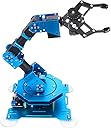
🤖 Elevate your coding game with the ultimate 6-axis robotic arm — where precision meets play!
The Hiwonder-xArm1S is a premium 6-axis full metal robotic arm kit designed for STEM education and creative programming. Featuring 6 high-precision intelligent servos with real-time feedback, it supports versatile control methods including PC, app, mouse, and wireless controllers. Its robust aluminum alloy frame and industrial bearings guarantee stability, while its intuitive programming interface enables users to create complex robotic actions effortlessly. Ideal for professionals and enthusiasts eager to explore robotics, coding, and automation with a hands-on, interactive platform.


| ASIN | B0793PFGCY |
| Additional Features | 6-axis design, high-precision intelligent servos, versatile control methods, action editing capabilities |
| Age Range Description | More than 14 years old |
| Animal Theme | Mouse |
| Are Batteries Required | No |
| Best Sellers Rank | #141,352 in Toys & Games ( See Top 100 in Toys & Games ) #1,404 in Educational Science Kits |
| Brand Name | LewanSoul |
| Collection Name | robotic arm, robot kit, education robot kit |
| Color | Blue |
| Customer Package Type | Standard Packaging |
| Customer Reviews | 4.1 out of 5 stars 269 Reviews |
| Edition | Hiwonder-xArm1S |
| Educational Objective | Learning programming, robotics, and STEM concepts |
| Finish Type | Glossy |
| Is Assembly Required | Yes |
| Is Autographed | No |
| Item Dimensions | 6.1 x 5.5 x 9.68 inches |
| Item Dimensions L x W x H | 6.1"L x 9.68"W x 5.5"H |
| Item Weight | 1.1 Kilograms |
| Manufacturer | Hiwonder |
| Manufacturer Maximum Age (MONTHS) | 42 |
| Manufacturer Part Number | LeArm |
| Material Type | Metal |
| Model Name | Hiwonder-xArm1S |
| Model Number | Hiwonder-xArm1S |
| Number of Pieces | 1 |
| Number of Players | 1 |
| Operation Mode | manual |
| Outer Material | Metal |
| Play Activity Location | Tabletop |
| Power Source | AC adapter |
| Recommended Uses For Product | educational purposes, programming, building and showcasing creative projects |
| Scale | Full Size |
| Size | Large |
| Style | Hiwonder-xArm1S |
| Supported Battery Types | No battery included |
| Theme | Action |
| Toy Figure Type | Play Figure |
| UPC | 651519699591 |
| Unit Count | 1 Count |
R**W
Works well assembly is fully explained with graphics and a tutor works for English speaker
I bought this with some reluctance having assembled kits from China before, but the specifications, capabilities, and features for the price made me want to try it anyway. The kit was well packaged and complete. The parts were all Identified and all there. The robot arm uses the newer bus servo motors and this is great. You simply tell a motor the absolute location you want it to go and how long you want that motion to take, This helps synchronizing different motions so they can all get there at the same time. You could also issue a short vertical motion and a long fast horizontal motion to tailor the movement shape. The built in shaft encoder allows you to know exactly where you start and where you are going, without drift when you get there or apply a load. There is no need to calculate the PWM signal and know where precisely, and drift. This also allows completely closed control application. I am an English only speaker however; assembling the kit was fairly simple considering the complexity. There are good graphic video demonstrations of each step along with a running audio descriptions. All the parts fit well together and there were no extremely difficult assembly steps needed .The bus wiring made the electrical part of the assembly easy. steps. The included control board has a great amount of capability and can store several complex programs for stand alone operation or download programs from the computer. The software for running the robot on the computer is powerful and has English versions. Programming can be done on the computer with discrete commands, by learning from manual movement steps or a combination of both. The robot can also be controlled by the supplied wireless game style controller, a cell phone or a mouse. One problem developed after assembly, The manufacturer (LewanSoul) responded quickly sometimes on the same day until the obscure problem was resolved. The finished robot performs well as expected, movements were consistent and repeatable. Ray Rew
A**N
Surprisingly well designed and performant
Opening up the box, all the parts were neatly packaged and undamaged. The quality of the anodization on the metal parts was surprisingly good and I liked how there was decent organization of screws and other small parts into separate bags. Assembly was pretty quick and straightforward (took a bit to get to the instructions) with no issues of fitment so QC seems to be good as well. Came with spares of most things and love the serial bus interface of all the servos, will probably switch to them for a lot of my future projects. One caveat is the included screwdriver isn't that useful since you'll need a smaller one for all the screws on the servos themselves and the cable management is a bit finicky (but way better than not having any cable management at all). After getting the arm assembled, it was pretty easy to set up with the software and get the included controller set up (which is one of the better ways to control any multi-axis robot). Overall, this is a pretty good product and can recommend if you want to get started on robotics / want to play around with a robot arm. They're still regular servo motors so the payload can't be too high but reasonable given the size (and price) of it.
J**.
Not a 6 axis arm
Contrary to what the manufacturer claims, this is a 5 axis arm. The fact that it has 6 servos does not make it a 6 axis robot. The 6th servo motor on this arm controls the gripper, commonly known as the end effector in the robotics world. A true 6 axis robot has an additional axis of rotation between axis 3 and 4. This is similar to the forearm of a human arm being able to rotate so the palm of your hand is able to face up or down. Search for 6 axis robot videos and you'll see what I mean. A minor point, but the naming of the axes on a multi axis device always begins at the base of the robot. Axis 1 is the base of the robot and the joint at the end of the arm is axis 5. This is true regardless of whether you're talking about a 3, 4, 5, 6 or 7 axis device. How do I know this? I wrote software for SCARA and 6 axis industrial robots for 18 years before I retired. That said, this is a decent toy. You can learn the basics of robotics using it. The manufacturer claims their control software runs on iOS and macOS. Be aware that you must have a M1 or greater Mac to load the software. It will not install on an Intel Mac. This is not mentioned anywhere in Hiwonder documentation. You will only find out once you go the the app store and try to install the app. Overall documentation is poor for this device. The servo motors have an input side and an output side. Their description of setting up the arm call both ends servos, when the input side is actually an encoder. An encoder supplies feedback to the controller telling the position of the motor. Don't expect smooth movements of the arm. Depending on how much the arm is extended (their joints 2 and 3). The further you try to reach for and object, the more jerky movements become. The motors are too heavy and contribute to instability. It would be better to use a pneumatic actuator for the gripper instead of a heavy motor. I bought this for my grandson who is 5 years old. After putting it together and operating it I came to the conclusion that it wasn't suitable for a child that age. He would surely damage it in no time. Be aware of this before you purchase it. Regards, Redwingz
M**N
Good Hardware, Poor Documentation
TLDR: the xArm 1S is well designed and tooled hardware that works hobbled by poor to nonexistent documentation. I purchased a Hiwonder xArm 1S as a potential project for a STEM Robotics course. The purchase was recent. While I've assembled the robot and tested it using the PC program, I can.t address long-term durability beyond observations I've made so far. First the good. Everything works. Construction is solid. There are a couple of injection molded parts, but the rest are anodized aluminum. Fit and finish are generally good. A couple of parts weren't bent to a full 90deg, but I coerced them sufficiently to work. The servos are quite energetic. They are capable of tilting the base off the surface it's sitting on. I don't know if the suction cups would prevent that (update: they don't). I don't have a surface I could test it with. I will probably mount the arm directly to a board, anyway. The servos, by the way, provide feedback for closed loop control. Hardware-wise, I'd give it 5 stars. Now the bad. The printed instructions are insufficient for assembling the robot. The poor image quality hides important details. None of the steps involving servos identify which servo to use even though they are numbered and installing the correct one in the correct place is critical. The video is only marginally better. Be prepared to pause frequently. The holes for attaching the gripper were ever so slightly off requiring the screws to be threaded through. Threading on the associated nuts in a very tight space was a challenge. It gets worse. If you want a toy, then you're golden. You can use the provided game controller, the available PC app, or the available phone apps to operate the arm. If, however you want to do something more advanced, be prepared to spend considerable time searching through the internet to find sufficient details to do it. What documentation Hiwonder does provide isn't sufficient. Their "tutorials," other than the one for assembly, focus one their canned control methods. Their support for Arduino (and Arduino clones) consists of making serial interface pins available and a sparsely documented set of commands. Hiwonder could really carve out a solid niche if they made some changes. Hardware-wise, add some stamped references where specific part relationships are important. Switch to hex or Torx screws. Consider threading parts where fitting in a nut is tight. On the software side, go all in on open source. Nothing encourages a community like working examples and access to good info and a decent API. Finally, invest in sufficient quality documentation. The hardware holds much promise, but it's held back by a half-hearted attempt to provide meaningful support of the soft side of the system. I'll battle on trying to get the arm to do something interesting. That said, I'm disappointed. I wanted to like this more. Hiwonder let me down.
B**D
Great robotic arm
Let me preface with... I've been a tinker'er, gadget geek, etc my entire life. Played with some toy robot stuff a few years back, before the whole maker, STEM, 3d printing, arduino, rasp pi, etc craze and this stuff became affordable. A mid life career change and the quest to always be learning new stuff led me to order this xArm. This review will be just some notes from my build that may help others. -Items are packaged well -out of the entire kit, only found 1 bad item (so far anyway), one of the acorn nuts for the suction cups wasn't threaded, minor issue, found another nut in my junk box. -when you start you build, take the bag of screws and sort them all by size into piles -I had the lewansoul website pulled up on my monitor with the large photo of xArm during my build for reference -watch the youtube build video in it's entirety before starting your build, just to get an idea of what you'll be doing, then build as you watch and pause the next round. The video is VERY good. -watch the wiring video before you start also!! and note where the short and long cables go. I would recommend plugging the proper cables into the servos as your are building, if you wait till it's all assembled it can be tough to get the connectors in -all the arm servos basically end up installed the same direction, the output shaft will be on the same, and the cable connectors will on be on the other side -when you get to the round aluminum cylinders and adding the brackets, the larger cylinder goes closer to the base of the unit, you can kinda see this when looking at the large web photos -as someone mentioned the servos are numbers 1 through 6 from the gripper towards the base -the servos come out of the box all centered, so don't turn the shafts at all, until they are mounted square to the brackets -there was no directions on how or where to install the control board, but's is pretty self explanatory by looking at the photos and parts you have left at that point, just use the screws that are left, and the plastic standoffs -I was unable to connect to the xArm with my bluetooth phone at first, I tried a different tablet and it worked ok, so I uninstalled the app, and reinstalled on my phone, then it worked fine. This may have something to do with permissions, as I denied permission to 'phone location' at first, and allowed it the second install. Hey Lewansoul, why do you need permission to my location with this app??? -Check your servo wiring when complete and make sure the routing doesn't bind up, or get pinched at the servo travel limits, use the included plastic clips to help as/where needed. -I cut some black foam weather stripping and installed it on my gripper to help it hold small plastic parts You don't need anything else to operate this arm, everything needed for basic operation is included in the box. You can manually move the arm, and program in an 'action' with just the 2 buttons on the control board. If you use the PC software to do the same thing, then you can go back and tweak your 'action' to make it more accurate. I'm looking forward to digging into the add on kit, and get an arduino hooked up to start working on my own code. Yes you can buy an arm kit for cheaper, but the fact that everything is included here in one box to get going, it has the serial servos with feedback, and I love the blue anodizing. I haven't found anything to deduct from it's 5 star status. For now, great job Lewansoul... I'll try to remember to update my review after I have more time with this, and dig into the add on kit.
B**H
A very well designed and precision robotics arm - Great for educational and fun applications.
This was my first experience with a robotic device. I wanted to see how versatile this product could perform. I first used the PC software that was downloaded from Lewansoul, which allowed me to "program" each of the servo's positions and action time. They call this "action groups". You can move the arm to a specific position either manually or using their software, and have it read the angle which puts a value of each of the 6 servo positions as an entry into a table. The table then is used like a program, starting from the first row downward executing each action with a specific time you set. It actually works quite well, and is somewhat precise in positioning the arm repeated times. Each servo has a precision of 0.24 degrees. If you do the geometry calculation, the variance at the full arm's length (approx 14") comes out about 0.058" or about 147 microns. For individual joints, at a distance of 1", results in an accuracy of 0.004" (or 10 microns). With this type of precision, you can do some fun experiments. I had it pick up a washer and had it drop it on a bolt. I could not take a nut and put it on a bolt, though I could have it thread the nut if it was on the bolt. I also had it "mix" a drink by picking up various plastic cups and pouring them into a glass, then shake the glass. I next hooked it up to a Arduino board and wanted to use the arm's controller for secondary programming. After some initial communications issues, which were fixed by Lewansoul providing the correct library for the Arduino sketch program, I was able to have it do some maneuvers and call stored action groups that were downloaded to the controller board from the PC software. As this is a new product for Lewansoul, I found it missing some documentation on the assembly instructions and certain feature operations, and after contacting their support, provided me with what I needed to know. It took me about 4 hours to build the X-arm. Much of the time was sorting out the numerous screws and while they have an excellent animated video showing how to construct the arm, I found myself trying to figure out what metric screw size was what in the kit. They should have a picture of each screw size, so you can match it up to the size you use for the assembly. The component list was incomplete, and it took a while to figure out where everything belongs. Aside from that, the assembly went quite well. In the video's, you'll see I put some soft putty on the edge of the grabber, so it does not slip out of the grasp. Also, if the servo tightens too much with bare metal, for some reason the servo does not want to release the grip. I have to ask Lewansoul about this behavior. I will be doing more "experiments" with the Arduino board, to give the X-arm more intelligent tasks. I will report back in the future with what I was able to accomplish.
S**E
Looks like bad QC
Stuck on step 5. It is supposed to be threaded, quality control should have caught this.
M**T
Great training aid and a great value for the money
This is my 3rd HiWonder product. I have the SpiederPi Pro and the PuppyPi Advanced (no Lidar). All of their products are well made and fairly well suppported. xArm went together easdily thanks to the 4 videos on YouTube. The girl that explains the assembly does a good job of showing not only what to do but also what not to do. I recommend strongly that you pay close attention to the servo arm position as you assemble. I think they are shipped in the "center" position but if you turn them during assembly, when it starts up and centers, your arm can move unexpectedly. This happened to me with servo 5 and the arm slammed down 90 degress upon going to the home position. You would think after decades of building RC planes and knowing to check center before assembling I would know better. Fortunately, like my other HiWonder robots, the device is sturdy and was not harmed by this action. The included game controlled has some good built in routines. It can pick up and object, move it to the right and drop it. They have a library of canned routines you can view and even create your own simply. What it most interesting is this works just like the large million dollar factory robots which can pick up, place, weld, screw, etc. This product is a great way for children and young adults to learn the basics of robotic arm action. Overall I am very pleased with the product and feel it is a great value for the money!
Trustpilot
3 weeks ago
2 weeks ago