Desertcart purchases this item on your behalf and handles shipping, customs, and support to New Zealand.
โก Elevate your workspace with power, speed, and stunning visuals โ donโt get left behind!
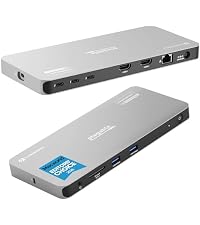
The Plugable Thunderbolt 4 Dock (TBT4-UD5) is a premium, award-winning docking station delivering 100W charging (96W certified), dual 4K 60Hz or single 8K display support, and ultra-fast 40Gbps Thunderbolt 4 connectivity. Featuring 13 ports including dual HDMI, USB-C, Ethernet, and SD/microSD slots, itโs designed for seamless compatibility with Windows and Mac systems, perfect for professionals seeking a streamlined, high-performance workstation.


| ASIN | B0CNTTVVN6 |
| Best Sellers Rank | #227 in Computers & Accessories ( See Top 100 in Computers & Accessories ) #17 in Laptop Docking Stations |
| Brand | Plugable |
| Built-In Media | Dual HDMI TB4 Dock 100W PD |
| Color | Black |
| Compatible Devices | Windows 11 Thunderbolt 4 hosts and Thunderbolt 4 Macs with macOS 11+ including, M5 / M4 MacBook Pro and MacBook Air, M1 Pro/Max, M2 Pro/Max, M3 Pro/Max, or base M3 (with clamshell mode required for dual displays), HP Omnibook / EliteBook / DragonFly / ProBook / Spectre x360 series, Dell Pro Max / Plus / XPS / Latitude / Inspiron, Lenovo ThinkPad / IdeaPad / Yoga , Framework (Intel Processors), Microsoft Surface Pro 11 & 10 for Business, Surface Pro 9,8 / Surface Laptop Studio / Surface Laptop 6 / 5, Acer Swift, Predator, Aspire Vero, ASUS ZenBook, ExpertBook, ROG Zephyrus, ProArt Compatible Devices Windows 11 Thunderbolt 4 hosts and Thunderbolt 4 Macs with macOS 11+ including, M5 / M4 MacBook Pro and MacBook Air, M1 Pro/Max, M2 Pro/Max, M3 Pro/Max, or base M3 (with clamshell mode required for dual displays), HP Omnibook / EliteBook / DragonFly / ProBook / Spectre x360 series, Dell Pro Max / Plus / XPS / Latitude / Inspiron, Lenovo ThinkPad / IdeaPad / Yoga , Framework (Intel Processors), Microsoft Surface Pro 11 & 10 for Business, Surface Pro 9,8 / Surface Laptop Studio / Surface Laptop 6 / 5, Acer Swift, Predator, Aspire Vero, ASUS ZenBook, ExpertBook, ROG Zephyrus, ProArt See more |
| Customer Reviews | 4.3 out of 5 stars 560 Reviews |
| Global Trade Identification Number | 00819927013174 |
| Hardware Interface | Thunderbolt |
| Input Voltage | 21 volts |
| Item Dimensions L x W x H | 8.9"L x 3.3"W x 0.9"H |
| Item Weight | 2.4 pounds |
| Manufacturer | Plugable |
| Mfr Part Number | TBT4-UD5 |
| Minimum Required Operating System Version | Windows 10 |
| Model Number | TBT4-UD5 |
| Number of Items | 1 |
| Number of Ports | 13 |
| Product Dimensions | 8.9"L x 3.3"W x 0.9"H |
| Total Number of HDMI Ports | 2 |
| Total USB Ports | 6 |
| Total Usb Ports | 6 |
| UPC | 819927013174 |
| Unit Count | 1 Count |
| Warranty Description | 2 Year Limited Parts and Labor |
| Wattage | 134 watts |
K**N
Excellent Thunderbolt 4 Dock for MacBook Pro, Finally True Dual Monitors
โ โ โ โ โ The Plugable Thunderbolt 4 Dock has honestly been one of the best desk upgrades Iโve made for my MacBook Pro 16". Setup was basically plug-and-play, and it immediately solved a major frustration I had with another dock that would only mirror displays instead of properly extending them. With this dock, Iโm running two external monitors independently with no issues at all, while also keeping the MacBook fully charged through the same connection. The 100W charging has been more than enough for my workflow, even with video editing, multiple monitors, and accessories connected. Physically, the dock has a very clean and professional design. Itโs compact for what it does, roughly 9" x 3.5", and under an inch tall, so it fits nicely on the desk without taking over the workspace. I also appreciate the subtle blue LED indicator. Itโs visible enough to confirm power, but not distracting in a darker office or studio setup. Performance has been excellent overall. Connections have stayed stable, monitors wake correctly, and the dock runs cool and quiet. The front-facing ports are convenient for quick access to accessories and drives. My only real complaint is the laptop connection placement. The main Thunderbolt cable that connects to the laptop plugs into the front of the dock instead of the back. Functionally it works perfectly, but from a cable management standpoint I really wish Plugable had included a rear host connection option to keep the setup cleaner. That small design choice aside, this has been an outstanding dock for a MacBook Pro setup, especially if you need true dual-monitor support, charging, and reliable Thunderbolt performance from a single compact device.
M**A
Worth the price
Itโs pricey, but itโs great! (so far), especially if you have a Mac. I kept coming across all the cheaper brands werenโt compatible with Mac to display different screen, so I did some research and found this thunderbolt station compatible with MacBooks. I use this with my MacBook Pro and 2 extra monitors, for dual monitor support (3 total screens total). It works great! Iโm able to have different items on all the screens. I also plug in my USB from the mouse I use into the dock and that works great too! The thunderbolt dock also charges my Mac! Which was great to see! The dock is sturdy, easy to use, and I highly recommend. Also, this is not a paid review. Just a regular person that was impressed and wanting to help anyone else out who is unsure which brand to chose from.
N**N
4k 60z on both monitors!
I purchased so I can run my two 4k monitors at 60hz. I had purchased their cheaper version and one was at a 60hz but the other was at 30hz. This one both run smoothly at 4k 60hz. This works on my Dell work laptop as well as my personal Asus laptop, so the versatility is great. The charging capacity is amazing (works for both) and makes switching between them easy. Highly recommend if you are looking for a docking station.
L**G
Great Docking Station
Overall: Great docking station for a laptop computer. + Many different ports for many different devices + Easy to set up - It does need one more C port (Only comes with one) - Itโs a bit expensive - Doesnโt come with a large diagram of all ports and their speeds (One is available online but you have to search for it)
E**N
Single Dual monitor support for MacBook Pro M1 and M4
Works great for MacBook m1 and m4. Needed a thunderbolt dock that could support 2 external monitors and my laptop as a third. This works great, charges the laptop, and connects quickly. Highly recommend as it was quite difficult to find something affordable and that had thunderbolt 4 that could support this configuration without extra cables.
T**N
A slow roll to not working
Purchase this in March and with 30 days I had to recycle the unit multiple times to get monitors to register properly and charging to occur. Particularly annoying when charging stops and I do not notice it while I am engaged in a slew of Zoom calls. The result is I am cycling the unit multiple times in a workday. After 30 days my USB ports started to fail one at a time over a period of weeks until today I have to use a USB-c multi-port accessory with USB-a ports in order to enable peripherals that have usb-a only functionality. This is not something I expect from a $200+ piece of technology. I am beyond the return period and when I reached out to the manufacturer they asked me to run a debugging app which I am unable to do because I have a work computer. Pluggable has asked for my Amazon order number and I will update this review once I have a response from them. I think what Pluggable misses is that consumers do not have the time, interest, or acumen to debug a product for them. There are enough reviews on this site to demonstrate known problems and there are much better, customer forward policies than debugging. It is too bad because I like this product and my only (minor) complaint is the location of the PD connection to my computer is in the front instead of the back. This should have been a five star review and I would have given it such if service was more customer centric and just sent a new unit in exchange for my defective one.
D**.
Nothing exciting
Writing this review while new. Mostly works. got 2.5Gbps ethernet working via an usb adapter. Peripheral, PD 3, dual video, all thru a single usb TB4 cable, impressive. My prior KVM setup was a wire hell, even after a quite decent effort to organize all the cabling. I share it between 4 computers. Mac M5 pro -- works with dual video just like an intel laptop. Another AMD laptop with dp Alt -- that works with single monitor only, but with a little replugging of one of hdmi monitors directly into the laptop you can get the second screen too if badkly needed. Finally, an ASUS workstation with a TB4 port -- that was finicky one, but entirely on ASUS side. Would connect with 6.6 ft cable, stable so far but very hard to configure the desktop bios to work well with tb4. Some issues are still unresolved (such as the lack of keyboard on boot). But that's all on ASUS and its thunderboltex 4 nightmare of hardware. With the exception of wide range of host types, my use case therefore is quite basic, and it works as expected so far for that. Nothing fancy. Aside from dp-alt dual with MST everything works, but that's expected.
D**I
Fantastic Thunderbolt 4 Dock โ RockโSolid Performance and Outstanding Support
The Plugable TBT4โUD5 has been one of the best Thunderbolt docks Iโve used. It delivers stable, highโbandwidth performance with my dual 4K ASUS ROG Strix monitors and handles demanding workloads (AutoCAD, Blender, gaming) without breaking a sweat. One of the biggest advantages is that the HDMI ports provide native GPU output without DisplayLink, which means no compression, no lag, and no weird artifacts โ a huge plus for anyone who needs accurate, highโquality video. I did run into an intermittent monitor flicker early on, and Plugableโs support team was exceptional. Evan walked me through detailed diagnostics, reviewed logs I sent, and ultimately arranged a warranty replacement. The new dock has been flawless. Great hardware, excellent performance, and truly topโtier customer support. Highly recommended.
R**O
Excelente Producto!
Excelente! Llego antes de lo esperado, pero lo que mas me gusto, es que era exactamente lo que estaba buscando. Funcionรณ a la perfecciรณn con mi Macbook Pro 16 M4 Max! Excelente producto MUY recomendable!
H**K
All the right ports, including a front TB4!
Plugable TBT4-UD5 Thunderbolt 4 Dock. Got a new laptop with two ThunderBolt4 (TB4, aka. USB4) ports. So, went hunting for a dock to take full advantage. The field is very limited though, and this one seems the best, better even than the "big brother" of it from Plugable. This was the only dock I found that had another Thunderbolt port (on the front, even) for peripherals. As well as a pair of 5gbs USB3 ports on front, and several 10gbs ports on the rear. This is a great dock and is working well here. My only(!) complaint is the dumb front-mounted port for the laptop cable. Lots of other docks make the same mistake, dunno why? It belongs at the REAR, guys!! Otherwise all quite good! There's a white version that is sometimes lower priced: B0FGFW5FVD and also the Kensington AD2010T4 dock appears to be exactly the same thing as this one. EDIT: More than a year on, and it's going strong here and I'm exceptionally pleased with it. No issues. Loving the extra TB4 jack on the front, for backups to external NVMe drives. Solved the front-mounted laptop cable issue with a right-angled TB4 cable that easily routes to the rear and keeps things tidy. Note that I use this almost exclusively with Kubuntu Linux 24.04 on the laptop. Everything works very well with no fuss. Added a photo, with a KVM switch sitting on top.
K**L
Excellent docker and Top Notch Customer Support! Buy it!
VERY GOOD product! It connects easily. I had a problem with connecting a 2nd monitor which was resolved quickly through Plugable customer service. The dock doesn't take up a lot of space on my desk and does what I need it to do. Customer satisfaction is #1 with this company.
D**S
Buen producto
Buen producto
N**C
Great product and customer service
Great product and great customer service, would recommend to anyone!
Trustpilot
1 month ago
3 weeks ago