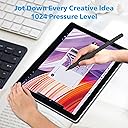
✍️ Elevate your Surface game—write, draw, and create like a pro with zero compromises!
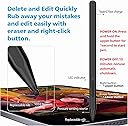
The Milikilo F97 Stylus Pen is a premium aluminum-crafted accessory designed for a wide range of Microsoft Surface devices. Featuring 1024 pressure sensitivity, tilt shading, eraser and right-click buttons, and smart palm rejection, it offers a natural and precise writing experience. With USB-C fast charging providing up to 80 hours of use and strong magnetic attachment, this pen is built for professionals and creatives who demand reliability and performance on the go.


| ASIN | B0CYXWKWNY |
| Are Batteries Included | Yes |
| Are Batteries Required | Yes |
| Battery Average Life Standby | 30 days |
| Battery Description | Lithium-Ion |
| Best Sellers Rank | #2,529 in Cell Phones & Accessories ( See Top 100 in Cell Phones & Accessories ) #52 in Styluses |
| Brand | Milikilo |
| Charging Time | 40 minutes |
| Color | Black |
| Compatible Devices | Laptops, Tablets |
| Customer Reviews | 4.3 out of 5 stars 1,327 Reviews |
| Enclosure Material | Aluminum |
| Item Diameter | 1 Inches |
| Item Dimensions | 6.22 x 0.39 x 0.39 inches |
| Item Weight | 14 Grams |
| Manufacturer | Milikilo |
| Material | Aluminum |
| Model Number | F97 |
| Number of Batteries | 1 Lithium Ion batteries required. (included) |
| Warranty Description | 1 year manufacturer |
J**N
Instant setup, USB-C charging, and smoother writing than the original Surface Pen.
I’ve had ongoing issues with Surface Pens purchased from Best Buy, so I decided to try this one instead, and I’m so glad I did. Although I’ve only had it for a few hours, it’s already far better than any of the original Surface Pens I’ve used. Shipping was fast (arrived within two days), and the pen itself looks great in the emerald green color. It charges via USB-C and comes with two extra pen tips and a pen tip extractor, which is a nice bonus. The biggest surprise was that I didn’t need to connect it to Bluetooth at all; it worked immediately as soon as I turned it on. It also arrived fully charged, which was greatly appreciated. I’m especially happy to be done with AAAA batteries, which are frustratingly hard to find in stores. The writing experience is excellent: very responsive, with strong pressure sensitivity that accurately translates into line thickness. There’s no noticeable lag, and it feels natural to write with. The pen fits comfortably in my hand and is very easy to use. For reference, I’m using it with a Microsoft Surface Book 2, and it works perfectly. Overall, I’m genuinely excited to start using this pen in my day-to-day work.
A**R
Very good basic stylus
Product works as advertised. It feels well built and i have zero complaints about it for what it is. If you need a basic stylus then this is great, however as someone who really likes to use my tablet for drawing, i am going to replace this stylus with one that has the built in eraser side at the end.
E**N
Awesome Stylus Pen
I absolutely love this stylus pen!! It works on my Laptop/Tablet of Microsoft Surface Pro 7. When I first ordered it, I thought it wasn't going to work on anything else other than drawing and art design apps, but....... IT WORKS ON EVERYTHING! My Cricut Design Space, Wizard101, Websites, etc! Super happy I had ordered this. It's sleek, awesome, and the battery life is unreal. Connection is awesome and very quick. Writing speed is like normal writing for me on paper and again, I love it. Thickness however I can't say since I don't have drawing apps, however, this Stylus pen is in general the best. Most likely will buy another one if and when this breaks or stops working.
J**E
It works
Works like a charm, I can now draw on screen and finish art faster .Charge seems to last long and it's magnetic.
A**.
Instant pairing and zero lag, a no-brainer alternative to the $100 official pen.
I needed a backup stylus for field work because I didn't want to risk losing my expensive official Microsoft Surface Pen on a job site. I honestly expected this to feel "cheap" or have connectivity issues, but I can't tell the difference in daily performance. The "MPP" Magic (No Bluetooth needed): Because this uses the Microsoft Pen Protocol (MPP), there is no fiddling with Bluetooth settings. As soon as I turned it on and touched the screen, it worked. • Pressure Sensitivity: It tracks perfectly. If I press harder while sketching a diagram in OneNote, the line thickens exactly like the OEM pen. • Palm Rejection: This is the dealbreaker feature, and thankfully, it works here. I can rest my hand fully on the screen while writing, and it doesn't register stray marks. Magnetic Attachment & Charging: It has a strong magnet that snaps firmly to the side of the Surface Pro, just like the original. • Important Note: While it magnetically attaches, it does not wirelessly charge (unlike the Slim Pen 2). You have to plug it in via USB-C to charge it. However, the battery lasts forever. I’ve used it for a week of meetings and haven't needed to recharge it yet. Tactile Feel: The tip has a nice amount of friction. It doesn't feel like slippery plastic-on-glass; there is just enough resistance to make your handwriting look neat. Verdict: Unless you are a professional digital artist who needs specific tilt-shading capabilities of the high-end Slim Pen 2, save your money. For taking notes, marking up PDFs, and general navigation, this is an absolute steal.
J**R
This is the official high-end stylus designed for Surface devices
Best overall experience: The Surface Slim Pen 2 is hard to beat if you plan to use your Surface Pro 12 for serious productivity or creative work. Great value picks: Mid-range third-party styluses provide strong performance at a fraction of the price, especially if your focus is note-taking, document markup, or general use. Budget-friendly: Simple stylus pens are perfect for casual users or as a backup. Weight & Size: Very lightweight at about 13 g (0.03 lb) — lighter than many competitors, which reduces hand fatigue during long writing or drawing sessions. Compact dimensions (~5.38″ × 0.44″ × 0.25″) give it a sleek, pencil-like feel that many users appreciate. Feel & Balance: Feels thin and modern — closer to a traditional pen than older Surface pens — offering a natural grip. Reviewers often describe the writing experience as pen-on-paper like, with good balance and control. Connectivity & Features: Connects via Bluetooth 5.0, enabling button functions and extra features like customizable clicks. Magnetic attach and optional keyboard dock charging (depending on your Surface accessory setup) make storage and power more convenient. 4,096 levels of pressure sensitivity and zero-force inking make for smooth shading and detailed writing. Pros: Excellent accuracy, light weight, rich features, great for notes & art. Cons: Price is higher than budget options, and you need the right keyboard case or charger to recharge easily.
A**R
Product Defects
The pen worked great for the first few days. I was able to handwrite digital notes with very good legibility. The pressure feedback generally worked quite well. My pen may have been defective. After 2 weeks, the pen would write while floating above the tablet surface, creating scribbly illegible notes. After 1 month, the pen stopped working all together. I tried all of the troubleshooting listed in the self-serve support. Would replace, but window has passed. Cannot recommend this product. Paired with Microsoft Surface Go Model 1962
T**D
Decent but Nibs wear fast
Feels good and works well One gripe is the nib is wearing exceptionally fast, I mean within 2 days of just doodling there's already significant wear and flattening on the tip. I am using a paper textured screen cover so I don't fault the pen entirely but still Additional minor gripe is the sleep mode on the pen activates slightly to aggressively for my taste looking at reference for a minute or so and you'll have to click the button to wake up. Overall for the price the form factor and performance is acceptable.
Trustpilot
1 month ago
2 months ago