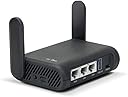
Desertcart purchases this item on your behalf and handles shipping, customs, and support to New Zealand.
🌍 Stay connected, secure, and in control—wherever your journey takes you!
The GL.iNet GL-A1300 Slate Plus is a compact, dual-band Wi-Fi 5 travel router featuring a powerful 717 MHz IPQ4018 processor and OpenWrt 21.02 OS. It delivers combined wireless speeds up to 1300 Mbps, supports pre-installed OpenVPN and WireGuard VPN clients with speeds up to 190 Mbps, and offers advanced network customization and security features. Designed for frequent travelers, it includes a physical toggle for VPN and AdGuard Home activation, supports network storage via USB, and ensures secure, stable internet access in hotels, cafes, and airports worldwide.


| Antenna Location | Travel |
| Antenna Type | Fixed |
| Asin | B0B4ZSR2PX |
| Best Sellers Rank | #9,189 in Computers & Accessories (See Top 100 in Computers & Accessories) #57 in Routers (Computers & Accessories) |
| Box Contents | Ethernet Cable, Power Adapter (EU + UK Plug), Router (with 2 years warranty), User Manual |
| Brand Name | GL.iNet |
| Colour | Black |
| Compatible Devices | Devices with Wi-Fi capability |
| Connectivity Protocol | Wi-Fi, Ethernet, USB |
| Connectivity Technology | Ethernet, USB, Wi-Fi |
| Control Method | Touch |
| Controller Type | Push Button |
| Coverage | Standard Inner Cover |
| Customer Reviews | 4.4 4.4 out of 5 stars (1,536) 4.4 out of 5 stars |
| Data Transfer Rate | 1300 Megabits Per Second |
| Frequency | 5 GHz |
| Frequency Band Class | Dual-Band |
| Has Internet Connectivity | Yes |
| Has Security Updates | Yes |
| Is Modem Compatible | No |
| Item Dimensions L X W X H | 8.4L x 3.3W x 11.8H Centimeters |
| Item Weight Unit Of Measure | 429 Grams |
| Lan Port Bandwidth | 10/100 megabits pro sekunde |
| Manufacturer | GL.iNet |
| Manufacturer Part Number | GL-A1300 |
| Maximum Upstream Data Transfer Rate | 867 Megabits Per Second |
| Model Name | GL-A1300 |
| Model Number | GL-A1300 |
| Number Of Antennas | 2 |
| Number Of Items | 1 |
| Number Of Ports | 3 |
| Operating System | OpenWrt 21.02 |
| Other Special Features Of The Product | Access Point Mode |
| Ram Memory Installed | 256 MB |
| Router Network Type | wireless |
| Security Protocol | WPA2 or WPA3 |
| Unit Count | 1.0 Count |
| Voltage | 5 Volts |
| Wi Fi Generation | Wi-Fi 5 |
| Wireless Compability | 802.11a, 802.11ac, 802.11b, 802.11g, 802.11n |
User
Value for money | Connectivity | Functionality - 4.99/5
Awesome product, superb speed with almost no packet loss as if I'm connected with LAN (without vpn), and coverage, VPN (vpn cuts down speed as usual) is easy to setup as well.Please be aware that it's original power supply is a US plug (flat plug ends), so you will end a US-India plug adapter/converter.
User
Does the VPN stuff really well
Does the job!!!
User
Not as Described
Not as DescribedHotel feature in default is and lot of risky network error
User
Waste product
Bakwaas
User
The Price needs to be 1/6th of what its currently listed at.
Doesn't have a 5G-NR SIM based modem inbuilt or an e-sim support, which makes it useless at this price point
User
Nice travel router - even better with real OpenWRT onboard
Used on several work trips so far. Immediately installed full OpenWRT and was able to do some pretty funky networking with it to allow access to internet, but also connect into customer network. Myself and my fellow worker could connect to both via Wifi, all while not concerned at all about the Wifi security, or about having to VPN back to our company and then out to the site we were at. Very nice.
User
This is the 2nd one of these travel routers that I’ve bought so obviously I recommend it.
This is the 2nd one of these travel routers that I’ve bought. That’s the best recommendation I can give. I’m using my first one as a router for Streamlocator where it performs very well. It also performed well on the few occasions when I had the opportunity to use it as an actual travel router.
User
Top Router!
Der GL.iNet GL-A1300 (Slate Plus) Router ist eine ausgezeichnete Wahl für Reisende oder als Ergänzung im Heimnetzwerk, dank seiner einfachen Einrichtung, schnellen Verbindungsgeschwindigkeit und vielfältigen Einstellungsmöglichkeiten bereits in der Standardoberfläche.Positive Merkmale:1. Einfache Einrichtung:Die Einrichtung des Routers ist unkompliziert und schnell, was die Nutzung sofort ermöglicht, ohne lange Konfigurationszeiten.2. Schnelle Verbindungsgeschwindigkeit:Der Router ermöglicht eine schnelle Verbindungsgeschwindigkeit, was für reibungsloses Streaming, Gaming oder allgemeine Internetnutzung entscheidend ist.3. Vielfältige Einstellungsmöglichkeiten:Die Standardoberfläche bietet zahlreiche Einstellungsmöglichkeiten, um den Router nach individuellen Bedürfnissen anzupassen und zu optimieren.4. Guter Support:Der Router wird von einem guten Support-Team begleitet, das bei Fragen oder Problemen hilfreich zur Seite steht.5. Integriertes VPN:Ein herausragendes Merkmal des Slate Plus, was ihn in seiner Preisklasse von allen Routern abhebt, ist das integrierte VPN, das zusätzliche Sicherheit und Privatsphäre beim Surfen im Internet bietet.6. Geringer Stromverbrauch:Der Router benötigt wenig Strom, was ihn effizient und umweltfreundlich macht.7. Tragbarkeit:Aufgrund seiner kompakten Größe und Portabilität ist der Router ideal für Reisen geeignet, insbesondere wenn der WLAN-Empfang begrenzt ist, z.B. beim Camping.8. Gute WLAN-Reichweite:Die WLAN-Reichweite des Routers ist ausreichend, um eine Wohnung komplett abzudecken.9. Preis-/Leistung:Absolute Spitzenklasse und zu dem Preis wirklich unschlagbar.Negative Merkmale:1. Schwierigkeiten mit bestimmten VPN-Verbindungen:Es kann Schwierigkeiten geben, eine Verbindung zu bestimmten VPN-Diensten wie NordVPN über OpenVPN herzustellen. (Kann allerdings auch ein Problem vom Anbieter oder vom Benutzer sein!) Allerdings konnte eine erfolgreiche Verbindung über Wireguard von NordVPN (ja, das geht über einen kleinen Umweg) hergestellt werden, was eine Alternative darstellt. Hier läuft der Router immernoch sehr schnell (abhängig vom Internetprovider und der Leistung des VPN-Anbieters) und funktioniert einwandfrei!Fazit:Der GL.iNet GL-A1300 (Slate Plus) Router ist ein hervorragender Reisebegleiter oder eine ideale Ergänzung für das Heimnetzwerk. Mit seiner einfachen Einrichtung, schnellen Verbindungsgeschwindigkeit, vielfältigen Einstellungsmöglichkeiten und dem integrierten VPN verdient er 5 von 5 Sternen und eine klare Kaufempfehlung.
User
Topkwaliteit met eenvoudige VPN-bediening
Alles werkt perfect. De bediening is eenvoudig en intuïtief, ook wat betreft de VPN. Na twee weken gebruik ben ik erg tevreden.
User
Better is the enemy of good enough
7/8/26: bought a second one for my sister, also on tds fiber, it works fine. She was initially given a tds router but it was not fully configured by the installer so rather than deal with them I replaced it with this. Updated to 5 stars for reliability and configurability. It’s not the fastest but it’s still plenty good enough. I still wish it had activity lights but the fiber media converter (ONT) does so that’s something. We have small offgrid cabins where power use is important and these sip power and can cover a 550sqft cabin with no problem.6/15/26: moved the wan to a tds fiber connection that was recently made available in our very remote area. Works fine, zero hiccups.2/20/26: It’s been chugging along for a couple of years now and has not given me any trouble at all. I have it plugged into an ATT Nighthawk hotspot from about 2017 that is troublesome but that’s because ATT likes to redirect us to cell towers that have terrible signal strength in an attempt to prevent us from actually using the data cap. They deny it of course but I’ve watched them doing it with other equipment.I also have a starlink mini and to switch I just move the routers wan cable from the hotspot to the starlink, works fine and doesn’t mess with the router setup. I have the starlink set to pass thru and I do not use its router at all. It’s just a modem.I finally looked into vlans with this router but couldn’t figure it out. The LuCi admin interface supports it but it’s complicated. I’m not using the Guest network tho so using LuCi I changed the firewall rule for the Guest network to send and receive from the lan but not the wan - that lets me connect some bad behaving stuff like amazon fire tablets without them using tons of my data plan doing things I can’t control. Now a cheap amazon tablet can display web pages served by my own rpi’s and thus function as annunciations for my solar panel system status without downloading 5Gb of movie trailers they think I might be interested in.Actually I HAVE had one problem - I have a pihole DNS and I point the router at it along with all the clients (manually in their wifi setups). Some of my apple clients can ping hostname.local but sometimes they can’t. Nothing on the Guest network can but all of my rpi’s can do it. It’s a pita to hardcode IP addresses in web pages not to mention poor form.11/3/24: NOTE: to perform a factory reset press the reset button for 10 seconds. A led will flash slow for a couple of seconds, then faster and then blink rapidly. Release the reset button while it’s rapid blinking. If you keep holding it the device will not do a factory reset, it ignores you pressing the reset button. This worked for my slate+ and both 150M’s.originalDropping 2 stars: there are no activity/status lights on the ethernet connectors it’s a small thing but a big part of how I keep track of what is going on in my network. Also there are no traffic rate statistics for any of the clients other than a one-shot 10-second average - I want to know the cumulative numbers for each client. Both of these missing features are valuable tools for spotting unusual activity and in some circumstances they may be the only ones. The router is fast and has been reliable but these missing tools are very disappointing.On initial setup only the 5G wifi interface is active and this cannot be used with an iPad or iPhone for config - they never see the connection as active. The internet is not accessible on them until after the admin password is set. I had to break out an old win-7 laptop to configure it. (by 2026 I think this issue is corrected but I don’t know if it was in the router fw or in iPadOS).I hooked the wan interface to a GB switch on my existing network and using the iPad on 5G transferred large audiobook files from a WD NAS drive at about 13MB/s to a Samsung Bar thumb drive (~400mb/s) local to the iPad. During those transfers the power utilization bounced between .6a and 1.03a (at 5v) so reasonably miserly given the data rate.
Trustpilot
2 months ago
3 days ago