

Desertcart purchases this item on your behalf and handles shipping, customs, and support to New Zealand.
🔧 Upgrade your game: Power up your PS4 controller with USB-C precision!
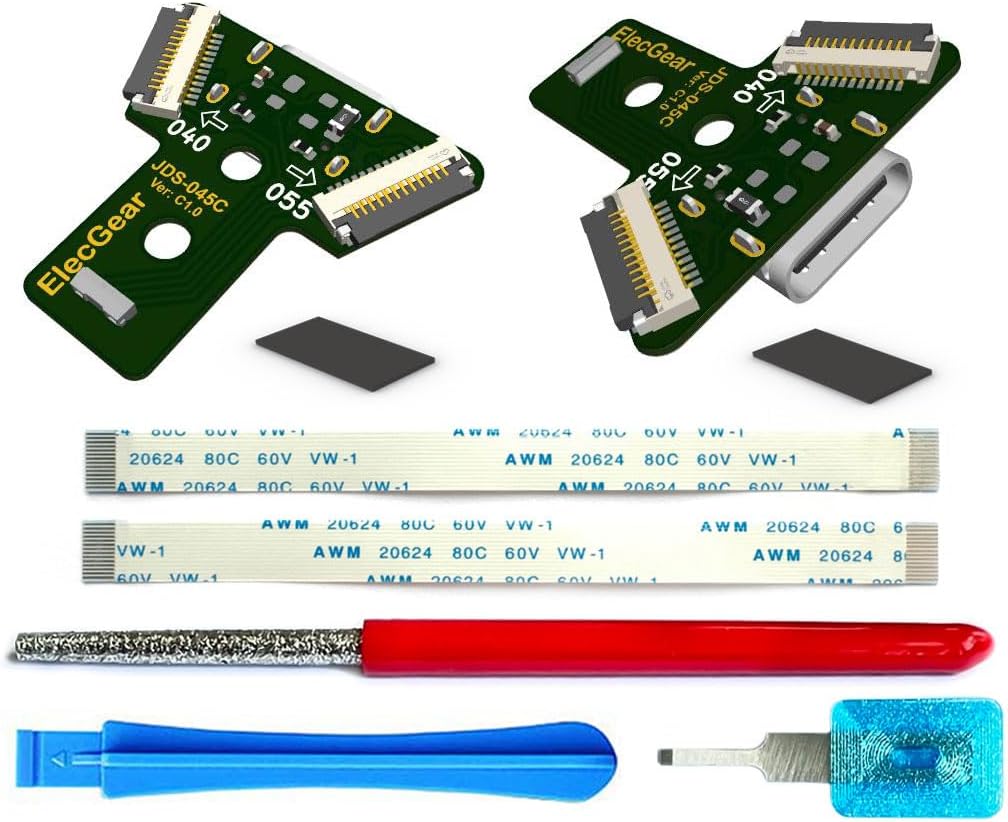
ElecGear’s 2x USB-C Charging Port PCB is a premium replacement and upgrade kit for 2nd Gen PS4 controllers (JDS-040/050/055). It replaces the outdated micro-USB port with dual USB-C connectors, delivering a stable 1A current and reversible plug orientation for enhanced charging reliability. The package includes all necessary flex cables and specialized tools, enabling skilled DIY enthusiasts to seamlessly repair and modernize their controllers, unifying their gaming setup with the latest USB-C standard.
| ASIN | B0DBZL9GFW |
| Best Sellers Rank | 57,083 in Business, Industry & Science ( See Top 100 in Business, Industry & Science ) 52 in Adapter Boards |
| Brand | ElecGear |
| Brand Name | ElecGear |
| Colour | JDS-045C for 2nd Gen |
| Compatible Devices | PS4 Controller |
| Compatible devices | PS4 Controller |
| Connector Type | USB Type C |
| Connector type | USB Type C |
| Country of Origin | China |
| Current Rating | 1 Amps |
| Customer Reviews | 4.4 out of 5 stars 218 Reviews |
| Finish type | Plastic |
| Item Weight | 0.02 Kilograms |
| Manufacturer | ElecGear |
| Manufacturer Part Number | JDS-045C |
| Model Number | JDS-045C |
| Number of Items | 1 |
| Number of Ports | 2 |
| Package Quantity | 1 |
| Power Plug Type | No Plug |
| Product Finish Type | Plastic |
| Product Warranty | 30 Day Warranty Against Manufacturer Defects |
| Specific Uses For Product | Video Game Console |
| Specific uses for product | Video Game Console |
N**N
PS4 ezpz
Wanted to upgrade my older PS4 controller to usb c, as I didn't want a cable just for the controller, now everything is usb c!! Was very easy to install, but I do recommend watching a tutorial on yt to do the install if you are unsure.
H**N
All you need in one kit
Outstanding kit. Clear, colour instructions, all the modding tools you need including a tiny chisel and file. Works perfectly. Very impressed!
N**M
Works as expected, can't find anywhere else
Great, works very well on PC and cheap compared to anywhere else, can't really find it in aliexpress, works as expected with DS4Windows, light bar works as expected too, tried it on a broken controller and works well, very easy to botch the USB hole so do be careful, they do say to do it slow on the leaflet. I sanded it a little too much so the bottom is a little open but doesn't bother me at all. Will install on main controller.
E**.
Modern part replacement of high quality
High quailty parts with instuments enclosed. Easy enough to follow, although it is easy to remove too much material from the port, perhaps seller can also include a tool to check fit in future batches. Good for saving money and better for the planet, denfinitly get this instead of Micro usb replacement parts.
F**F
Filing hole
Picture shows the filing will be done only at bottom which is not the case alot need to be filed at top ended up with gaps on 2 of my controllers works fine tho
R**X
Kit parfait
Très bon kit il y a juste la partie sur le limage du port de charge de la manette elle on 6 moins et aucun défaut
G**E
USB C conversion
I had two PS4 controllers with different PCB versions (JDS-050 and JDS-055), and I used both PCBs with success. All tools provided, 5min conversion per controller. No more headaches with multiple USB cables.
M**O
Funzionano perfettamente con PC e PS5
Prodotto perfetto, richiede un po' di lavoro per essere installato correttamente ma la scatola contiene tutte le istruzioni dettagliate con foto, e gli utensili necessari per il lavoro. Una volta finito il joypad caricava senza problemi e si è connesso perfettamente al mio Mac ed alla mia ps5 usando il cavo. Ho recuperato due joypad seminuovi in mezz'ora, per cui avrei altrimenti dovuto tenere un cavo micro USB apposta.
S**T
ممتاز ولن تندم على شراءه
ممتاز جداً ويسهل الإستخدام حيث اكثر الأسلاك حالياً تايب c . وثابت . بصراحه انصح فيه وبقوه 👍
P**P
思ってたよりモノは良い。削りを丁寧に。
一通り工具も揃ってます。大変なのは削りだけ。丁寧に時間をかけてやれば付属工具でも行けるけど、慣れてない人がやると怪我するかも。あと削りカスはこまめに掃除機で吸いましょう。精度が低くなるだけでなく、インストール後に基盤に入り込むとトラブルになります。 できればアルコールで拭きましょう。 安いので良いからルーターがあると、かなり簡単にできます。 付属工具だと4時間、ルーターがあれば1時間で終わります。 この手の製品にしては珍しく写真入りのマニュアルもついてきます。 PD充電も対応してるのでとても便利。オススメです。
Trustpilot
2 weeks ago
2 months ago