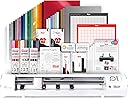
----------------- 𝗤𝘂𝗶𝗰𝗸 𝗩𝗲𝗿𝗱𝗶𝗰𝘁 ----------------- If you’re looking for a high-precision cutting machine that’s reliable, well-supported, and built to last, the Siser Juliet Electronic Cutter is an absolute game changer! After switching to it from the Silhouette Cameo 4, the difference in accuracy, reliability, and overall user experience has been HUGE. The Juliet consistently produces clean, precise cuts with virtually no issues, even with heavy use. 𝗣𝗿𝗼𝘀 - Extremely precise and accurate cuts (great for sticker makers especially if you use holographic laminate/sheets!) - Very reliable — no miscuts after months of heavy use! - Strong long-term software support from Siser - Compatible with additional tools like crease and etch attachments - Excellent customer service compared to competitors - Built like a premium, long-lasting machine 𝗖𝗼𝗻𝘀 - Higher upfront cost compared to entry-level cutters - May have a slight learning curve for beginners coming from other machines ----------------- 𝗠𝘆 𝗘𝘅𝗽𝗲𝗿𝗶𝗲𝗻𝗰𝗲 ----------------- After doing a LOT of research on cutting machines, I ultimately decided to purchase the Siser Juliet (and luckily found it on sale). Looking back now, I honestly wish I had bought it first. Here's why: Before I purchased the Juliet, I was using a Silhouette Cameo 4. Although it worked well for a time, I eventually encountered several issues. I began experiencing miscuts and an unsettling loud screeching noise that sounded like metal dragging on metal. This made crafting more frustrating than enjoyable. I also want to highlight that Silhouette's customer support was not helpful; they attributed the problem to a firmware issue when it was clearly a mechanical one. I attempted to fix the machine myself, but despite numerous efforts, I was unsuccessful. 𝗦𝗶𝗻𝗰𝗲 𝘀𝘄𝗶𝘁𝗰𝗵𝗶𝗻𝗴 𝘁𝗼 𝘁𝗵𝗲 𝗝𝘂𝗹𝗶𝗲𝘁 𝘁𝘄𝗼 𝗺𝗼𝗻𝘁𝗵𝘀 𝗮𝗴𝗼, 𝘁𝗵𝗲 𝗱𝗶𝗳𝗳𝗲𝗿𝗲𝗻𝗰𝗲 𝗵𝗮𝘀 𝗯𝗲𝗲𝗻 𝗮𝗯𝘀𝗼𝗹𝘂𝘁𝗲𝗹𝘆 𝗶𝗻𝗰𝗿𝗲𝗱𝗶𝗯𝗹𝗲. I use this machine heavily, and during the entire time I've had it, I haven't experienced a single miscut. The precision and consistency have made crafting much smoother and more enjoyable. Plus, it is significantly quieter and faster than any other cutting machine I've used! This incredible machine has made me fall in love with crafting again! 💜 ----------------------------- 𝗣𝗿𝗲𝗰𝗶𝘀𝗶𝗼𝗻 𝗮𝗻𝗱 𝗥𝗲𝗹𝗶𝗮𝗯𝗶𝗹𝗶𝘁𝘆 ----------------------------- The biggest thing that stands out with the Siser Juliet Electronic Cutter is its accuracy. Cuts are extremely clean and precise, even with detailed designs. I haven’t experienced the misalignment or inconsistent cuts that I previously dealt with using my old machine. 𝗙𝗼𝗿 𝗮𝗻𝘆𝗼𝗻𝗲 𝘄𝗵𝗼 𝗱𝗼𝗲𝘀 𝗮 𝗹𝗼𝘁 𝗼𝗳 𝘃𝗶𝗻𝘆𝗹 𝘄𝗼𝗿𝗸, 𝗛𝗧𝗩 𝗽𝗿𝗼𝗷𝗲𝗰𝘁𝘀, 𝗼𝗿 𝗱𝗲𝘁𝗮𝗶𝗹𝗲𝗱 𝗱𝗲𝘀𝗶𝗴𝗻𝘀, 𝘁𝗵𝗮𝘁 𝗿𝗲𝗹𝗶𝗮𝗯𝗶𝗹𝗶𝘁𝘆 𝗺𝗮𝗸𝗲𝘀 𝗮 𝗵𝘂𝗴𝗲 𝗱𝗶𝗳𝗳𝗲𝗿𝗲𝗻𝗰𝗲. After months of heavy use, the machine continues to perform exactly the same as it did on day one, which gives me a lot of confidence in its long-term durability. ------------------------------------- 𝗦𝗼𝗳𝘁𝘄𝗮𝗿𝗲 𝗮𝗻𝗱 𝗢𝗻𝗴𝗼𝗶𝗻𝗴 𝗦𝘂𝗽𝗽𝗼𝗿𝘁 ------------------------------------- 𝗢𝗻𝗲 𝘁𝗵𝗶𝗻𝗴 𝗜 𝗿𝗲𝗮𝗹𝗹𝘆 𝗮𝗽𝗽𝗿𝗲𝗰𝗶𝗮𝘁𝗲 𝗮𝗯𝗼𝘂𝘁 𝗦𝗶𝘀𝗲𝗿 𝗶𝘀 𝗵𝗼𝘄 𝘁𝗵𝗲𝘆 𝗰𝗼𝗻𝘁𝗶𝗻𝘂𝗲 𝘁𝗼 𝘀𝘂𝗽𝗽𝗼𝗿𝘁 𝗮𝗻𝗱 𝗶𝗺𝗽𝗿𝗼𝘃𝗲 𝘁𝗵𝗲 𝗺𝗮𝗰𝗵𝗶𝗻𝗲 𝘆𝗲𝗮𝗿𝘀 𝗮𝗳𝘁𝗲𝗿 𝗶𝘁𝘀 𝗿𝗲𝗹𝗲𝗮𝘀𝗲. Unlike some companies that release a “new” machine every year, Siser focuses on refining and improving the software for the Juliet and listening to feedback from their users. They’ve continued to add improvements and new features over time, which shows that they’re committed to the people using their machines. They’ve also released additional tools for the Juliet, like crease and etch tools, which expand what the machine can do without requiring an entirely new model. --------------------- 𝗖𝘂𝘀𝘁𝗼𝗺𝗲𝗿 𝗦𝗲𝗿𝘃𝗶𝗰𝗲 --------------------- 𝗔𝗻𝗼𝘁𝗵𝗲𝗿 𝗮𝗿𝗲𝗮 𝘄𝗵𝗲𝗿𝗲 𝗦𝗶𝘀𝗲𝗿 𝗿𝗲𝗮𝗹𝗹𝘆 𝘀𝘁𝗮𝗻𝗱𝘀 𝗼𝘂𝘁 𝗶𝘀 𝗰𝘂𝘀𝘁𝗼𝗺𝗲𝗿 𝘀𝘂𝗽𝗽𝗼𝗿𝘁. My experience with Siser support has been quick, helpful, and responsive, which is something I unfortunately didn’t experience with other brands. Compared to my past experience dealing with issues on the Silhouette Cameo 4, the difference in response time and helpfulness was amazing. ----------------------- 𝗩𝗮𝗹𝘂𝗲 𝗳𝗼𝗿 𝘁𝗵𝗲 𝗣𝗿𝗶𝗰𝗲 ----------------------- 𝗪𝗵𝗶𝗹𝗲 𝘁𝗵𝗲 𝗦𝗶𝘀𝗲𝗿 𝗝𝘂𝗹𝗶𝗲𝘁 𝗘𝗹𝗲𝗰𝘁𝗿𝗼𝗻𝗶𝗰 𝗖𝘂𝘁𝘁𝗲𝗿 𝗺𝗮𝘆 𝗰𝗼𝘀𝘁 𝗺𝗼𝗿𝗲 𝘁𝗵𝗮𝗻 𝘀𝗼𝗺𝗲 𝗲𝗻𝘁𝗿𝘆-𝗹𝗲𝘃𝗲𝗹 𝗰𝘂𝘁𝘁𝗶𝗻𝗴 𝗺𝗮𝗰𝗵𝗶𝗻𝗲𝘀, 𝘁𝗵𝗲 𝗿𝗲𝗹𝗶𝗮𝗯𝗶𝗹𝗶𝘁𝘆 𝗮𝗻𝗱 𝗽𝗿𝗲𝗰𝗶𝘀𝗶𝗼𝗻 𝗺𝗮𝗸𝗲 𝗶𝘁 𝘄𝗲𝗹𝗹 𝘄𝗼𝗿𝘁𝗵 𝘁𝗵𝗲 𝗶𝗻𝘃𝗲𝘀𝘁𝗺𝗲𝗻𝘁. Instead of troubleshooting miscuts or dealing with mechanical issues, I can focus on my projects. For serious crafters or small business owners, the time and money saved on craft materials, along with the frustration avoided, add up quickly. And when you’re investing in a machine like this, knowing the company actually supports its customers is a big deal. ------------------------------ 𝗪𝗵𝗼 𝗧𝗵𝗶𝘀 𝗠𝗮𝗰𝗵𝗶𝗻𝗲 𝗜𝘀 𝗙𝗼𝗿 ------------------------------ ✅ Crafters who want extremely precise cuts ✅ People frustrated with miscuts or reliability issues from other cutters ✅ Vinyl or HTV creators who work with detailed designs ✅ Small business owners making products with cutting machines ✅ Anyone who values long-term support and good customer service ---------------------------------------- 𝗪𝗵𝗼 𝗠𝗶𝗴𝗵𝘁 𝗣𝗿𝗲𝗳𝗲𝗿 𝗦𝗼𝗺𝗲𝘁𝗵𝗶𝗻𝗴 𝗘𝗹𝘀𝗲 ---------------------------------------- ⚠️ Beginners looking for a very low-cost starter machine ⚠️ People who only craft occasionally and don’t need professional-level precision -------------- 𝗖𝗼𝗻𝗰𝗹𝘂𝘀𝗶𝗼𝗻 -------------- The Siser Juliet has been an absolute game changer for my crafting workflow. It’s 𝗶𝗻𝗰𝗿𝗲𝗱𝗶𝗯𝗹𝘆 precise, extremely reliable, and backed by a company that continues to support and improve the product over time. After dealing with issues on the Silhouette Cameo 4, switching to the Siser Juliet has made crafting very enjoyable again. ⭐ 𝗕𝗼𝘁𝘁𝗼𝗺 𝗹𝗶𝗻𝗲: If you want a top-tier cutting machine that’s reliable, accurate, and well-supported, the Juliet is absolutely worth it. I’m now a loyal Siser customer and will continue recommending this machine to other crafters.