We remain fully operational. Our teams are working around the clock to ensure your deliveries continue safely.

DOWNLOAD THE APP


Copyright © 2025 Desertcart Holdings Limited
DOWNLOAD THE APP




Buy anything from 5,000+ international stores. One checkout price. No surprise fees. Join 2M+ shoppers on Desertcart.
Desertcart purchases this item on your behalf and handles shipping, customs, and support to New Zealand.
🎨 Elevate your digital art game with precision and speed—don’t get left behind!
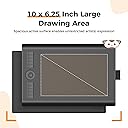
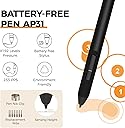
The GAOMON M10K 2018 is a professional-grade graphic drawing tablet featuring a spacious 10 x 6.25 inch active area, 8192 levels of pressure sensitivity, and a battery-free stylus for smooth, responsive input. Equipped with a programmable touch ring, round key, and 10 customizable hotkeys, it streamlines your creative workflow. Compatible with Windows 7+ and macOS 10.12+, it supports all major design software, making it the ideal choice for designers, educators, and digital artists seeking precision and versatility at an unbeatable price.


| ASIN | B07HQDN7W6 |
| Active Surface Area | 10 inches x 6.25 inches |
| Best Sellers Rank | 829 in Computers & Accessories ( See Top 100 in Computers & Accessories ) 1 in Graphic Tablets |
| Box Contents | USB Cable |
| Brand | GAOMON |
| Brand Name | GAOMON |
| Colour | Black |
| Compatible Devices | [Windows 7, Mac OS 10.12 or higher] |
| Connectivity technology | USB |
| Country of Origin | China |
| Customer Reviews | 4.4 out of 5 stars 22,855 Reviews |
| Display Type | LCD |
| EU Spare Part Availability Duration | 2 Years |
| External Testing Certification | 0000 |
| Item Dimensions L x W | 25.4L x 15.9W centimetres |
| Item Type Name | Digital Drawing Pad |
| Item Weight | 695 Grams |
| Manufacturer | GAOMON |
| Manufacturer Part Number | A0.M10K00-1-002018-EU |
| Model Name | GAOMON M10K 2018 |
| Model Number | M10K 10*6.25 inches |
| Model name | GAOMON M10K 2018 |
| Native Resolution | 1920x1080 |
| Network Connectivity Technology | USB |
| Operating System | Windows 7 or later, macOS 10.12 or later |
| Operating system | Windows 7 or later, macOS 10.12 or later |
| Pressure Sensitivity | 8192 Levels |
| Pressure sensitivity | 8192 Levels |
| Product Features | 1 Touch Ring(Canvas Zoom in/out, Brush Zoom in/out and roll)+1 Round Key+10 Express Keys |
| Product Warranty | 1 Year Warranty Against Manufacturer Defects |
| Screen Size | 10 Inches |
| Special feature | 1 Touch Ring(Canvas Zoom in/out, Brush Zoom in/out and roll)+1 Round Key+10 Express Keys |
| Specific Uses For Product | Teaching |
| Target Audience | Teachers and Students |
| UPC | 653334993496 |
D**9
Better than the competition, and cheaper!
Wow. I'm pleasantly surprised. I previously owned a much more expensive Wacom tablet. After years of frustrations with that one in relation to drivers and glitchy behaviour I finally decided to chance a different brand. I have to say I'm blown away. For the price point it's excellent. I don't know why anybody would need to spend more money than this. It does everything I want and does it well. The software is great too. Nice and simple, works well without clutter. Very happy with my purchase.
B**A
Impressive signature tablet!
Very impressed with this signature tablet!! Compatible on Windows 11, very to install. Just download the driver from their website. (Tip: Run As Administrator when installing the driver for all users to use on a PC). The tablet is light weight, decent, practical sized. The stylus is lovely to grip and responsive on the tablet. Easy to use and setup.
A**S
Pretty good, but not really for my needs in particular
I own a MacBook Pro 14” with an M5 chip, and mainly use this product in the preview app to add annotations. It was very easy to set up and works as described, though since I’m using the preview app there isn’t a shortcut for the brush/pen though a shortcut can be added. It does get a little bit confused every now and then and seems to not be able to properly replicate the delete button. There is no more usb port on a MacBook so I had a little scare that I wouldn’t be able to use but the converter meant for the phone works just fine. Seems pretty smooth but I tend to write with a lot of pressure and can not figure out how to change that. Though if you’re using the recommended applications this will be easily customisable for you. Comes with everything for described and for 20 pounds is an excellent alternative to a iPad
K**D
Overall fantastic product
Order came quickly, lovely packaging, product works very well and its very easy to use (plug and play basically) !! I have no complaints
R**D
Great drawing tablet/ OSU tablet
I love this tablet! The pen feels solid and I haven't had any issues with mine breaking or getting work yet, for the price that you pay, it's amazing. No setup needed unless you want to change some settings. Value 10/10 Design 10/10 Would reccomend!
S**R
A great tablet.
My wife needed a tablet to complete a design course that she is doing. She has a Mac and a PC, so I needed a tablet that was low cost that works easily with Mac OS and Windows. I also didn't want a pen with a battery. I looked at all the others in this price range and watched many videos. Some of the review videos can be very fussy when reviewing these things so I also had to add a bit of my own judgement. I seem to have made the right choice with this model. As my wife is incredibly pleased with it. Believe me, if this were no good, she would be getting me to buy a different one. So already, we are onto a winner. The pen is of an excellent quality and has no battery to keep having to change. It is accurate and the only problem my wife has is getting used to using it as a pen and not a mouse. When you first use these things, you want to try to use it like a mouse. But with a tablet, if you move the pen to the top right of the pad, then the mouse pointer will be at the top right no matter what you do. The buttons on the tablet are a nice to have. They are easy to setup and customise with the provided app. She has been using it with Adobe Creative Cloud with no issues at all. We just plugged it in, and it worked. Nothing else to do really. At the cost, I thought it was going to be a nightmare. But this tablet has really surprised me with how effective it is at this price. I have been buying the famous brand all these years thinking there is no other make of tablet that I would want to use. This model has changed all that for me and I would be happy to look at other products made by this brand. This tablet also comes with a nice storage bag and a USB to USB C and USB Mini adapter. It also works with Windows 7 if you don't have Windows 10 yet. You can also use the USB C adapter to connect other items to your Mac such as a USB memory stick. The tablet is 10mm thick, so not too high for drawing. Overall, a high-quality, extremely easy to use tablet and comes in a quality box with everything needed.
M**S
Good for Windows/OSU, but struggles with newer MacBooks (Poor Drivers)
I bought this tablet a few years back, mainly buying into the hype that you “need” a tablet to be good at OSU! On Windows, it’s a decent, cheap device. It works fine for gaming and the input is responsive. If you use a Windows PC, it’s a solid choice. Recently, I tried using this with my new MacBook for College work, writing notes and answering practice questions as it is advertised as an “Online-Learning Device”. It was a nightmare. Despite downloading drivers from the Gaomon website, I couldn’t get the pressure sensitivity to work properly, nor could my Mac recognise the device. The cursor moves, but you have to press down incredibly hard for it to register, making it useless for writing. The active area is quite small, so if you have large hands you might find it quite cramped. It uses Micro-USB, and the pen is comfortable enough, but a little thick. In short, it’s great on Windows (aside from the fact that the software is quite clunky), but I cannot recommend it for Mac Users or students wanting to take notes.
J**B
Check it out
Pretty efficient very effective it is a great prize for a starter gadget. Very interesting to get into digital. Art with it got apt bettet at drawing on my pc with it overall its great for people who on a budget and want to start doing drawing on iPad or pc or iPhone
Trustpilot
3 weeks ago
2 months ago